

5 AI Features Improving Inbox Accessibility
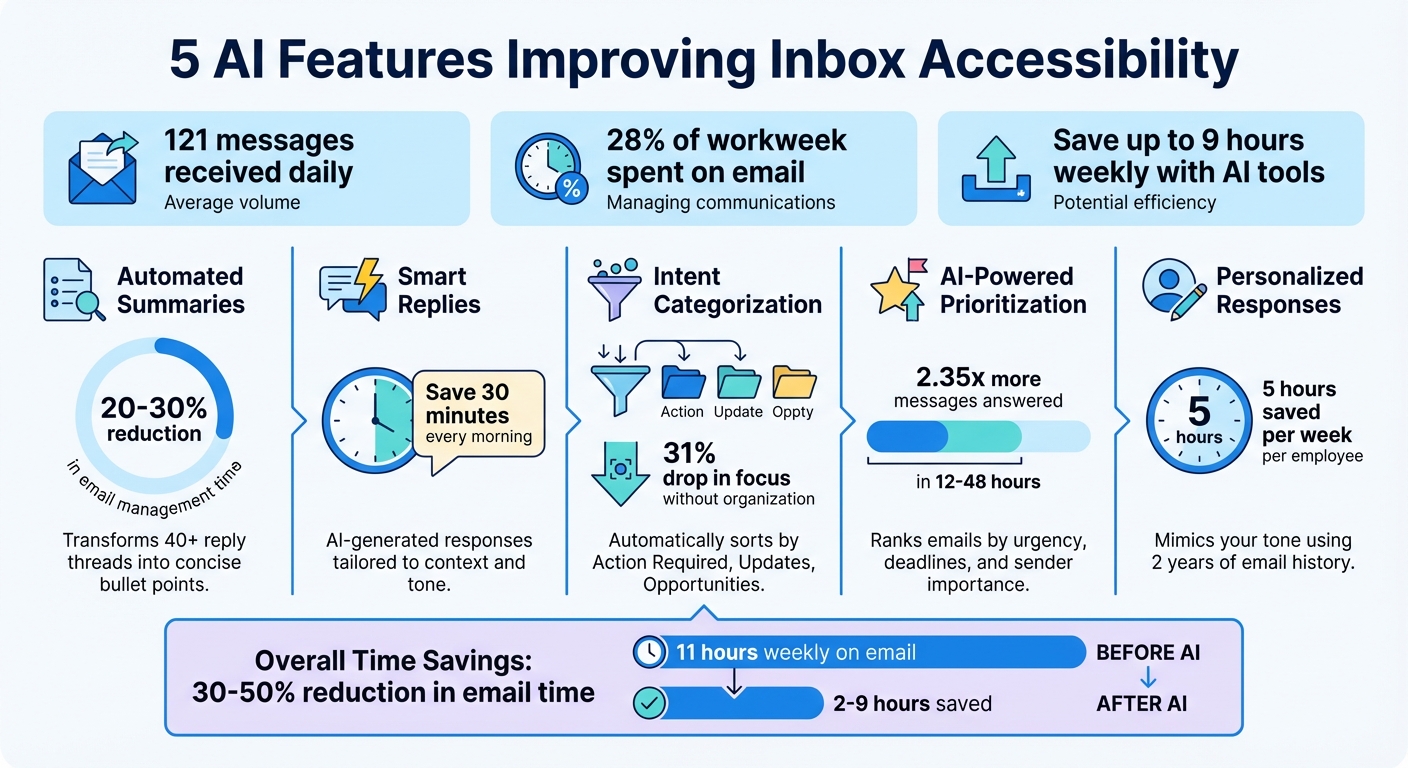
Managing your inbox can feel like a full-time job. With over 121 messages daily and email alone consuming 28% of the workweek, staying on top of communication is a challenge. Add the constant "app hopping" between platforms like Slack, LinkedIn, and WhatsApp, and productivity takes a major hit. This is where AI tools come in, helping users save up to 9 hours weekly by simplifying inbox management. Here are five AI-powered features reshaping how we handle messages:
- Automated Summaries: Quickly grasp long email threads with concise bullet points highlighting key decisions and next steps.
- Smart Replies: Get pre-drafted responses tailored to the context, tone, and urgency of your messages.
- Intent Categorization: Automatically sort messages by purpose, like "Action Required" or "Routine Updates", for better organization.
- AI-Powered Prioritization: Focus on what matters by ranking emails based on urgency, deadlines, and sender importance.
- Personalized Responses: Generate replies that mimic your tone and style, pulling in relevant context from calendars or files.
These tools don't just save time - they also reduce mental strain, minimize distractions, and help you respond faster. Whether you're catching up after a vacation or managing high-priority tasks, AI makes inbox management smoother and more efficient.
5 AI Features That Save 9 Hours Weekly on Inbox Management
This AI Agent manages my email inbox. Here’s how
1. Automated Inbox Summaries
AI-generated summaries transform lengthy email threads - sometimes stretching beyond 40 replies - into concise, easy-to-digest bullet points. Instead of wading through every message, you’re presented with the key takeaways upfront: action items, deadlines, major decisions, and next steps. Leading platforms like Apple Mail, Gmail, and Yahoo Mail are integrating these features directly into their inboxes, often replacing the usual preview text with these AI-powered overviews.
Streamlines Inbox Management
When your inbox is overflowing, reading through every email becomes impossible. AI summaries help cut through the clutter by surfacing only the most critical details. For instance, instead of combing through a lengthy project thread, you might see a summary like, "Budget approved, deadline shifted to March 15, Sarah needs feedback on design mockups." This time-saving feature can reduce email management time by 20–30%, with frequent users of AI tools reclaiming nearly 9 hours per week.
Boosts Accessibility on the Go
For those juggling busy schedules or dealing with information overload, these summaries make managing emails far more convenient. You can even use natural language queries like, "What emails did I get from the school?" or "When will my shoes be delivered?" to quickly get a snapshot without opening each email. This is particularly useful after vacations or meetings when catching up on unread messages could otherwise feel overwhelming. By simplifying email reading, these tools make it easier to take action faster.
Speeds Up Responses
AI summaries also help you prioritize time-sensitive tasks by flagging important messages right at the top. Tools like Inbox Agents provide daily briefings that consolidate high-priority emails, ensuring nothing critical slips through the cracks. This not only reduces response time but also keeps you on top of your most pressing tasks.
2. Smart Replies
Smart replies, powered by AI, analyze your incoming messages and generate responses tailored to the context. They draw insights from your email history and connected files like Google Drive or OneDrive. These replies even adapt to your tone - formal for professional exchanges, casual for personal ones - by reviewing up to two years of your sent emails.
By building on features like inbox summaries, smart replies are designed to save time and simplify communication.
Reduces Response Time
One of the biggest advantages of smart replies is how they minimize delays caused by hesitation. They eliminate the dreaded "blank screen" moment when you're unsure how to start a reply. Take the example of a dog groomer who used Gemini to fully automate her responses; this saved her up to 30 minutes each morning drafting emails.
Supports Multitasking
When you're juggling multiple responsibilities, smart replies help you stay on top of time-sensitive tasks. Whether it's confirming a delivery or scheduling a meeting, these one-click responses let you manage routine emails quickly. Blake Barnes, VP of Product at Google Workspace, sums it up well:
We're moving from a place where AI is broadly helpful to AI that's helpful for you.
Enhances User Accessibility
Smart replies also cater to users who face challenges like writer's block or difficulties navigating social cues. These AI-generated drafts provide cognitive and social support, making communication smoother. Additionally, the reduced typing effort is a game-changer for users with mobility issues, easing physical strain during email management. Tools like Inbox Agents take this a step further, offering smart replies across platforms like Email, LinkedIn, WhatsApp, and Slack - all from one unified interface.
3. Intent Categorization
After automated summaries and smart replies, intent categorization takes inbox management to the next level by deciphering the purpose behind every message. Using Natural Language Understanding (NLU), this AI-powered feature analyzes incoming messages to sort them based on intent. Whether it’s an inquiry, a complaint, a request, or something else, the system detects patterns in the content, flags sentiment changes, identifies urgency, and even picks up on buying signals. For example, phrases like “please confirm” or “by EOD” automatically trigger tags like Action Required.
This sorting isn’t limited to just your email - it works across platforms like LinkedIn, WhatsApp, and Slack, consolidating everything into one streamlined view. Instead of manually skimming through 121+ daily messages to figure out what’s important, the system categorizes them into clear groups like Revenue Opportunities, Investor Updates, or Routine Messages. It’s a game-changer for cutting through the clutter and setting the stage for maximum productivity.
Improves Inbox Efficiency
Intent categorization doesn’t just sort messages - it prioritizes them. By scanning for urgency, deadlines, and requests, the system labels messages as high, medium, or low priority. This ensures that crucial emails stay front and center while less urgent ones take a backseat. For heavy inbox users, this smart organization can save up to nine hours a week.
The system also learns as it goes. After a short adjustment period, it picks up on your typical phrasing and common requests, tailoring its categorization to your unique workflow. As Inbox Agents explains:
“Smart triage hides the noise & feeds you only the signal - the important parts.” - Inbox Agents
Supports Multitasking
By identifying the intent behind each message - like separating complaints from inquiries - this feature lets you tackle similar tasks in batches. This reduces the mental strain of constantly shifting gears between different types of messages. Tools like Inbox Agents take it a step further by unifying intent detection across all your communication platforms, so you’re not wasting time hopping between apps to figure out what needs attention.
Unorganized inboxes can lead to a 31% drop in focus during the workday, thanks to constant notifications and distractions. Intent categorization keeps you focused on what matters most, helping you stay efficient and in control.
sbb-itb-fd3217b
4. AI-Powered Prioritization
Taking intent categorization a step further, AI-powered prioritization fine-tunes your workflow by ranking messages based on urgency. While intent categorization groups emails by purpose, prioritization focuses on what needs your attention first. Using Natural Language Understanding (NLU), this feature scans for key indicators like sentiment changes, deadlines, and buying signals, then assigns priority levels - high, medium, or low. It even identifies key senders, such as your manager or high-value clients, ensuring their messages don’t get overlooked [31, 1].
Managing email takes up about 11 hours a week - nearly 28% of the workweek. AI prioritization can reduce this time by 20–30%, potentially saving up to nine hours weekly [7, 38]. Tools like Inbox Agents go beyond email, identifying critical messages across platforms like LinkedIn and WhatsApp, so you never miss an important opportunity.
Reduces Response Time
AI prioritization doesn’t just organize your inbox - it speeds up your entire workflow. By bringing urgent messages to the forefront, it ensures the most critical emails are addressed first. Users of AI-powered email tools respond to 2.35 times more messages within 12 to 48 hours compared to traditional methods.
These systems integrate with CRMs and calendars to provide context, such as upcoming meetings or late shipments, further refining prioritization [7, 38]. They also keep track of unanswered emails, automatically resurfacing them with pre-drafted follow-ups. This proactive approach ensures nothing slips through the cracks, keeping your communication sharp and timely.
Supports Multitasking
For those managing multiple platforms, AI prioritization minimizes the need to switch between apps, helping you stay focused on what matters most. By consolidating messages from email, Slack, LinkedIn, and other channels into one intelligent feed, the system highlights urgent tasks while archiving less important ones [1, 41]. Features like split inboxes let you handle similar types of messages - like routine updates - in batches, freeing up time for higher-priority work.
As the Superhuman Team describes it:
"Critical emails rise to the top like cream, while the noise sinks to the bottom where it belongs." - Superhuman Team
This streamlined system helps you maintain control, even when managing hundreds of messages across multiple platforms daily.
5. Personalized Responses
Taking smart replies to the next level, personalized responses ensure that every message reflects your unique communication style.
These AI systems learn how you write by analyzing your email history - sometimes going back as far as two years. They pick up on your specific word choices, phrasing, and tone to craft responses that sound like you wrote them yourself. They can even adjust the formality of your messages depending on who you're addressing, whether it's a manager, a client, or a colleague.
But this technology isn't just about mimicking your style. It combines data from calendars, cloud storage, and CRMs to create replies that are not only accurate but also contextually relevant. For instance, if a client asks about the status of a project, the AI can pull details from relevant files and deadlines instead of offering a generic response. This level of customization doesn’t just feel personal - it also boosts efficiency. As Blake Barnes, VP of Product at Google Workspace, explains:
"We're moving from a place where AI is broadly helpful to AI that's helpful for you".
Improves Inbox Efficiency
In the U.S., professionals spend an average of 19 hours a week on writing tasks like email responses. By using AI-driven personalization, companies like Mark Cuban's Cost Plus Drugs have reported saving an average of 5 hours per week per employee.
These tools eliminate the frustration of writer's block by providing drafts you can tweak quickly. Many systems even offer multiple draft options - for example, concise, formal, or action-oriented - so you can pick the one that fits your needs at the moment. Platforms such as Inbox Agents extend this personalization to other channels like LinkedIn, Instagram, Slack, and WhatsApp, handling routine communications so you can focus on higher-priority tasks. This multi-platform approach ensures you stay on top of your inbox, no matter where the messages come from.
Reduces Response Time
Personalized AI also speeds up engagement. In email marketing, AI-driven personalization can boost click-through rates by up to 30%. One HubSpot user saw email opens increase by 93% and clicks jump by 55% after adopting an AI send-time optimization tool.
Conclusion
The five AI features - automated summaries, smart replies, intent categorization, AI-powered prioritization, and personalized responses - are changing the way we handle inboxes. They lighten the mental load, speed up responses, and ensure urgent messages get the attention they deserve. For many, these tools are giving back precious hours each week.
In fact, using AI-powered inbox tools can cut down the time you spend on email by 30% to 50%. Some users even report gaining up to 9 extra hours every week. Beyond just saving time, these features make communication more accessible for everyone. For instance, voice transcription can assist those with visual impairments, while summaries help reduce cognitive strain for neurodivergent individuals. The result? A more inclusive and efficient way to communicate.
If you're ready to give these tools a try, start small. Enable built-in AI features like Gmail's Smart Compose or explore platforms like Inbox Agents, which offers a 14-day free trial - no credit card needed. Test these tools on a specific email label or a shared inbox for a couple of weeks to see how they impact your workflow before rolling them out more broadly.
With the average person receiving over 121 messages daily across various platforms, the volume of communication isn't slowing down. AI tools are no longer just a convenience - they’re becoming essential to keep up. As one App Store reviewer of Canary Mail shared:
"AI Copilot saves me 30 minutes every morning. It's like having a personal assistant in my inbox".
Whether you're managing customer support, driving sales, or coordinating with your team, AI tools help you work more efficiently, respond faster, and focus on what truly matters.
FAQs
How do AI-powered summaries make managing emails easier?
AI-powered summaries make handling emails much easier by turning long emails and threads into short, clear overviews. This allows users to quickly grasp the main points, prioritize important messages, and spend less time sorting through their inbox.
By cutting through unnecessary details, these summaries lighten the mental effort of dealing with complex or repetitive content. The result? Faster decisions and a more organized approach to managing your email.
How do smart replies help with multitasking?
Smart replies make handling emails quicker and easier, enabling users to focus on other priorities. By cutting down the time and effort required to write responses, they help conserve mental energy and boost productivity.
These AI-driven suggestions are tailored to the context of the conversation, ensuring responses are both relevant and professional. This makes juggling multiple tasks feel more manageable and efficient.
How does AI intent categorization make managing your inbox easier?
AI intent categorization works by analyzing the purpose behind each message - whether it's an urgent request, a customer question, or a potential purchase - and then automatically tagging or routing emails based on their content. This makes it easier to prioritize high-importance conversations while filtering out messages that require less immediate attention, saving both time and effort.
By organizing messages efficiently, this tool helps you focus on what truly needs your attention, cutting through the chaos of a cluttered inbox and making your responses faster and more effective.