

AI Intent Response Metrics: A Complete Guide
If you only track accuracy, you're missing the point. I’d measure AI intent response performance in four layers: classification, reply quality, workflow results, and business impact.
Here’s the short version:
- Before launch, I’d check precision, recall, F1, confusion by intent, and confidence thresholds
- After launch, I’d watch resolution rate, handoff rate, first contact resolution, and latency
- For reply quality, I’d track hallucination rate, policy errors, relevance, and helpfulness
- For business results, I’d report CSAT by intent, revenue per conversation, and cost per resolution
- For governance, I’d log intent, confidence, model version, handoff events, timestamps, and outcome
A few numbers stand out:
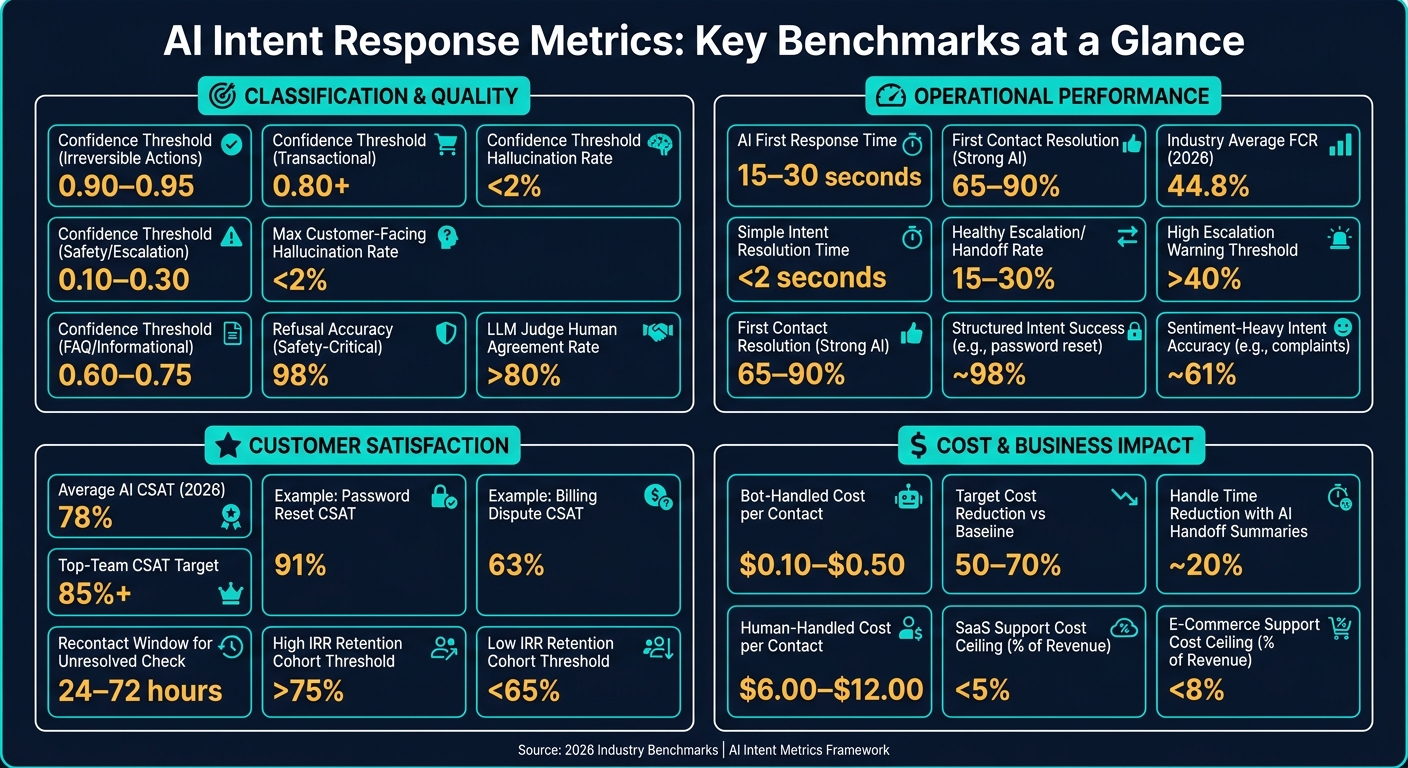
- Strong AI setups often target 65%–90% FCR
- The 2026 average for full AI resolution is 44.8%
- Hybrid setups often see 15%–30% handoff rates
- Bot-handled contacts may cost $0.10–$0.50, while human-handled contacts may cost $6.00–$12.00
- Customer-facing hallucination rate should stay under 2%
Here’s the main idea: an AI system can pick the right intent and still send a poor reply. So I would never score intent detection and response output as one blended number. I’d split them, track them by intent, and tie them back to resolution, CSAT, and cost.
That’s what this guide is about: the small set of metrics that tells you if your AI is helping customers or just answering them.
AI Intent Response Metrics: Key Benchmarks at a Glance
Core Metrics for Intent Classification and Response Quality
Accuracy, Confusion Matrices, and Intent-Level Error Analysis
Overall accuracy is a good starting point, but it doesn't tell the whole story. A model can hit 92% accuracy and still fail on edge cases that matter, like fraud-report or cancel-subscription.
That's why one headline number isn't enough. You need to look at performance for each intent. A confusion matrix helps make that plain. It's an N × N grid that compares the model's predicted label with the correct one. If the same two intents keep getting mixed up, like "billing inquiry" and "subscription change", the model isn't separating them well.
Use that matrix to spot the intent pairs the model confuses again and again. Then tighten the intent definitions and add examples that draw a clean line between them.
Once those blurry spots are clear, set thresholds based on the cost of being wrong.
Precision, Recall, F1, and Confidence Thresholds
Precision tells you how often a predicted intent is right. Recall tells you how often the model finds all real cases of that intent. F1 blends the two into one score.
Don't use one blanket cutoff for every intent. The same confidence score may be fine for one workflow and too risky for another.
| Workflow Type | Threshold Strategy | Action on Low Confidence |
|---|---|---|
| Irreversible (e.g., cancel subscription) | High floor (0.90–0.95) | Route to human agent |
| Safety / escalation path | Low floor (0.10–0.30) | Trigger handoff immediately |
| Informational (FAQ) | Medium (0.60–0.75) | Suggest draft or flag as out-of-scope |
| Transactional (e.g., order status) | High (0.80+) | Ask a clarifying question |
Also, treat unknown or out-of-scope inputs as their own class. If you skip that, the model will shove every message into the nearest known intent, even when none of them fit.
After the classifier is tuned, the next step is checking whether the reply itself is any good.
Response Quality and Policy and Safety Signals
Getting the intent right doesn't mean the response will be useful. A model can pick the right intent and still send a reply that's factually wrong, off-brand, or against policy. So response quality needs its own metrics.
The main signals to track are hallucination rate for factually wrong replies, policy violation rate, response relevance, and helpfulness. Teams should keep hallucination rate below 2% for customer-facing interactions, while high-performing teams often aim for under 3% in CI testing environments. In safety-critical systems, refusal accuracy matters too. The model should correctly decline out-of-scope or harmful requests 98% of the time on must-refuse test sets.
A practical way to score this is with an LLM judge that reviews transcripts against a rubric on a 1–5 scale. This method can match human rater agreement at over 80%. For teams that can't review thousands of conversations each week by hand, that's a big help. Add thumbs up/down feedback and correction rates, and you'll spot quality problems much earlier.
These model-level signals feed into the operational metrics that show what the inbox is doing day to day for speed, deflection, and handoffs, which you can measure using an inbox priority calculator.
sbb-itb-fd3217b
How to Choose the Right AI Evaluation Metrics (with Galileo)
Operational Metrics That Show Inbox Performance
Model-level metrics show how well the AI labels intent and writes replies. Operational metrics show what that means in day-to-day inbox work - for the people sending messages and the team answering them.
These are the numbers that come up in SLA reviews, team standups, and capacity planning. They tell you if the system is helping the team move more work, or just making dashboards look good.
Automation Rate, Deflection Rate, and Handoff Rate
Automation rate tracks end-to-end AI completion. Deflection rate tracks whether a contact stayed out of the human queue. Handoff rate tracks how often the AI sends the conversation to a person.
Those sound close, but they don’t tell the same story. Deflection can go up even when customers never get real help from an agent, which is why it needs to sit next to handoff and resolution metrics.
For a hybrid AI-human setup, a healthy escalation rate usually lands between 15% and 30%. Once it climbs above 40%, that often points to weak intent recognition or a knowledge base that needs work.
Segmenting by intent type makes the gaps much easier to see. Structured intents like password resets can hit about 98% success. Sentiment-heavy intents like complaints may drop to around 61% accuracy. If you only look at blended averages, those differences get buried.
Use business conversations only when you calculate these rates. Leave out greeting-only sessions, spam, and internal test traffic. If you don’t, the numbers can look better than they are.
Once volume looks solid, the next step is simple: check whether speed and resolution are getting better too.
Time to First Response, Resolution Time, and First Contact Resolution
Speed metrics can be misleading. A fast but generic reply can improve first-response time without solving anything. So speed only matters when you pair it with a quality or outcome signal.
In strong setups, AI agents average a first response time of 15–30 seconds, and simple intents should resolve in under 2 seconds. But First Contact Resolution usually says more. Strong AI deployments aim for an FCR of 65–90%, while the 2026 industry average for full AI resolution sits at 44.8%.
A good way to check whether a conversation was actually resolved is to watch for repeat contact within 24–72 hours on the same issue. If the customer comes back, mark that earlier conversation as unresolved. That re-contact window helps catch surface-level fixes that make FCR look better on paper than it is in practice.
Speed matters when it leads to more work getting finished, not just faster timestamps.
Agent Productivity in a Unified Inbox
When AI takes on routine work, productivity stops being just about reply speed. The better measure is completed work. Track productivity as complexity-weighted completions per hour.
It also helps to measure at the issue level, not the conversation level. One thread can include more than one intent, so conversation counts can blur what’s happening. Use business conversations only as the denominator so greetings, spam, and test traffic don’t skew the result.
Context-rich handoffs have a clear effect here. When AI passes along a full conversation summary and history to a human agent - instead of tossing them into a cold thread - human handle time on escalated cases drops by about 20%. That matters a lot when volume is high and every minute counts.
Inbox Agents centralizes conversations across channels and adds AI summaries and smart replies, which speeds handoffs.
Business Metrics: Customer Satisfaction, Revenue, and Cost
Operational metrics show how the inbox is running day to day. But after speed and containment, leaders want to know something else: is the AI helping satisfaction, revenue, and cost? That’s where intent performance starts to matter in business terms people care about - customer loyalty, sales, and spend.
CSAT, NPS, and Conversation-Level Satisfaction
The big mistake here is mixing everything together. A blended CSAT can look fine while hiding a weak intent underneath. For example, a 91% score on password resets may cover up a 63% score on billing disputes.
Report CSAT by intent. Blended averages hide weak workflows.
The average CSAT for AI-handled conversations in 2026 is about 78%, and top teams aim for 85% or more. In most cases, that gap comes down to one thing: how well the team breaks performance out by intent and then acts on it.
It also helps to track recontact rate and customer effort score. Here’s why: if someone gets handed off, has to repeat the issue, then comes back the next day with the same problem, that first satisfaction score doesn’t tell the full story. High containment with low CSAT is a warning sign, not a win.
For each intent, report AI and human CSAT separately. That split makes it much easier to see where automation can take on more work and where a person still needs to stay in the loop.
Conversion Rate, Revenue per Conversation, and Average Order Value
Once satisfaction is broken out by intent, the next step is simple: check whether it shows up in retention and conversion.
Cohorts with an Intent Resolution Rate (IRR) above 75% show meaningfully higher 90-day retention than cohorts below 65%. That retention gap turns into revenue, which is why IRR is one of the clearest ways to explain AI spend to leadership.
Track conversion rate and revenue per conversation by intent, not as blended totals. Then split those same metrics between automated conversations and human-handled ones. If you don’t separate them, it’s hard to tell what the AI is doing versus what your team is doing.
Cost per Resolution and Savings from Automation
Revenue impact matters more when automation also cuts the cost of each resolved interaction.
Use cost per resolved interaction: total spend divided by conversations that actually solved the customer’s problem.
The gap between AI and human handling is big. Bot-handled conversations usually cost between $0.10 and $0.50 each, while human agent conversations cost $6.00 to $12.00. And if a callback or follow-up happens, the issue wasn’t resolved the first time - so count both interactions.
To estimate monthly savings, use this formula: AI resolution volume × (human cost per contact – AI cost per contact). Before you calculate it, set a human-only baseline from an earlier period. A solid target is cost per resolution that lands 50% to 70% below that baseline.
Track that number every month. What you’re looking for isn’t just lower cost today. You want to see whether cost stays flat while volume grows. That’s the clearest sign the system is scaling well.
For SaaS businesses, support cost should stay below 5% of revenue. For e-commerce, the target is under 8%. If the AI is doing its job, those ratios should keep moving in the right direction as the customer base gets bigger.
How to Build, Report, and Improve an Intent Metrics Program
Define Your Intent Taxonomy and Logging Model
Before you trust any metric, you need clean labels and clean logs. If intent labels are messy, precision, recall, and error analysis stop being useful in production.
Start small. Use 5–15 top-level intents at first, and only grow to 30–50 when the data shows you need that level of detail. Define intents around the user's goal, not your team's internal process. For example, "user-wants-refund" is a useful label. "run-refund-flow" is not.
You should also log an OOD class as its own category, so unclear or off-topic inputs don't get shoved into known intents.
Log these fields for every conversation:
| Field | What to Capture |
|---|---|
| Intent label | Predicted vs. actual (post-review) |
| Confidence score | Calibrated confidence score |
| Model/prompt version | For regression tracking |
| Channel | Email, chat, SMS, etc. |
| Timestamps | Standardize timestamps in U.S. format (e.g., 06/23/2026 02:30 PM) |
| Handoff/escalation events | When and why a human stepped in |
| Resolution outcome | Resolved, abandoned, or escalated |
| Customer feedback | CSAT score or survey response |
Standardized timestamps matter more than they seem. They make cross-channel comparisons much easier, especially when you're checking patterns across email, chat, and SMS.
Set Up Dashboards, Review Cadence, and Alerts
Once your data model is stable, turn it into a routine. A good dashboard doesn't just show numbers. It helps you spot problems before they spread.
A simple review cadence works well:
- Daily: spikes and pipeline failures
- Weekly: per-intent precision, recall, and top unhandled topics
- Monthly: CSAT, conversion, and cost per resolution
Review the top 10 unhandled topics every week. And if anything moves more than two standard deviations from baseline, trigger an alert.
Inbox Agents can bring messages and AI interaction data into one interface, which makes it easier to connect conversation outcomes with intent performance.
Use logged outcomes to tune thresholds by intent. That part matters. Some intents can handle lower confidence without much risk, while others need a tighter bar. Alerts should catch both model drift and inbox disruption, not just noisy model behavior.
Conclusion: The Metrics That Matter Most
Once the logging model and review cadence are in place, the hard part is staying disciplined.
Accuracy by itself isn't enough. The metrics that affect the business come in layers. Intent-level precision and recall help you catch classification issues early. Resolution rate and first contact resolution show whether the AI is fixing problems or just replying to them. CSAT by intent shows where automation is building trust and where it's falling short. And cost per resolution ties performance back to the bottom line.
Treat AI agents like decision systems, not just response systems. Measurement frameworks are still uneven, which is exactly why structured logging and a steady review cadence matter.
FAQs
Which metrics matter most first?
Start with the core metrics that tell you if the AI agent is solving the user’s problem: Task Completion Rate, Goal Accuracy Rate, and Hallucination Rate.
These come first for a simple reason: they show whether the agent produces real outcomes, not just polished replies. If those numbers look weak, everything else is secondary.
After that, look at Intent Recognition Accuracy. Once you know the agent can finish tasks and stay on target, this metric helps you see whether it’s reading user requests the right way from the start.
Then bring in measures like escalation rates and customer satisfaction scores to sharpen the overall experience. Those metrics won’t tell you if the agent solved the problem on their own, but they do show where the handoff points are and how people feel after the interaction.
How often should I review AI intent metrics?
Review AI intent metrics through continuous monitoring and periodic deep dives. For high-consequence metrics like hallucination rates, it often makes sense to check them daily or weekly at the start. Once the system settles down, you can shift to a biweekly cadence.
For overall performance, run formal reviews and retraining every 30 to 60 days. If intent accuracy slips or you spot other regressions, start an immediate review.
How do I measure success by intent?
Measure success by intent. Don’t stop at top-line numbers and call it a day. Look at how well your AI helps people finish the job they came to do.
The main metric here is Resolved Intent Rate. That’s the share of conversations where the user’s goal gets completed without human help and without the user needing to come back later.
It also helps to break results out by request type. A billing question and a password reset don’t work the same way, so they shouldn’t be judged the same way either. To check whether an intent was actually resolved, look at signals like:
- immediate re-queries
- abandonment
- follow-up actions
- AI-specific surveys or CSAT
Those signals help confirm whether the issue was solved or whether the user got stuck and had to try again.
You should also keep an eye on Intent Recognition Accuracy and Goal Accuracy.