


Certificate-Based Authentication for APIs: Basics
Certificate-based authentication (CBA) is a modern, secure method to protect APIs by replacing traditional passwords with digital certificates. This approach significantly reduces risks like phishing and brute-force attacks by relying on cryptographic keys to verify identities. Here's a quick breakdown:
- How It Works: CBA uses public and private key pairs. The client proves ownership of a private key without exposing it, ensuring secure communication.
- Key Features:
- Certificates: Issued by trusted Certificate Authorities (CAs), they link identities to public keys.
- Mutual TLS (mTLS): Both client and server authenticate each other for added security.
- Encryption: Ensures data confidentiality and integrity during API interactions.
- Benefits:
- Eliminates password-related vulnerabilities.
- Provides stronger identity verification.
- Scales well for large systems.
- Challenges:
- Requires managing certificate lifecycles (issuance, renewal, and revocation).
- Needs specialized knowledge to set up and maintain a Public Key Infrastructure (PKI).
How to Setup Certificate Authentication with Azure API Management and EZCA with Automatic Rotation
Key Components of Certificate-Based Authentication
Certificate-based authentication hinges on three main elements that work together to validate identities and secure API interactions.
Certificates and Certificate Authorities (CAs)
A digital certificate serves as an identity credential, linking a public key to an identity. These certificates are issued and signed by trusted Certificate Authorities (CAs), which confirm their validity without exposing sensitive information. Each certificate contains key details like the subject's name, their public key, and a digital signature from the CA. API servers verify certificates by matching the signature with a pre-approved list of trusted root certificates stored in a "trust store." Most APIs follow the X.509 v3 standard, which includes metadata such as validity periods, serial numbers, and subject alternative names (SANs).
"The goal of certificates and PKI is to bind names to public keys. That's it. The rest is just implementation details." - Mike Malone, Founder, Smallstep
For public-facing APIs, organizations often rely on Web PKI providers like Let's Encrypt. However, for internal systems, Internal PKI is preferred to bypass rate limits and accommodate internal DNS names. In high-security setups, limiting certificate validity periods is a recommended practice to maintain tighter security controls.
Public and Private Keys
Once trust is established through certificates, cryptographic key pairs form the backbone of authentication and encryption. Certificate-based authentication uses asymmetric cryptography, where each entity has a pair of keys. The public key, included in the certificate, is openly shared and used for encrypting data and verifying signatures. The private key remains secure and is used to decrypt data or sign messages, proving ownership.
A client demonstrates control of its private key by signing a challenge provided by the server. The server then uses the public key from the certificate to verify the signature. Once validated, both parties negotiate a symmetric session key for efficient encryption.
To ensure secure API communication, RSA keys should be at least 2,048 bits, or Elliptic Curve (ECDSA) keys should be at least 256 bits. Protecting private keys is critical - tools like Hardware Security Modules (HSMs) or secure token devices create isolated environments that shield keys from external threats. Automating certificate renewal is equally important, as it ensures new key pairs are generated before certificates expire, avoiding service disruptions.
Mutual TLS (mTLS)
mTLS takes certificate-based authentication to the next level by enabling two-way authentication for stronger API security. Unlike standard TLS, where only the server verifies its identity, Mutual TLS (mTLS) requires both the client and server to authenticate each other using certificates. This dual verification process ensures a more secure connection.
During the handshake, both parties exchange and validate certificates to confirm their identities before establishing a secure communication channel. This process prevents on-path attacks, eliminates spoofing, and protects against credential theft since stolen passwords are useless without the matching certificate and private key.
"Mutual TLS, or mTLS for short, is a method for mutual authentication. mTLS ensures that the parties at each end of a network connection are who they claim to be by verifying that they both have the correct private key." - Cloudflare
When deploying mTLS for APIs, it’s essential to disable default provider-generated endpoints (like AWS execute-api) to ensure clients can only connect through custom domains where mTLS is enforced. For internal microservices or IoT devices, organizations often act as their own Certificate Authority to issue and manage certificates, as public CAs are generally used for one-way TLS on public networks.
How Certificate-Based Authentication Works in APIs
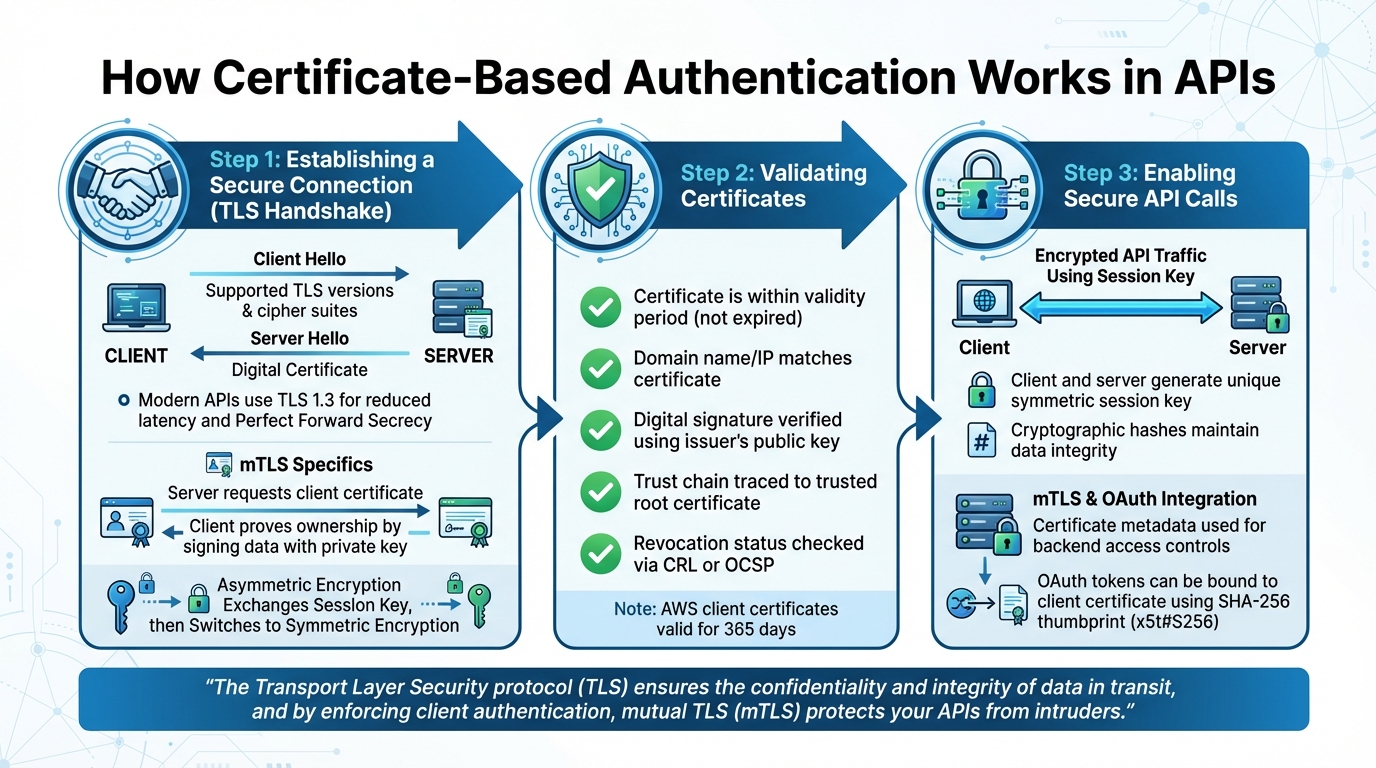
How Certificate-Based Authentication Works in APIs: 3-Step Process
Certificate-based authentication ensures secure communication between API clients and servers by establishing trust and encrypting data. Although the process happens quickly, each step plays a crucial role in safeguarding API interactions from unauthorized access.
Establishing a Secure Connection
The process kicks off with a TLS handshake, where the client and server agree on the parameters for secure communication. It starts when the client sends a "Client Hello" message, listing supported TLS versions and cipher suites. The server replies with a "Server Hello", selecting a compatible TLS version and cipher suite, and provides its digital certificate to confirm its identity.
Modern APIs often rely on TLS 1.3, which reduces latency and enforces Perfect Forward Secrecy. This not only speeds up the handshake but also ensures that even if a private key is compromised later, previous session data remains secure.
"The Transport Layer Security protocol (TLS) ensures the confidentiality and integrity of data in transit, and by enforcing client authentication, mutual TLS (mTLS) protects your APIs from intruders." - Neeraj Kushwaha
During the handshake, asymmetric encryption securely exchanges a session key. After that, symmetric encryption takes over for faster data transfer. In mutual TLS (mTLS) setups, the server also requests the client’s certificate. The client proves ownership by signing random data with its private key, which the server verifies using the corresponding public key. Once this secure connection is established, the next step is validating the certificate.
Validating Certificates
Certificate validation is critical to ensure authenticity and prevent security risks. The first check ensures that the certificate is within its validity period - confirming it hasn’t expired. Additionally, the server’s domain name or IP address must match the certificate to avoid man-in-the-middle attacks.
Next, the validation process verifies the certificate’s digital signature using the issuer’s public key. This step ensures that the certificate hasn’t been tampered with and establishes a trust chain, tracing back through intermediate certificates to a trusted root certificate. To confirm the certificate hasn’t been revoked, systems may use Certificate Revocation Lists (CRLs) or the Online Certificate Status Protocol (OCSP).
Client certificates, such as those provided by AWS API Gateway, typically remain valid for 365 days. Automated certificate rotation is essential to prevent service interruptions. Once the certificate is validated, the session is ready for secure API communication.
Enabling Secure API Calls
After validation, both the client and server generate a unique symmetric session key to encrypt all subsequent API traffic. This key ensures data confidentiality and uses cryptographic hashes to maintain data integrity.
In mTLS implementations, certificate metadata - like Subject or Issuer Distinguished Names - can be used to inform backend access controls. Additionally, mTLS can bind OAuth access tokens to a client certificate using a SHA-256 thumbprint (x5t#S256), adding another layer of security.
In August 2020, AWS introduced integrated mTLS authentication for regional REST and HTTP APIs. This feature allows users to upload a CA public key certificate bundle to an S3 bucket, which API Gateway uses to validate client certificates during the handshake. This setup supports compliance with standards like Open Banking in regions such as the UK and Australia. When using mTLS with custom domains, disabling the default provider-generated endpoint ensures all traffic is routed through the mTLS-protected pathway.
sbb-itb-fd3217b
Pros and Cons of Certificate-Based Authentication
Certificate-based authentication comes with both advantages and challenges. While it offers robust security measures, it also introduces complexities in management. Understanding these aspects can help determine if it's a good fit for your API infrastructure.
Benefits
Stronger security is one of the key advantages. By eliminating the need for passwords, certificates make APIs less vulnerable to phishing, brute-force attacks, and credential theft. Instead, they rely on private keys, which can be securely bound to hardware for an added layer of protection.
Mutual authentication through mTLS (mutual TLS) ensures that both the client and server verify each other's identities. This two-way verification adds an extra layer of trust and security.
Reduced administrative burden becomes evident over time. Once certificates are installed, users no longer need to remember passwords, and IT teams are spared from frequent password resets. This makes certificate-based systems highly scalable, especially for environments with large numbers of APIs.
"Certificates are a fundamental part of any non-trivial architecture. They provide the strongest possible way to authenticate users and devices, encrypt communications, protect data integrity, and ensure compliance with security standards." - Smallstep
Drawbacks
Certificate lifecycle management can be a logistical challenge. Certificates have set expiration dates, often between 1 to 3 years. For instance, AWS Certificate Manager defaults to 13 months (395 days). Missing a renewal deadline can lead to immediate service disruptions.
PKI complexity is another hurdle. Setting up and maintaining a Public Key Infrastructure (PKI) requires specialized knowledge. Changes to root certificate authorities (CAs) can be particularly disruptive, as they necessitate manual updates across all client systems and browsers.
Revocation challenges can create security vulnerabilities. If a certificate is compromised, revocation (using methods like CRLs or OCSP) may not take effect immediately, leaving a window of risk. Additionally, issues like clock synchronization or misconfigured firewalls can lead to unexpected authentication failures.
Comparison Table: Pros and Cons
| Aspect | Description | Security Impact | Implementation Considerations |
|---|---|---|---|
| Mutual Authentication | Both client and server verify each other's certificates | High: Prevents man-in-the-middle attacks | Requires a PKI to manage certificates for both ends |
| Passwordless Auth | Relies on asymmetric cryptography instead of passwords | High: Eliminates phishing and credential theft | Needs secure storage for private keys (e.g., TPM or HSM) |
| Hardware Attestation | Keys are tied to physical hardware | Very High: Prevents unauthorized key transfers | Depends on the availability of compatible hardware |
| Certificate Expiration | Certificates have fixed validity periods | High: Missed renewals can cause outages | Requires monitoring and automated renewal processes |
| Revocation Management | Delays in revocation can leave certificates active | Medium: Potential vulnerability during delays | Needs proper configuration of OCSP or CRLs |
| Management Complexity | Lifecycle management can be resource-intensive | Variable: Risk of errors or misconfigurations | Often requires PKI expertise or third-party management tools |
Certificate-based authentication is a powerful tool for securing APIs, but it requires careful planning and management to avoid pitfalls. Balancing its benefits with its operational demands is key to successful implementation.
How to Implement Certificate-Based Authentication for APIs
Implementing certificate-based authentication involves three main stages: generating certificates, configuring the API server, and testing and monitoring. Each phase requires specific tools and steps to ensure a secure and functional setup.
Generate Certificates
The first step in implementing certificate-based authentication is generating the certificates. You can use tools like OpenSSL, PowerShell, or cloud-native services such as AWS Certificate Manager and Azure Key Vault. While self-signed certificates work for testing or internal use cases, production environments should always use certificates issued by a trusted Certificate Authority (CA) to avoid browser trust issues.
For OpenSSL 3.0 and later, the following command generates a key and certificate pair:
openssl req -x509 -newkey rsa:4096 -sha256 -days 365 -nodes -keyout server.key -out server.crt
Modern browsers require a Subject Alternative Name (SAN) in the certificate. Certificates that rely solely on a Common Name (CN) are often rejected. To include a SAN, use the -addext flag:
-addext "subjectAltName=DNS:yourdomain.com"
For better security, use algorithms like RSA:4096 or ed25519 and avoid SHA-1. In Windows environments, PowerShell provides a native alternative for certificate generation:
New-SelfSignedCertificate -DnsName "example.com" -CertStoreLocation "cert:\LocalMachine\My"
Here's a quick comparison of tools and their use cases:
| Tool | Command Example | Use Case |
|---|---|---|
| OpenSSL | openssl req -x509 -newkey ed25519 -noenc -keyout key.pem -out cert.pem -addext "subjectAltName=DNS:example.com" |
Linux and cross-platform generation |
| PowerShell | New-SelfSignedCertificate -DnsName "example.com" -CertStoreLocation "cert:\LocalMachine\My" |
Windows and ASP.NET Core environments |
| AWS CLI | aws apigateway generate-client-certificate --description "MyCert" |
AWS-managed certificates |
Configure the API Server
Once you have the certificates, the next step is configuring the API server. The setup process varies depending on the platform.
For AWS API Gateway, you’ll need to create a custom domain name with TLS 1.2 (or higher) as the minimum version. Upload a truststore (a PEM file containing the certificate chain from the issuing CA to the root CA) to Amazon S3, and associate it with the TruststoreUri of your custom domain. AWS allows a truststore to hold up to 1,000 certificates or 1 MB of data. To ensure mutual TLS (mTLS) is the sole access method, disable default endpoints like execute-api.
In Azure API Management, enable the "Negotiate client certificate" or "Request client certificate" setting within the Custom Domain blade. Certificates can be managed directly or through Azure Key Vault. Use the validate-client-certificate policy to verify attributes like thumbprint, issuer, or subject name.
For ASP.NET Core applications, install the Microsoft.AspNetCore.Authentication.Certificate package and configure AddAuthentication().AddCertificate() during startup. Use Kestrel with ClientCertificateMode.RequireCertificate to enforce certificate requirements. If deploying behind a load balancer or proxy, enable certificate forwarding with AddCertificateForwarding to pass certificates via headers like X-SSL-CERT. For IIS, enable "Require SSL" and set client certificates to "Require" in the SSL settings.
For Node.js, configure https.createServer with requestCert: true and rejectUnauthorized: true, and include the CA certificate in the server options.
Test and Monitor
After configuration, it’s important to test and continuously monitor the setup. Start by verifying the mTLS handshake with this command-line tool:
curl -v --key ./client.key --cert ./client.pem https://api.example.com
AWS API Gateway includes a "Test" tab in the console to validate client certificate configurations before deployment. For automated testing, use tools like HttpClient with a configured HttpClientHandler to attach certificates to requests.
Certificate expiration is a common issue that can disrupt services. For example, J.P. Morgan mandates that certificates have a maximum validity of one year. Regularly monitor expiration dates using AWS’s get-client-certificate command. Azure Key Vault can simplify this process by automatically rotating certificates and updating API Management instances within four hours.
"You can easily provide new certificates to J.P. Morgan any time to prevent service interruptions." - J.P. Morgan
Watch for HTTP 403 errors, as these may indicate issues like untrusted or expired certificates. To validate certificate revocation status, implement the Online Certificate Status Protocol (OCSP) or Certificate Revocation Lists (CRL). Enable caching for validation results to minimize performance impact.
For ongoing monitoring, tools like Azure Monitor or Application Insights can track logs, metrics, and API authentication events. When rotating certificates in AWS, follow these steps:
- Generate the new certificate.
- Add its public key to the backend server’s truststore without removing the old one.
- Update the API Gateway stage to point to the new certificate ID.
- Confirm traffic is using the new certificate, then remove the old one from the truststore.
Conclusion
Certificate-based authentication steps in to replace traditional passwords with digital certificates, offering a far more secure alternative. This method significantly minimizes risks like phishing, brute-force attacks, and credential theft, making it an essential tool in modern security practices. Meanwhile, mutual TLS (mTLS) adds another layer of protection by ensuring both parties in a connection verify each other’s identities.
Automation plays a key role here. The ACME protocol simplifies the process of issuing and renewing certificates, helping organizations avoid costly outages caused by expired certificates. Unlike traditional certificates that last one to three years, ACME certificates often have shorter lifespans - around 90 days - to promote better security through regular rotation.
"Certificates are a fundamental part of any non-trivial architecture. They provide the strongest possible way to authenticate users and devices, encrypt communications, protect data integrity, and ensure compliance with security standards." – Smallstep
Managing the lifecycle of Public Key Infrastructure (PKI) can be challenging, but certificate-based authentication aligns perfectly with Zero Trust principles. By tying identity to digital credentials instead of reusable secrets, this approach strengthens security. For organizations handling APIs - whether in B2B communications, microservices, or IoT systems - certificates deliver cryptographic proof of identity that passwords simply can’t match.
To fully leverage certificate-based authentication, it’s vital to automate certificate renewals, secure private keys within Hardware Security Modules (HSMs), and actively monitor for unusual activity. When implemented and managed effectively, this method doesn’t just address vulnerabilities - it transforms API security into a key strategic advantage.
FAQs
What makes certificate-based authentication a better choice than traditional passwords for APIs?
Certificate-based authentication takes security up a notch compared to traditional passwords by leveraging cryptographic X.509 certificates. These certificates deliver phishing-resistant, highly secure verification and are incredibly difficult to manipulate, significantly lowering the chances of password-related issues like theft or brute-force attacks.
On top of that, it supports mutual TLS authentication, where both the client and server confirm each other's identities without needing shared secrets. This makes API communications not only safer but also more dependable.
What is mutual TLS, and how does it improve API security?
Mutual TLS (mTLS) adds an extra layer of protection to APIs by requiring both the client and the server to verify each other's identity using X.509 certificates during a two-way TLS handshake. This mutual authentication ensures that only verified and trusted entities can interact with the API.
In addition to creating an encrypted connection, mTLS validates both parties, safeguarding against unauthorized access and man-in-the-middle attacks. This makes it an essential method for securing sensitive API communications.
What challenges come with managing a Public Key Infrastructure (PKI) for certificate-based authentication?
Managing a Public Key Infrastructure (PKI) for certificate-based authentication isn't exactly a walk in the park. With its intricate cryptographic methods and strict technical standards, it demands a deep understanding that can feel overwhelming. The steps involved - like key generation, signing, and verification - require expertise that many organizations find hard to master, often causing them to shy away from fully implementing PKI.
But the challenges don’t stop at the technical level. Running a PKI at scale introduces a whole new set of hurdles. Think about it: preventing certificate outages and managing the lifecycle of thousands of certificates is no small task. Without automation, routine jobs like renewals, revocations, and trust-store updates can quickly become error-prone, leading to service disruptions. That’s why large-scale PKI deployments often lean heavily on certificate lifecycle automation and reliable tools to simplify these processes and ensure everything runs smoothly while staying compliant.