

Best Practices for Unified Messaging Platform Integration
Managing multiple communication channels doesn’t have to be chaotic. Unified messaging platforms bring email, SMS, social media, and voicemail into one centralized system, saving time and improving customer experiences. Businesses using these platforms boost customer retention to 89% compared to 33% for others. Why? Teams can view full interaction histories, respond faster, and avoid making customers repeat themselves.
Here’s what you need to know about integrating a unified messaging platform:
- Save Time: Teams reclaim over 12 hours weekly by consolidating scattered messages.
- Key Features: Centralized inbox, AI automation (chatbots, smart replies), analytics, and CRM integration.
- Technical Setup: Requires APIs, webhooks, UTF-8 encoding, and secure HTTPS endpoints.
- AI Advantage: Automate routine tasks, analyze sentiment, and personalize responses.
- Testing First: Always test integrations in a sandbox to avoid live data issues.
Unified messaging isn’t just about efficiency - it’s about creating smoother customer experiences. Whether you’re handling high volumes of inquiries or aiming for faster response times, a well-integrated platform can transform your communication workflows.
Unified Communications: The Fit Small Business Guide
Prerequisites and Compatibility Requirements
Before diving into the integration process, it's crucial to ensure your technical setup is ready to handle the demands of unified messaging. A properly configured infrastructure will help you avoid issues like failed connections, lost message threads, or security vulnerabilities. These technical prerequisites lay the groundwork for a seamless integration process, which we'll explore in the following steps.
Technical Requirements for Integration
Your system must meet several technical criteria to support integration effectively. Key components include API keys, OAuth flows with valid Client IDs and Client Secrets, and webhook configurations with public HTTPS endpoints for real-time updates. Public HTTPS endpoints are essential for receiving instant notifications, such as new messages, delivery receipts, or status changes, without relying on polling.
Another critical aspect is UTF-8 encoding, which ensures international characters and emojis render correctly across devices. Without this, messages containing special characters might appear corrupted to recipients. Additionally, your system's threading model should be assessed to ensure it can group conversations accurately. Use identifiers like INTEGRATION_THREAD_ID or DELIVERY_IDENTIFIER as needed, and ensure your database supports parent_id relationships to reconstruct conversation histories and manage replies effectively.
To maintain performance, adhere to API rate limits and implement retry logic with exponential backoff to handle HTTP 429 errors gracefully. Keep in mind that administrative endpoints, such as those for fetching logs, often have stricter rate limits compared to high-volume sending endpoints.
| Requirement Category | Component | Purpose |
|---|---|---|
| Security | API Key / OAuth | Authenticates requests and manages user permissions |
| Real-time Data | Webhooks | Receives instant event notifications (e.g., new messages, delivery receipts) |
| Compatibility | UTF-8 Encoding | Ensures consistent text and emoji rendering across systems |
| Performance | Rate Limiting | Prevents provider throttling by managing API call frequency |
| Data Structure | Threading Model | Groups messages into conversations using parent_id or thread identifiers |
Reviewing Existing Systems and Dependencies
Take a close look at your CRM and helpdesk software to confirm they support the necessary OAuth scopes (e.g., conversations.read, crm.objects.contacts.write) and rich text features like bold text, hyperlinks, inline images, MMS, files, and quick replies. Without proper compatibility, you could run into issues like content truncation or formatting errors.
Ensure that your workflows align with the platform's threading requirements. For example, if your CRM uses an INTEGRATION_THREAD_ID structure but the messaging platform relies on DELIVERY_IDENTIFIER, your message history could become inconsistent. Additionally, your systems must handle standardized date formats (e.g., yyyy-MM-dd'T'HH:mm:ss.SSSZ) and convert them to native time formats to account for different time zones.
Before going live, test your integration in a sandbox environment. This allows you to verify message flows and endpoint configurations without risking live data. Secure your webhook URLs by enforcing HTTPS, validating request signatures using HMAC headers, and implementing IP allowlists to block unauthorized access. Also, define supported MIME types and maximum file sizes (e.g., 1.5MB) early on to avoid attachment issues between your messaging platform and CRM.
Step-by-Step Integration Guide
Step-by-Step Guide to Unified Messaging Platform Integration
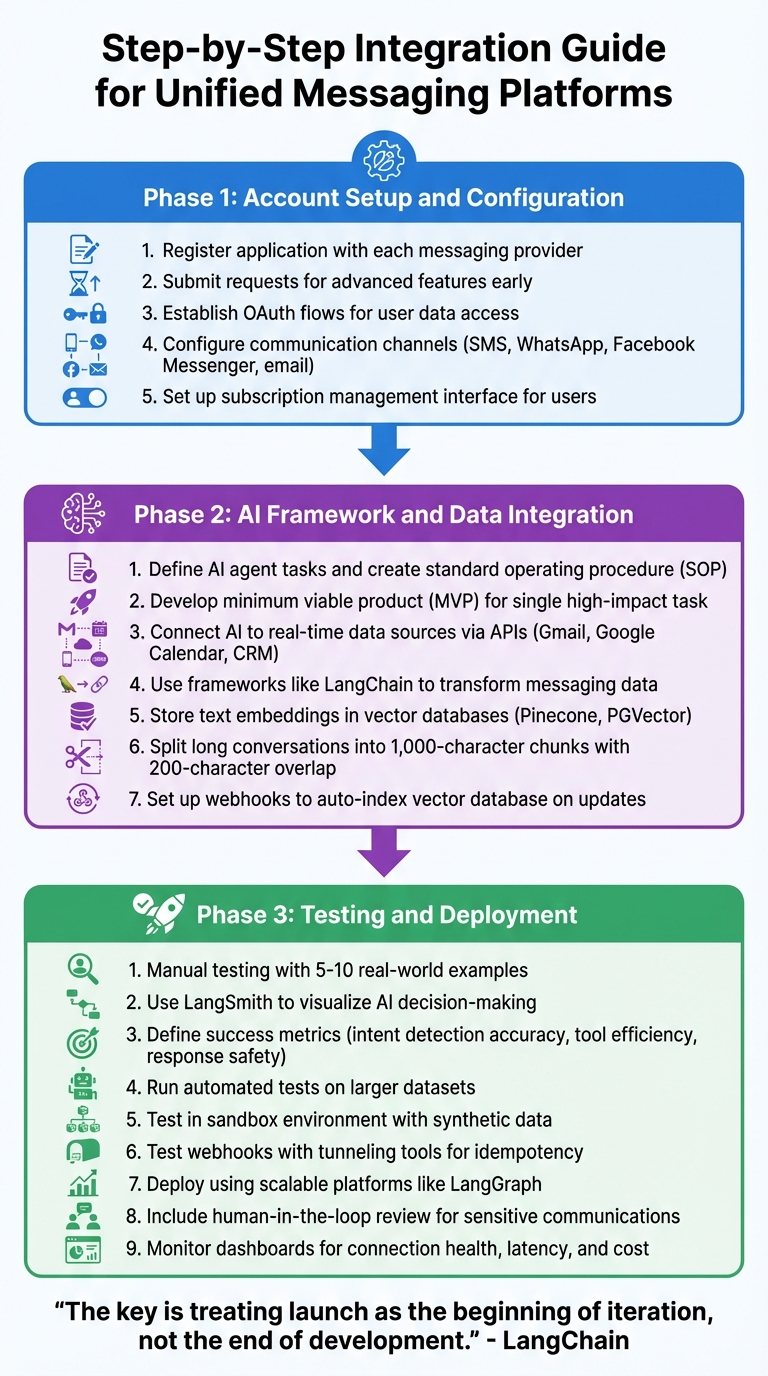
Once you've confirmed all prerequisites, it's time to connect your messaging channels into a single, cohesive system. This process unfolds in three main phases: setting up accounts and authentication, integrating AI tools for automation, and thoroughly testing everything before going live. Follow these steps in order for a smooth implementation.
Account Setup and Configuration
Start by registering and configuring your messaging channels. Begin by signing up your application with each provider to ensure access to the required channels. If advanced features need approval, submit those requests early to avoid delays.
Next, establish OAuth flows to enable user data access. Once authentication is up and running, configure your communication channels - whether it's SMS, WhatsApp, Facebook Messenger, or email - using the platform's interface. Additionally, set up a subscription management interface that allows users to explore available apps and manage their notification preferences.
AI Framework and Data Integration
Before diving into code, clearly define what tasks your AI agent will handle. Create a standard operating procedure (SOP) outlining human workflows for tasks like email triage or sentiment analysis. This will clarify the tools and logic your AI needs to replicate.
Focus on developing a minimum viable product (MVP) that automates a single high-impact task, such as identifying message intent, instead of trying to tackle everything at once. Connect your AI to real-time data sources - like Gmail, Google Calendar, or your CRM - via APIs. Use frameworks like LangChain to transform messaging data into text documents with metadata, ensuring the AI has the necessary context. Store these text embeddings in vector databases like Pinecone or PGVector, enabling semantic search and Retrieval-Augmented Generation over past conversations.
For long conversations, use a text splitter to divide them into manageable chunks - typically 1,000 characters with a 200-character overlap - to maintain context across boundaries. Set up webhooks to automatically re-index your vector database whenever a user connects or updates a message.
Testing and Deployment
Begin with manual testing using 5–10 real-world examples to ensure your AI is functioning as expected. Use tools like LangSmith to visualize decision-making processes and debug multi-step integrations as needed. After successful manual testing, transition to automated testing by defining key success metrics - like intent detection accuracy, tool efficiency, and response safety - and run tests on larger datasets programmatically.
Use a sandbox environment with synthetic data to test API calls and explore endpoints without risking live customer data. Test webhooks with tunneling tools to simulate retries and ensure they handle idempotency correctly.
When you're ready to deploy, use scalable platforms like LangGraph to monitor real-time metrics such as latency and cost. For sensitive communications, include a human-in-the-loop review process for AI-generated responses before they are sent. After launch, keep an eye on dashboards to track connection health and quickly address any spikes in cost, latency, or accuracy issues.
"The key is treating launch as the beginning of iteration, not the end of development." - LangChain
Integration Best Practices
Once your platform is deployed, maintaining its reliability and security becomes the top priority. By focusing on technical stability, strong security protocols, and regular feedback from stakeholders, you can ensure your integration continues to deliver value without adding unnecessary risks or complications.
Improving Performance and Reliability
Make every API call resilient. Use exponential backoff for retries when services are temporarily overloaded or facing infrastructure hiccups. For instance, if a request fails, wait progressively longer before trying again - start with one second, then two, then four.
Avoid duplicate messages with unique identifiers. Assign a unique ID to every message. This prevents duplicates, especially in systems that guarantee at-least-once delivery.
Route API calls based on geography. Direct requests to the nearest regional endpoint to reduce latency and improve response times. For example:
- Use
us-rcsbusinessmessaging.googleapis.comfor North America (phone numbers starting with +1, +5). - Use
europe-rcsbusinessmessaging.googleapis.comfor Europe (prefixes +2, +3, +4, +7). - Use
asia-rcsbusinessmessaging.googleapis.comfor Asia (prefixes +6, +8, +9).
Refresh connection pools regularly. Align connection lifetimes with DNS TTL (typically 300 seconds) to avoid using outdated IP addresses. Failing to refresh connections can lead to timeouts and failed message deliveries.
Check delivery receipts before using fallback channels. A timeout doesn’t always mean a message failed - it could be caused by temporary network congestion. While SMS is a reliable fallback with a 98% open rate, use it thoughtfully to avoid duplicate notifications.
Data Security and Compliance
Protect webhook endpoints. Always use HTTPS and verify request signatures with headers like X-Hub-Signature or HMAC. This ensures incoming data is legitimate and prevents unauthorized actions or data breaches.
"Production apps are strongly recommended to secure both your API calls and incoming Webhook to prevent attacks and mitigate security breaches of your existing access tokens." - Facebook Messenger Platform
Use system-level access tokens. Rely on tokens tied to a business account rather than individual credentials. This prevents disruptions if personnel changes occur and ensures continuity for your integration.
Enforce idempotency at the database level. Track every processed messageId to prevent duplicate API calls from causing unintended effects. This is especially crucial in sensitive areas like financial transactions or inventory management.
Encrypt and anonymize sensitive data. Encrypt user information both in transit and at rest to meet GDPR requirements. Additionally, anonymize logs whenever possible to reduce exposure risks while maintaining enough detail for troubleshooting.
Monitor token expiration proactively. Set up alerts for errors like Graph API error 190, which signals an expired access token. Quickly addressing token issues helps avoid service interruptions and ensures seamless message processing.
By combining these security practices with performance improvements, you can achieve a stable and secure integration.
Involving Stakeholders and Gathering Feedback
Technical success alone isn’t enough - your platform should also align with business goals and user expectations. Define success metrics early. Stakeholders should identify whether the primary focus is utility, customer satisfaction, or a mix of both. These goals will guide design decisions, from conversation flows to feature prioritization.
Map user navigation flows through collaboration. Work with customer service teams, sales staff, and end users to understand how people will interact with the platform. This insight can prevent costly redesigns down the line.
Use real-world data for improvement. Start by addressing the most common user requests, then refine the system based on "no-match" events - instances where the platform couldn’t interpret or respond to a query. This approach ensures development efforts target actual user needs.
"A conversational tone should support an experience, not define it." - Meta
Audit integrations regularly. Periodically review and deactivate connections that no longer align with current business needs. This reduces management overhead, conserves resources, and minimizes potential security vulnerabilities.
Blend conversational and graphical elements. Combine chat-based interactions with buttons and quick-reply templates for routine tasks. This approach simplifies user input, reduces errors, and keeps the experience intuitive.
sbb-itb-fd3217b
Customizing for Industry-Specific Requirements
Building on strong integration practices, it's crucial to adapt your solution to fit the unique demands of your industry. Whether it's ensuring HIPAA compliance in healthcare, managing bulk campaigns in retail, or implementing zero-storage designs for finance, the goal is to align functionality with industry workflows and regulations. Customization like this can transform basic tools into a real competitive advantage.
Using AI for Personalization
Adapting AI tone for context: AI can adjust its tone to match your audience. For example, it can provide formal responses in legal or financial contexts, casual replies for retail, and empathetic, supportive messaging for technical issues. This ensures the communication style aligns with customer expectations across various industries.
Sentiment analysis for proactive support: Real-time sentiment analysis can identify negative feedback and escalate critical cases automatically. This ensures urgent issues are routed to the right team for immediate attention.
Automating issue tracking: AI can scan informal conversations for bug reports or service complaints, then automatically create tickets in your project management system. This eliminates manual data entry and ensures no issues are overlooked - especially valuable for SaaS and technical support teams.
Streamlining CRM matching: AI can match incoming messages to existing CRM records, giving agents instant access to customer details like purchase history, previous interactions, and account status. This leads to faster, more personalized service.
These AI-driven personalization tools are essential for scaling operations while maintaining quality and efficiency.
Enterprise-Level Features
Team-based routing: Automatically assign messages based on factors like content, customer segment, or time of day. With personalized "My Inbox" views, agents can focus on their assigned tasks and track their performance metrics.
Internal collaboration tools: Use internal notes to discuss complex cases without exposing these conversations to customers. This feature is especially important in industries like healthcare and finance, where multiple specialists may need to collaborate on a single case.
Real-time processing for compliance: For regulated industries, processing messages in real time without storing customer data at rest minimizes compliance challenges and reduces the risk of data breaches.
These enterprise features not only enhance communication workflows but also ensure that operations meet strict regulatory and security standards.
Inbox Agents offers enterprise-level capabilities - ranging from personalized AI responses to advanced team management and flexible workflows. Their Enterprise plan equips businesses with the tools they need to scale effectively while maintaining high levels of security and compliance.
Security, Scalability, and Maintenance
After establishing the basics of integration, maintaining security, ensuring scalability, and planning for ongoing maintenance become essential to keep your platform performing well as your business grows. These elements are crucial to sustaining reliability and responsiveness over time.
Security Measures and Protocols
To protect your platform and its users, encrypt all communication logs and user data - whether it's stored or being transmitted. Use row-level security with tenant identifiers to separate data between organizations. For AI-powered platforms that rely on large language models, include safeguards like PII masking and hallucination detection. These measures help protect sensitive information and prevent inaccurate responses from being delivered to customers.
Follow best practices such as adopting OAuth2, JWTs, and SSO in line with NIST SP 800-63b guidelines. Secure gateways are essential for validating incoming data and managing traffic spikes. Additionally, logging all events, including Server-Sent Events (SSE), creates a comprehensive audit trail that supports compliance and security reviews.
These protocols not only shield your system but also lay the groundwork for scalability and efficient maintenance.
Planning for Scalability
Once your system is secure, focus on ensuring it can grow alongside your business. Scalability often hinges on Message Segments per Second (MPS), which measures how many messages your platform can handle without delays. For example, short codes typically start at 100 MPS, while toll-free numbers begin at 3 MPS. If your message volume exceeds these limits, messages may queue for up to 4 hours before being dropped. To avoid bottlenecks, calculate throughput by dividing Total Message Segments by MPS to ensure your sender type can handle large volumes effectively.
For long-term growth, prioritize horizontal scaling (adding more servers) over vertical upgrades (enhancing existing servers). As your database expands, techniques like sharding or partitioning can help distribute data across multiple servers, improving performance. Use tenant-aware caching tools like Redis or Memcached to reduce server strain by avoiding repetitive query processing across users.
To minimize latency, route traffic through regional endpoints closest to your recipients’ locations. For platforms managing high conversational volumes, AI orchestration can automate routine tasks, allowing your system to handle more interactions without needing to increase staffing.
"Scaling should be planned early, even if the product is still small, so that your architecture supports long-term growth without requiring a full rebuild." - Nexiby SaaS Development Guide
Updates and Maintenance Schedule
Regular maintenance is key to keeping your system running smoothly. Use validation APIs to clean up your databases by filtering out landlines or unreachable carriers before sending messages. This reduces costs and improves delivery rates. Aim to keep delivery error rates below 2% and opt-out rates under 1–2% by monitoring these metrics with visual dashboards and programmatic webhooks.
Implement exponential backoff for retries to handle service overloads gracefully. Schedule periodic security audits to check for compliance with geographic regulations, carrier-specific requirements (like A2P 10DLC or Toll-Free verification), and AI decision-making processes. Observability tools can help map agent dependencies and detect unauthorized interactions in real time. Regularly update system components and test message templates using A/B testing to optimize performance.
Platforms like Inbox Agents simplify these processes by offering built-in features such as automated spam filtering, abuse detection, and AI-powered inbox management. Their tools are designed to handle increasing message volumes while maintaining strict data protection standards, freeing you to focus on growing your business without worrying about infrastructure challenges.
Conclusion
Bringing all communication channels - email, SMS, WhatsApp, social media, and voicemail - into one unified messaging platform simplifies the way teams work. By cutting out the need to constantly switch between apps, it ensures teams can access complete conversation histories with full context at any time. This not only saves time but also drives productivity and keeps teams working efficiently. Companies that excel in omnichannel customer engagement retain about 89% of their customers, compared to just 33% for those with weaker engagement efforts. These efficiencies create a strong foundation for improving customer interactions over time.
AI automation takes this a step further by handling routine tasks, enabling teams to manage higher volumes without compromising on quality. Studies show that automated systems can address up to 35% of customer inquiries without human involvement, allowing agents to focus on complex, high-value issues. When paired with solid integration and security measures, these tools empower teams to work smarter and more strategically.
Inbox Agents makes this process even easier by merging unified messaging and AI automation into a single, user-friendly platform. With features like automated summaries, smart replies, and spam filtering, Inbox Agents handles the technical details so businesses can concentrate on growth. Its AI adapts to your workflows, improving accuracy and reducing onboarding time for new team members. By adopting a solution like Inbox Agents, businesses can maintain these efficiencies and stay ahead in the ever-changing world of communication.
FAQs
What are the key technical requirements for integrating a unified messaging platform?
To integrate a unified messaging platform effectively, the system must rely on a single, standardized API. This API should consolidate multiple messaging channels - like email, SMS, and chat apps - into a single interface. By doing so, developers can send and receive messages without unnecessary complications. To safeguard sensitive data, secure authentication methods such as API keys or OAuth tokens should be employed, along with HTTPS for secure data transport. Features like pagination, error handling, and rate-limit management are also essential for managing high message volumes smoothly.
Real-time communication is another key element. The platform should offer webhooks or event notifications to keep users updated instantly on new messages, status changes, or conversation activity. Effective handling of threaded conversations is equally important, enabling developers to track message histories and retrieve entire conversation threads when needed. Additionally, robust capabilities for managing multiple inboxes and channels provide the flexibility and scalability required for growing demands.
Lastly, developer-friendly tools like SDKs or client libraries can make the integration process much easier. Clear, well-organized documentation and versioned APIs ensure developers can adapt to updates without unnecessary hassle. These technical elements create a solid foundation for seamless integration, designed to address the specific messaging needs of various industries.
How does AI improve the performance of a unified messaging platform?
AI brings a whole new level of efficiency to unified messaging platforms, turning them into smart communication hubs. It can automatically summarize lengthy conversations, suggest replies tailored to the context, and even flag high-priority or inappropriate messages. This not only saves teams valuable time but also ensures communication stays consistent and professional. On top of that, AI-driven sentiment analysis can catch signs of customer frustration early, giving teams the chance to step in and resolve issues before they grow.
Beyond communication, AI simplifies workflows by automating repetitive tasks like creating support tickets, routing them to the right teams, and tagging interactions for reporting purposes. Predictive insights further help teams make better use of their resources, while tools powered by generative AI - such as real-time knowledge bases - equip agents with quick, relevant solutions. Together, these features speed up responses, deliver more personalized customer experiences, and free up teams to focus on higher-level, strategic work.
How can I ensure data security and compliance when integrating messaging platforms?
To maintain data security and meet compliance standards during messaging platform integration, begin by enforcing strong authentication and authorization protocols like OAuth 2.0. Combine this with a least-privilege access model to restrict permissions to only what’s necessary. Regularly update and rotate API keys and access tokens to reduce risks if credentials are exposed. Protect data in transit using TLS 1.3 encryption, and secure stored data with industry-standard encryption algorithms. To prevent vulnerabilities such as injection attacks, validate all inputs and outputs. Also, stick to data minimization by transmitting only the fields required for specific workflows.
Ensure your integration complies with frameworks like GDPR, HIPAA, CCPA, or SOC 2 by creating clear data-retention policies, anonymizing or masking sensitive data, and keeping thorough audit logs. Use centralized logging tools to continuously monitor API usage and detect unusual activity. Regularly perform security assessments, including penetration testing and vulnerability checks, to identify and address potential weaknesses. Finally, establish a comprehensive incident-response plan to manage breaches effectively and meet any regulatory reporting obligations. By adopting these practices, platforms like Inbox Agents can securely consolidate conversations across multiple channels while staying aligned with U.S. privacy and security regulations.