


Dynamic Personalization for Local Audiences
Dynamic personalization tailors marketing messages based on a customer’s location, weather, or local events, creating a more relevant and engaging experience. Why does this matter?
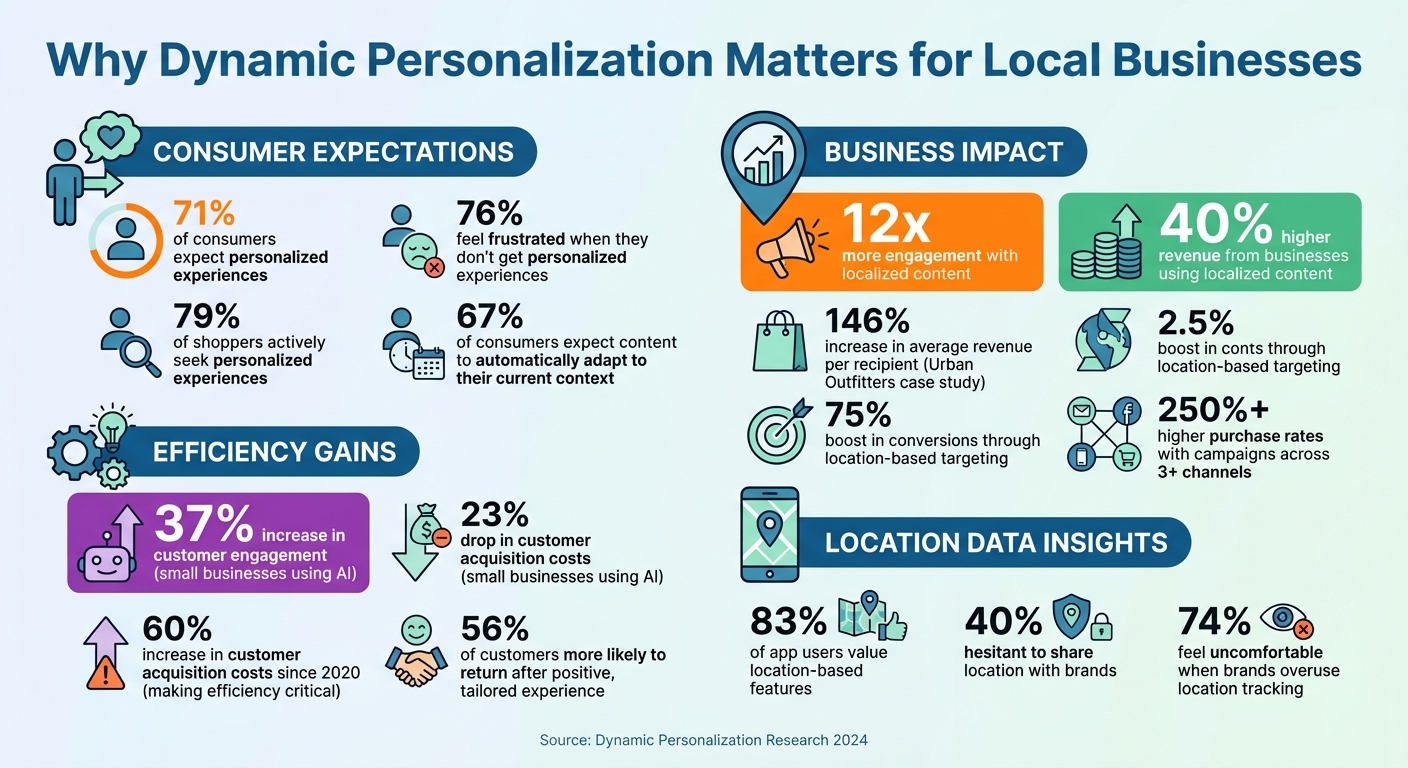
- 71% of consumers expect personalized experiences, and 76% feel frustrated when they don’t get them.
- Businesses using localized content see 12x more engagement and 40% higher revenue.
- With customer acquisition costs up 60% since 2020, generic campaigns waste resources.
How does it work?
- Geolocation & Geofencing: Target users by city, zip code, or within a specific range for promotions.
- Weather & Event Triggers: Adjust messages to match local conditions or happenings.
- Localized Messaging: Align content with regional preferences, like offering ski deals in Denver or rain gear in Seattle.
Tools like Inbox Agents simplify this process by combining customer data with local insights, helping businesses deliver timely, relevant, and location-aware communication. This approach not only improves engagement but also builds trust when executed respectfully.
Dynamic Personalization Statistics: Impact on Engagement and Revenue
Core Principles of Location-Based Personalization
Using Geolocation and Geofencing
Geolocation tailors content based on a user's last-known location - whether that's their country, city, or zip code - combined with behavioral and demographic insights. This method keeps things relevant without requiring constant tracking. Geofencing takes it a step further by setting up a virtual boundary using GPS, RFID, or Wi-Fi. When users enter, exit, or linger within this boundary, personalized messages or offers can be triggered automatically.
Here's how they differ: Geotargeting operates on a broader scale, such as cities or regions, making it ideal for showing local currency, adjusting shipping details, or promoting nearby stores. Geofencing, on the other hand, works within much smaller ranges (50 meters to 50 kilometers), making it perfect for proximity-based promotions. A standout example is Burger King's "Whopper Detour" campaign. By geofencing 14,000 McDonald’s locations, they offered users within 600 feet of a McDonald’s a Whopper for one cent via the Burger King app. The result? 3.2 million app downloads and a 50% surge in monthly active users.
Though 83% of app users value location-based features, 40% are hesitant to share their location with brands. To address this, clearly communicate the benefits of sharing location data - like finding nearby stores or accessing local deals - during onboarding. For instance, William Hill used location-based push notifications to send tailored offers, such as free bets tied to a user’s location. This strategy increased engagement by 400%. Alex Rutherford, Head of Mobile Sportsbook at William Hill, emphasized:
"The push notification strategy is not to overwhelm the customer but ensure at all times that every message they receive is absolutely relevant."
However, there’s a fine line between helpful and invasive. Around 74% of people feel uncomfortable when brands use location data in ways that seem more like surveillance than service. Instead of over-personalizing, focus on adding value - whether that’s a discount code or directions to a nearby store. Location-based triggers can also incorporate context-aware signals, such as weather or local events, to make interactions feel natural.
Adding Weather and Local Events
Weather and local events create opportunities for timely, context-driven messaging. For example, a food delivery app might promote discounts on cold, rainy days when staying in is more appealing. Similarly, an athletic brand could adjust its marketing visuals based on regional weather - highlighting rain gear during a Seattle downpour or showcasing summer apparel during a Phoenix heatwave.
Weather-based targeting has proven effective. Japanese retailer PARCO saw a 25% increase in purchase rates by leveraging this approach. Local events can also amplify engagement. For instance, Sephora SEA’s Lunar New Year campaign drove a 132% boost in purchases. Even sports teams are getting in on the action. The Sacramento Kings used beacons and real-time data at the Golden 1 Center to send personalized greetings and player updates directly to fans’ phones, achieving a 41% indirect open rate for their app.
Integrating weather APIs like AccuWeather or Foursquare allows businesses to automatically recommend products based on current conditions. Dynamic templates that adjust content by zip code ensure messages feel perfectly timed and relevant. Combined with local event insights, these triggers create a powerful foundation for deeper personalization.
Localizing Your Messaging
Localization isn’t just about translating text - it’s about adapting to local preferences and cultural norms. For U.S. audiences, this might mean displaying prices in dollars, using the MM/DD/YYYY date format, and tailoring promotions to regional needs. Think wildfire insurance in California, hurricane prep in Florida, or ski vacation deals for Denver residents.
Urban Outfitters is a great example. By using location data to target specific regional campaigns, they increased average revenue per recipient by 146% and boosted conversions by 75%. Localization also extends to website features. Automatically adjusting shipping costs, payment options, and terminology based on a user’s location can make a big difference. Adding elements like "Find a Store" buttons or location-specific discount codes further enhances the experience. Integrating local event calendars to send personalized alerts - such as exclusive offers for conference attendees - adds even more value.
At its core, location-based messaging should make customers feel understood, not watched. When brands use location data to provide clear benefits - like pointing users to the nearest store or offering a timely deal - it builds trust. On the flip side, overly intrusive messaging can alienate users. Always include fallback options so that users who opt out of location sharing still receive relevant, default content tailored to broader regions like "Global" or "National."
How Inbox Agents Supports Dynamic Personalization
AI-Driven Local Insights
Inbox Agents uses location-based intelligence to fine-tune messaging in real time by analyzing factors like proximity, local events, weather, and traffic patterns. For example, if a customer reaches out from a specific zip code during a rainstorm, the system can suggest responses that acknowledge the current weather conditions.
The platform also merges first-party data (like purchase history and past interactions) with zero-party data (such as stated preferences) to create detailed, up-to-date customer profiles. This ensures that every interaction feels timely and relevant - something 67% of consumers now expect from brands, believing that content should automatically adapt to their current context.
Smart Replies and Tailored Responses
Inbox Agents’ smart reply feature uses machine learning to analyze incoming messages and recommend personalized responses. These replies can include customer names, address specific concerns, and even reference local details like store hours or regional promotions. The platform also supports dynamic variables, such as {{ location }} or {{ local_event }}, which automatically customize message templates.
For instance, a retail chain could use a single response template that fills in details like the nearest store address, available inventory, or upcoming community events. This method works - localized content tends to generate 12 times more engagement than generic corporate messaging. These personalized responses are seamlessly delivered across multiple communication channels.
Managing Multiple Platforms at Scale
With Inbox Agents, businesses can manage email, SMS, social media, and chat apps from one unified interface. This ensures a consistent brand voice while optimizing content and timing for each channel. The platform’s multi-agent architecture and visual templates make it easy for local managers to roll out coordinated, region-specific campaigns in just a few days. This approach pays off: companies that run campaigns across three or more channels see purchase rates more than 250% higher than those using only one channel.
Results and Best Practices for Implementation
Measuring Success with Dynamic Personalization
To evaluate how well your dynamic personalization efforts are working, focus on metrics that reflect engagement, conversions, and customer loyalty. Engagement metrics - like open rates, click-through rates, and session duration - can reveal how effectively your localized content connects with audiences in different regions. On the other hand, conversion metrics - such as higher conversion rates, increased subscriptions, or more frequent purchases - help gauge whether your strategies are translating into tangible business outcomes.
For a broader perspective, keep an eye on customer loyalty indicators like repeat purchase rates and customer lifetime value. These metrics provide a window into how well you're fostering long-term relationships. In fact, research indicates that 56% of customers are more likely to return after a positive, tailored experience. Operational improvements, like lower customer acquisition costs or reduced appointment no-show rates, are also worth tracking. For example, small businesses using AI-driven marketing strategies have reported a 37% boost in customer engagement and a 23% drop in acquisition costs.
However, personalization can backfire if it feels invasive. Keep an eye on opt-outs, app uninstalls, and negative feedback to ensure your efforts remain respectful. A survey found that 74% of people feel uneasy when brands overuse location tracking. As Todd Grennan from Braze wisely points out:
"As a rule, customers want to feel understood, not monitored".
With these metrics in place, you can fine-tune your approach and implement effective strategies through tools like Inbox Agents.
Steps to Implement Dynamic Personalization with Inbox Agents
Start by integrating data from your CRM, purchase history, and customer preferences with external signals like weather APIs and local event calendars. This creates a unified, context-aware profile for each customer, enabling more relevant and timely messaging.
Next, set up geofencing triggers to send messages when customers are near your store or a local event. Use Inbox Agents' dynamic variables to automatically tailor these messages based on location and context. This ensures your communication feels personal and locally relevant. Test these AI-driven responses on smaller audience segments, tracking key metrics like engagement, conversions, opt-outs, and complaints to refine your approach.
Use the Inbox Agents analytics dashboard to monitor real-time results, with automated alerts flagging any performance issues. Keep your email lists clean to maintain bounce rates below 1%. Start with a few impactful triggers - two or three at most - and expand gradually while maintaining a human touch to preserve brand authenticity.
sbb-itb-fd3217b
Conclusion
Key Takeaways
Dynamic personalization isn't just a nice-to-have anymore - it's a must for staying competitive. Today's consumers expect brands to adapt their content automatically based on their context. Ignoring location-based personalization? That’s a fast track to losing customers to competitors who better understand their local audiences.
The numbers back this up. Localized messaging can boost engagement by up to 12x and drive 40% more revenue. These stats highlight why local businesses need to step up their game and embrace personalization to stay relevant.
But there's a challenge: acquisition costs are climbing, especially for smaller businesses. Meanwhile, national chains pour resources into "near me" search optimization. This is where AI-driven personalization becomes a game changer. It helps smaller businesses compete by scaling authentic community connections. As Averi Academy puts it:
"AI doesn't replace the human elements that make local businesses special - it amplifies authentic community connections".
Tools like Inbox Agents make this shift easier. The platform consolidates all your messaging channels into one interface, powered by AI features like smart replies, automated inbox summaries, and personalized responses. Whether you're managing customer reviews, sending weather-based promotions, or coordinating across email, SMS, and social media, Inbox Agents ensures every interaction feels personal and relevant. It’s about turning challenges into opportunities for growth.
Start small with high-impact strategies like cart recovery emails or appointment reminders. Then, layer in real-time signals like local events or weather updates. Unified customer profiles help keep your messaging consistent across all channels. And the payoff? Small businesses using these strategies report an average 37% increase in customer engagement and a 23% drop in acquisition costs. Even without a massive budget, you can deliver the personalized experiences that 79% of shoppers actively seek.
The key is striking the right balance - personalization should always feel relevant and respectful. Be transparent about why you're collecting location data, keep your messaging authentic, and monitor opt-out rates closely. When done right, dynamic personalization doesn't just boost engagement - it builds trust and drives real results.
How Does Location Data Personalize Marketing Experiences? - The Geography Atlas
FAQs
How can businesses personalize messages without making them feel intrusive?
Dynamic personalization should strike the right balance - it should feel helpful, not intrusive. Start by securing clear consent from your customers and working only with the data they willingly provide. The key is to prioritize relevance by tailoring messages to align with each user’s current needs and preferences. To prevent overwhelming your audience, implement frequency caps and ensure every piece of content fits the context.
Tools like Inbox Agents make this process easier by combining email, SMS, and chat into a single interface. Features such as smart replies, automated outreach, and abuse filtering allow businesses to fine-tune messages to match individual preferences while respecting privacy. By testing your content, limiting the number of touchpoints, and empowering users to control their communication settings, you can deliver personalized experiences that feel meaningful rather than invasive.
How can using weather and local events improve message personalization?
Incorporating real-time weather updates and local event information into your messaging can make your content feel more relevant and timely to your audience. Imagine referencing a rainy day with a promotion like “Stay dry with 20% off umbrellas today” or mentioning a popular local concert to grab attention. These small, personalized touches can lead to higher engagement and better results compared to generic messaging.
But it’s not just about engagement. Using weather and event-based personalization allows businesses to segment their audience based on context rather than just traditional demographics. This ensures your messages are not only timely but also resonate deeply with your audience. By adapting content dynamically to reflect current conditions or events, businesses can build stronger connections, inspire loyalty, and see measurable growth in sales.
Inbox Agents takes this approach further by seamlessly integrating live weather updates and local event calendars into its platform. With features like AI-driven smart replies and personalized content blocks, your messages feel like they’re crafted specifically for your audience’s neighborhood and current situation. This level of personalization can turn relevance into lasting relationships and higher revenue.
What’s the difference between geofencing and geotargeting in marketing?
Geofencing works by setting up virtual boundaries that activate specific marketing actions when a user’s device enters or leaves a designated area. For instance, a store might send a notification to a potential customer as they walk nearby.
Geotargeting, in contrast, focuses on delivering personalized messages to users based on their location, but it doesn’t rely on any boundary-triggered events. Instead, it’s more about tailoring content to people within a certain geographic area.
While both approaches aim to connect businesses with local audiences, geofencing is more immediate and action-driven, whereas geotargeting takes a broader approach, often used for delivering customized content.