

Guide to AI-Powered Channel Prioritization
AI-powered channel prioritization uses machine learning and natural language processing (NLP) to rank incoming messages by urgency, customer value, and business impact. This approach helps businesses respond faster, improve efficiency, and focus on high-value opportunities.
Key Benefits:
- Saves time by automating manual message sorting.
- Reduces response delays, improving customer satisfaction and deal outcomes.
- Flags revenue-driving messages like pricing inquiries or demo requests.
- Centralizes communications across platforms like email, LinkedIn, and WhatsApp.
How It Works:
- Data Collection: Gathers messages from all channels into one system.
- Analysis: Uses NLP to assess sentiment, urgency, and buying intent.
- Scoring: Assigns priority levels based on customer profile and message context.
- Routing: Directs important messages to the right team or workflow.
- Learning: Continuously improves through feedback and new data.
Results:
- Businesses report up to a 40% reduction in response times.
- Sales reps spend more time selling - up to 45% of their week.
- AI tools like Inbox Agents offer features like real-time prioritization and a 14-day free trial to get started.
AI-powered prioritization is transforming communication management, making it faster and more effective while allowing teams to focus on what matters most.
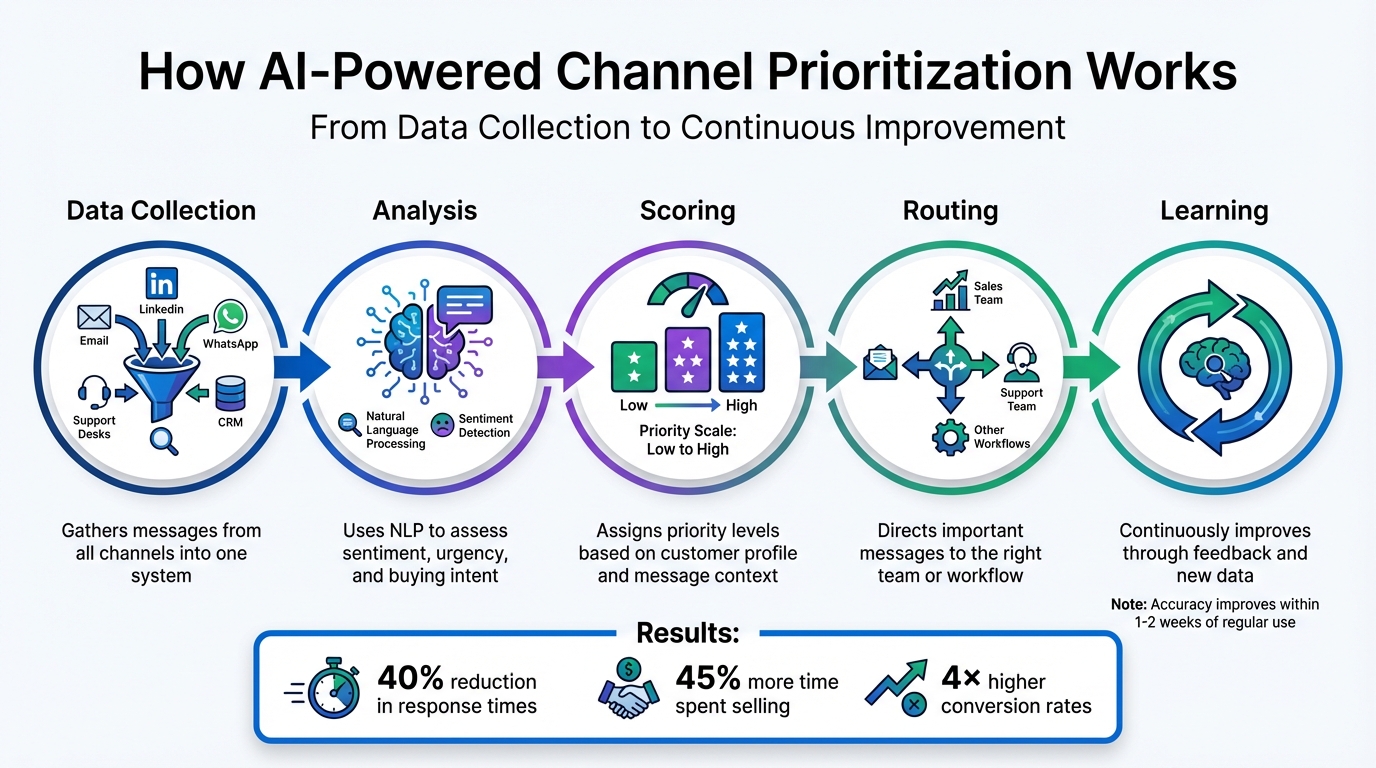
How AI-Powered Channel Prioritization Works: 5-Step Process
How to Build an Enterprise-Ready AI Prioritization Strategy
Key Features of AI-Powered Channel Prioritization
These tools allow businesses to handle large volumes of messages with accuracy and efficiency.
Sentiment and Context Analysis
AI leverages Natural Language Understanding (NLU) to analyze every message, detecting shifts in sentiment, urgency, and buying intent. This helps flag high-priority opportunities and alert teams before minor issues snowball into bigger problems. By examining communication patterns, tone, and terminology, AI distinguishes routine messages from critical ones.
This technology essentially acts as an early warning system, enabling support teams to address frustrated or at-risk customers promptly. By focusing on context, AI filters out irrelevant chatter and highlights only the actionable parts of conversations. With the average person receiving over 121 messages daily across various platforms and spending more than three hours managing them, context analysis ensures that important messages don’t get lost in the noise.
"Natural Language Understanding flags sentiment shifts, urgency, and buying intent." - Arvat AI
AI further enhances prioritization by evaluating customer profiles and the potential impact of each interaction.
Customer Value and Impact Scoring
AI doesn’t just interpret messages - it also evaluates who’s sending them and their potential business value. By analyzing customer profiles (like industry, company size, and job title) and behavioral signals (such as time spent on pricing pages or repeated content downloads), AI ranks interactions based on revenue potential or strategic significance.
This creates a dynamic, real-time ranking system that updates as new data becomes available. High-value interactions are automatically pushed to the top of the queue or routed to the appropriate team member for immediate attention. Meanwhile, lower-priority messages are directed into nurturing workflows. Companies using AI for lead scoring and pipeline management report conversion rates nearly four times higher than average. Predictive lead scoring, for example, can lead to a 38% increase in lead-to-opportunity conversion rates.
"Using AI for lead scoring and pipeline insights can boost conversion rates by almost 4× compared to the average." - Martal Group
Continuous Learning and Adaptation
Unlike static systems that lose their edge over time, AI evolves by learning from new customer behaviors and market trends. Through incremental learning, it absorbs fresh insights while retaining historical patterns. Transfer learning allows AI to apply knowledge from one platform, like email, to others such as LinkedIn or Slack, ensuring consistent prioritization across all channels.
User feedback further fine-tunes the system, improving accuracy within just 1–2 weeks of regular use. For instance, one bank’s adaptive fraud detection system reduced fraudulent activities by 60% in a year, while retail recommendation engines that adjust to customer preferences saw conversion rates climb from 2.5% to 4.2%.
"Continuous learning AI? That's more like having a trusted assistant who gets smarter every day you work together, learning your preferences and adapting to new challenges without being told." - Superhuman Team
This adaptability enhances decision-making processes across the board.
Manual vs AI-Powered Prioritization
Manual prioritization often falls short, missing subtle cues and patterns. It’s slower, requiring agents to sift through messages manually, and relies heavily on memory or the immediate context of a single message. As message volumes grow, human efficiency drops significantly.
AI-powered prioritization, on the other hand, identifies patterns and sentiment changes instantly. It highlights urgent conversations and high-value leads in real time, drawing on full historical data and cross-platform interactions. Unlike manual methods, AI scales effortlessly, maintaining performance even as message volumes rise. Plus, it applies consistent, data-driven criteria to every lead, eliminating the variability introduced by individual reps.
Here’s a quick comparison of manual versus AI-powered prioritization:
| Feature | Manual Prioritization | AI-Powered Prioritization |
|---|---|---|
| Pattern Recognition | Often misses subtle behavioral signals or sentiment shifts | Automatically detects patterns and sentiment changes early |
| Speed | Slower; requires manual scrolling and filtering | Real-time; flags urgent and high-value leads instantly |
| Context | Limited to the current message or agent memory | Full context with integrated historical and cross-platform data |
| Scalability | Performance declines as message volume grows | Efficiently scales to handle hundreds of messages daily |
| Consistency | Varies by individual rep’s prioritization methods | Applies uniform, data-backed criteria to all leads |
AI-powered prioritization ensures streamlined, consistent, and effective message handling across all communication channels.
How AI-Powered Channel Prioritization Works
This section breaks down the four-step process that enables AI to turn a flood of messages into organized, actionable workflows. Each step builds on the last to ensure that communications are efficiently routed to the right person at the right time.
Data Collection and Ingestion
Everything starts with gathering messages from various communication channels into a single, centralized system. AI platforms use secure API integrations to pull messages from sources like email, support desks, web forms, CRMs, marketing tools, and messaging apps. This consolidation happens in real time or near real time - usually within five minutes - so incoming messages are processed promptly. During this step, key metadata (like the original source, sender details, timestamps, and historical engagement data) is preserved. Duplicate contact records are merged, creating a complete picture of each interaction.
"The intelligent inbound message routing template... will centralize all your inbound communications, use AI to automatically categorize, summarize, and prioritize each message, then route it to the appropriate team." – Zapier
Pro tip: Sync both inbound and outbound threads during this stage to give the AI a full view of how conversations evolve. Activating a "Human-in-the-Loop" mode during setup can also help fine-tune classification accuracy.
Once the data is centralized, the system moves on to analyzing content and assigning priorities.
Analysis and Scoring
With all the data in one place, the AI gets to work breaking down messages into measurable insights. Using Natural Language Processing (NLP), the system cleans up the text - removing things like HTML tags, signatures, and filler words - and applies methods like tokenization, lemmatization, and Named Entity Recognition (NER) to structure the data.
The AI then identifies customer intent and sentiment, pinpointing urgency or buying signals. Messages are converted into numerical representations using techniques such as TF-IDF or embeddings (like BERT or Word2Vec), which machine learning models can process effectively. Priority scores are calculated based on factors like sender reputation, key subject terms (e.g., "urgent", "deadline"), time sensitivity, and explicit action requests. A confidence score is also generated, flagging messages with lower confidence for human review.
Pro tip: Start small by testing AI prioritization on two or three high-volume scenarios - like password resets or billing disputes - using historical data annotated for intent and urgency. This approach can help improve accuracy early on.
Routing and Decision-Making
Once messages are scored, the AI ensures high-priority ones are delivered immediately, while lower-priority messages are directed to automated workflows. Confidence thresholds act as a safety net; if the AI isn’t confident about how to categorize a message, it automatically escalates it for human review. In some global setups, this type of classification has reduced message transfers by as much as 80%.
The AI's routing process is designed to handle messages seamlessly. Tools like Inbox Agents unify all communication channels into a single interface, allowing the AI to route messages efficiently while maintaining the context of conversations across email, chat, social media, and other platforms.
Pro tip: Establish clear fallback rules so that messages with low confidence are automatically escalated. You can also implement AI-generated draft replies, which sit in a "Drafts" folder for human review. This helps maintain a consistent brand voice.
Feedback Loop for Improvement
The final step is all about getting better over time. Feedback loops use manual overrides and agent corrections as "ground truth" signals, helping the AI retrain itself and reduce future errors. By analyzing historical interactions, the AI dynamically adjusts priority weights (like urgency, impact, and sentiment) in real time. This continuous refinement can lead to faster resolutions; for instance, deals have been shown to close up to 40% faster when follow-up patterns identified through feedback are prioritized.
"Feedback loops where agents correct routing decisions are among the most valuable signals for improving accuracy." – Agentix Labs
Companies that implement strong feedback loops often see task completion rates improve by 25–40%. A well-tuned system aims for manual overrides to occur less than 15% of the time, with over 85% alignment between AI predictions and actual outcomes.
Pro tip: Keep an eye on how often manual adjustments are made. If the frequency increases, it might be time to retrain the baseline rules. Regular audits can also ensure that critical metadata stays accurate and up to date.
Implementing AI-Powered Prioritization for High-Volume Scenarios
Building on the foundation of AI-driven analytics, let's explore how to implement AI prioritization in environments where managing a large volume of messages is a daily challenge. The aim is to shift from simply reacting to messages to creating a system where AI can automatically identify what’s most important, route tasks to the right team members, and scale operations without adding extra staff.
Defining Prioritization Rules and Criteria
To get started, establish clear rules for identifying urgent and high-value messages. These rules can be based on factors like sender reputation, specific keywords, and time sensitivity. For instance, you might prioritize messages from VIP clients, emails with keywords like “urgent” or “deadline,” or those requiring immediate action, such as “please review” or “need input.” Tailor these criteria to match your business priorities.
Behavioral signals, like changes in sentiment (e.g., frustration or interest in purchasing), can add another layer of refinement to your prioritization. Frameworks like RICE (Reach, Impact, Confidence, Effort) or MoSCoW (Must have, Should have, Could have, Will not have) can help you categorize tasks based on their potential return on investment.
Start with simple categorization rules and gradually introduce more complexity - like auto-responses - once the core system is stable. A feedback dashboard can help users flag misclassifications and fine-tune the AI’s sensitivity. Using confidence scores for routing can also help: high-confidence tasks can be handled automatically, while lower-confidence ones are flagged for human review.
Once you’ve defined your rules, integrate your messaging channels so the AI can apply them seamlessly.
Integration with Messaging Platforms
After setting your prioritization criteria, the next step is to bring all communication channels into a unified system. This involves connecting platforms like Gmail, Outlook, LinkedIn, Slack, and WhatsApp into a single interface.
Tools like Inbox Agents simplify this process by consolidating multiple messaging platforms. They also add AI-driven features like automated inbox summaries, smart replies, and abuse filtering to streamline conversations. Security is key during this integration: adhering to OAuth 2.0 protocols and encrypting access tokens ensures compliance with data privacy standards.
"The intelligent inbound message routing template takes the humans out of the loop, and transforms this manual process into an organized, intelligent workflow." – Zapier
To minimize errors, set a confidence threshold for AI categorizations - for example, only routing messages automatically if the AI’s confidence score is 85% or higher. For manual reviews in high-volume situations, keyboard shortcuts can make navigating the unified inbox faster and more efficient.
Once integrated, focus on optimizing the system to handle the high volume and speed required for your operations.
Optimizing for Large-Scale Messaging
Managing a large volume of messages effectively means avoiding bottlenecks. Automate repetitive tasks like lead routing and use filters to ensure older messages don’t get overlooked. Risk tiering is another useful strategy, allowing low-risk decisions to be automated while reserving critical actions for human approval.
Establish a governance team to oversee the AI’s deployment and ensure compliance with data regulations. Use dashboards to monitor performance and review flagged decisions regularly to maintain transparency in the AI’s processes. Sorting messages by how long they’ve been open can help ensure timely responses to older conversations.
Before scaling up, run a pilot program for 30–90 days focusing on one or two key use cases, such as lead qualification or opportunity scoring. Real-time notifications through tools like Slack or Microsoft Teams can highlight high-priority threads instantly. Extensive testing - like running 50+ iterations in a sandbox environment - will ensure the system performs reliably under real-world conditions.
For example, in 2025, Rootly, an incident management platform, partnered with Outreach to automate sales research and outreach. By using AI to identify high-intent leads and streamline repetitive tasks, they increased meetings scheduled by 69% and contacted 41% more prospects within just a few months.
"Understanding the data and having AI surface what actually works has been crucial to our success." – JP Cheung, Founding AE, Rootly
Priority Factor Weights
Different factors carry varying levels of importance depending on your business needs. Assigning weights to these factors helps align AI decisions with your goals. Here’s an example of weighted priorities for high-volume scenarios:
| Priority Factor | Weight Range | Description |
|---|---|---|
| Urgency | High (0.8–1.0) | Based on keywords like "urgent" or "deadline." |
| Buying Intent | High (0.7–0.9) | Flags sentiment shifts or inquiries about pricing/contracts. |
| Customer Tier | Medium (0.5–0.7) | Reflects sender reputation, such as VIP clients or high-priority contacts. |
| Sentiment | Medium (0.4–0.6) | Detects frustrated or at-risk customers to prevent escalation. |
| Relationship | Low (0.2–0.4) | Accounts for historical interaction frequency and tone matching. |
Weighted scoring combines factors like sender reputation, subject keywords, and action items to prioritize effectively. Define Ideal Customer Profile (ICP) criteria using metrics like employee count, revenue, and growth rates, and adjust these weights regularly based on team feedback and changing business needs.
sbb-itb-fd3217b
Benefits and Metrics of AI-Powered Channel Prioritization
Measuring the impact of AI-powered prioritization can reveal improvements in efficiency, scalability, and financial results. Companies using AI routing and prioritization systems often report faster response times, reduced costs, and higher satisfaction - provided they track the right metrics.
Improved Efficiency and Faster Resolution
AI-driven prioritization eliminates the delays of manual triage by automatically directing high-priority messages to the appropriate team members. This results in quicker first responses and higher first-contact resolution rates. For example, Notion boosted its resolution rate by 34% after introducing AI assistance for complex product inquiries. Similarly, NG.CASH saw its autonomous resolution rate jump from 13% to 70% by using AI for triage and issue resolution. These improvements are largely due to AI's ability to detect sentiment changes, identify urgency through keywords, and assign tasks to the correct workflows. Research shows that AI agent assistance can increase human productivity by about 13.8%, with broader deployments delivering annual productivity gains of 3% to 5%.
These efficiency enhancements create scalable benefits across the entire messaging ecosystem.
Better Scalability and Consistency
Manual prioritization can be both costly and inconsistent. AI, on the other hand, offers reliable accuracy - whether it's managing 100 or 10,000 messages - by applying prioritization rules uniformly across email, chat, SMS, and social media. For instance, Curology cut its customer service expenses by 65% with a HIPAA-compliant AI platform that scaled without adding staff. ClassPass achieved a 95% reduction in support conversation costs after deploying AI agents. AI's ability to analyze every interaction ensures it captures tone shifts, policy violations, and nuanced cases that manual quality checks often miss. Tools like Inbox Agents enhance this scalability by consolidating multiple messaging channels into one interface, offering features like automated inbox summaries, smart replies, and abuse filtering to maintain consistent prioritization.
This consistency in scalability builds a strong foundation for achieving measurable performance improvements.
Tracking Key Metrics for Success
To assess the impact of AI prioritization, focus on metrics that reflect both operational efficiency and business outcomes. Key indicators include First-Contact Resolution (FCR) - the percentage of tickets resolved without escalation - and Time-to-Resolution (TTR), which measures how quickly workflows are completed. Another critical metric is the deflection rate, which tracks the percentage of issues resolved independently by AI, linking directly to cost savings and increased agent availability. For instance, a U.S. airline used predictive AI during flight disruptions to improve targeting of at-risk customers by 210%, leading to an 800% increase in customer satisfaction. Bilt Rewards saved $1.75 million in support costs by implementing advanced AI automation.
Behavioral signals, such as the rate of frustrated interactions and the average number of agent transfers, can help pinpoint routing inaccuracies. To measure financial impact, compare the cost per successful resolution and AI-driven completion times against traditional manual workflows. Strive for AI accuracy rates of at least 85% and workflow adherence of 95% or higher, while keeping AI "hallucinations" (errors) below 2%.
"Evals are essentially the new performance review system for autonomous work. And it will be even more important for agents than people given the blast radius of a good vs. bad agentic workflow".
Best Practices for AI-Powered Channel Prioritization
Starting with Baseline Rules and Testing
Take a step-by-step approach when implementing AI-powered channel prioritization. Start by setting up a control group - route about 10% of your audience through a default channel to create a benchmark for AI performance. This initial phase usually lasts 1–2 weeks and helps consolidate spend and funnel KPIs into a single revenue scorecard.
Once the groundwork is laid, progress through three AI operational modes: "Assist", "Execute", and "Orchestrate." In "Assist" mode, the AI simply suggests reallocations. Moving to "Execute" mode, the system begins automatically shifting resources within pre-set limits, while still requiring human approval for any outliers. Finally, "Orchestrate" mode enables multi-channel operations with built-in service-level agreements and rollback mechanisms. This full transition typically takes 4–8 weeks. A key milestone during this phase is achieving an escalation rate below 5%, calculated by dividing human escalations by the total number of changes. These steps not only build a solid operational foundation but also support bias auditing and customization to align the AI with your organization’s values.
Monitoring and Reducing Bias
Once baseline rules are in place, it’s crucial to continuously monitor and address potential biases. AI systems can unintentionally reflect historical biases embedded in their training data, leading to unfair outcomes for certain customer groups or channels. Regular audits of prioritization outcomes - particularly across demographics and message types - help identify and correct these issues. Diversifying your training data to reflect the full scope of your market and embedding fairness metrics into the AI’s development are key steps toward more equitable results.
Transparency plays a vital role in combating bias. AI systems should provide clear decision trails, recommendation histories, and logic trees, enabling teams to audit and understand the rationale behind automated decisions. Establish feedback mechanisms where team members can flag errors or perceived biases. Use this input to refine and retrain the AI model.
"All AI systems require human oversight. Implement feedback loops where sales teams can mark qualification errors, which helps retrain models and improve accuracy over time".
Customizing for Business-Specific Needs
After addressing bias, refine the AI system to meet the specific needs of your business. Generic AI models often fall short when it comes to delivering results tailored to unique workflows. Start by analyzing your processes to identify repetitive tasks like lead routing, CRM updates, or data management. Train your AI on your company’s historical data rather than relying solely on pre-built models.
Introduce risk tiers to classify actions based on their potential impact. This allows the AI to handle low-risk decisions autonomously while reserving high-stakes actions for human approval. Additionally, teach the AI your brand’s tone by incorporating company-specific FAQs and past communications. For specialized industries, fine-tune the AI to detect relevant signals - such as "funding events + executive changes" in B2B sales - to pinpoint buying opportunities. For example, in 2025, Rootly collaborated with Outreach to streamline outreach efforts. By auditing workflows and leveraging AI to identify high-performing sequences, they saw a 41% increase in prospects contacted and a 69% boost in scheduled meetings.
Scaling with Dependency Mapping and Team Capacity
Before scaling your AI prioritization system, create a dependency map of your messaging infrastructure. Consolidate customer records across all channels to ensure the AI makes consistent decisions. Unified messaging, as mentioned earlier, is vital for scaling and maintaining accurate prioritization.
Set guardrails such as budget caps, exposure limits, and partitions to control AI-driven decisions. For actions outside predefined parameters or significant changes in targeting, require human approval to mitigate risks. Start with a departmental pilot to test the system and ensure your team can handle the increased workload before rolling it out enterprise-wide. Tools like Inbox Agents can assist in scaling by unifying multiple messaging channels into a single platform. Features like automated inbox summaries, smart replies, and abuse filtering help maintain consistency as the system scales. Additionally, document every AI decision, including its inputs, costs, and outcomes, to ensure transparency and auditability throughout the process.
Conclusion
AI-powered channel prioritization is transforming how businesses handle high-volume communication. By shifting from manual sorting to real-time prioritization, AI identifies which conversations need immediate attention and selects the most effective channels for engagement. For example, companies leveraging AI-driven email automation have seen a 45% increase in response rates and a 73% improvement in lead qualification accuracy.
The productivity gains from unified, intelligent systems are hard to ignore. Some businesses have reported cutting time spent on email management by 60% and achieving up to 90% time savings in key processes. This efficiency allows teams to redirect 60% of their efforts toward tasks that require deeper insights. Considering that professionals spend over three hours daily managing messages across platforms, these improvements can make a huge difference.
The key to success lies in treating AI as an adaptable partner rather than a static tool. Start with focused pilot projects, compare results against control groups, and always maintain human oversight for critical decisions. A strong foundation of unified, clean data is crucial - AI systems struggle when vital information is scattered across disconnected platforms. These steps ensure your team is ready to unlock the full potential of AI.
The competitive edge becomes even sharper when you look at the numbers. B2B teams using AI-powered multichannel outreach report 287% higher engagement rates compared to single-channel efforts. Additionally, modern sales teams have achieved 40–60% cost reductions and a 25% boost in deal velocity. With B2B buyers now navigating an average of 10 different interaction channels during their purchasing journey, the ability to prioritize and optimize across these touchpoints is no longer optional - it’s essential.
Platforms like Inbox Agents bring these capabilities to life. By consolidating messaging channels into a single interface with AI-powered tools - such as automated inbox summaries, smart replies, and intelligent filtering - businesses can seamlessly turn overwhelming message volumes into organized, actionable workflows. Whether you're managing customer support, sales outreach, or partner communications, AI-powered prioritization helps transform chaos into measurable results.
FAQs
How does AI-powered channel prioritization enhance customer satisfaction?
AI-powered channel prioritization uses real-time insights, such as customer behavior, intent, and past interactions, to identify the most suitable communication channel for each situation. Whether it's live chat, email, phone, or another platform, this system ensures the right tools are used at the right time. For instance, high-priority or complex issues are routed to live agents, while routine questions are addressed with automated responses, speeding up resolutions and improving efficiency.
This smart approach enhances customer satisfaction by cutting down wait times and creating a more personalized communication experience. Customers feel valued when their needs are met quickly and thoughtfully. Plus, as the AI continues to learn and adapt over time, its recommendations become even more precise, leading to smoother interactions and better outcomes overall.
How does AI decide which messages to prioritize?
AI organizes and prioritizes messages by analyzing several factors to gauge their urgency and importance. It starts by examining the intent and tone of the message, looking for specific keywords, phrasing, and sentiment. This helps determine whether the message is time-sensitive, a routine query, or a potential sales opportunity. For instance, messages with a frustrated or enthusiastic tone might signal a higher level of urgency.
Next, it evaluates engagement and behavior, such as how quickly the sender has been responded to in the past, click-through rates, and recent actions like visiting a website or interacting on social media. On top of that, contextual data - including account history, demographic details, and any assigned priority tags - adds another layer of insight. All of these elements are combined to generate a priority score, ensuring that critical messages are handled promptly while less urgent ones can be queued or managed automatically.
This is the foundation of how Inbox Agents optimizes communication. By focusing attention on high-priority conversations, businesses can respond more efficiently and dedicate resources to interactions that matter most.
How can businesses keep their AI-powered channel prioritization fair and unbiased?
To keep an AI-powered channel prioritization system fair, the first step is to train it on a diverse and well-balanced dataset. This dataset should reflect a wide range of customer interactions, covering different regions, languages, devices, and demographics. By doing this, you reduce the risk of the model favoring specific groups or channels. It’s also important to periodically review and update the training data to prevent certain customer segments from being overrepresented.
Another critical step is to monitor the system’s performance in real time. Look for patterns that might indicate bias, such as specific channels or user groups being consistently deprioritized. If you spot any imbalances, retrain the model with adjusted weights or apply fairness constraints to address the issue.
Lastly, include human oversight as part of the process. Experts should evaluate key decisions, particularly when the AI shows low confidence in its recommendations. By combining diverse data, ongoing monitoring, and human review, you can create a prioritization system that remains unbiased and promotes inclusive customer experiences.