

Unified Messaging vs. Separate Platforms: Cost Analysis
Managing communication tools can make or break your budget. Businesses face a choice: use a single unified messaging platform or stick with separate tools for email, chat, video, SMS, and social media. Here’s the bottom line: unified messaging platforms can save companies 30–35% annually compared to juggling multiple tools. Why? They simplify billing, reduce IT workload, and improve productivity by cutting down on app-switching.
Key Findings:
- Unified Messaging Costs: $15–$35 per user/month, with setup fees of $2,500–$3,000 for 50 users.
- Separate Tools Costs: $100–$300 per user/month, plus high integration and IT expenses.
- Productivity Impact: Unified platforms reduce lost time from switching apps, saving $90,000–$100,000 annually for a 50-person team.
- 3-Year Savings: Unified systems can save over $500,000 for 100 users compared to fragmented tools.
Quick Comparison:
| Category | Unified Messaging | Separate Tools |
|---|---|---|
| Monthly Cost (10 Users) | $250–$350 | $1,500–$3,000 |
| Setup Costs | $2,500–$3,000 | $5,000–$75,000 |
| IT Overhead | Minimal | $2,000–$5,000/month |
| Training Costs | Lower | Higher |
| Annual Savings | 30–35% | None |
Switching to a unified platform not only cuts costs but also helps teams work faster and more efficiently. Over time, the savings and productivity gains far outweigh the initial setup costs.
Unified Messaging vs Separate Tools Cost Comparison for 10-100 Users
Unified Communications Comparison | On-Premise vs. Cloud | Selection & TCO Analysis
Unified Messaging Platforms: Costs and Benefits
Unified messaging platforms bring together various communication channels - such as email, SMS, social media, voice, and video - into a single cloud-based interface. By combining hosting, maintenance, security, and upgrades into one subscription, they eliminate the need for on-site servers. Below, we explore how subscription fees, setup costs, and scalability contribute to financial efficiency.
Subscription Costs
In the U.S., most unified messaging platforms operate on a tiered, per-user monthly pricing model. Entry-level plans typically range from $15 to $20 per user per month, mid-tier options average $25, and premium plans cost around $30 to $35 per user monthly. For a 50-person team, this translates to monthly costs of $750 to $1,750. These subscriptions usually include essential services like cloud infrastructure, platform maintenance, security, and regular updates. Without such platforms, businesses would face separate expenses for server maintenance and third-party integrations, making this bundled approach a cost-effective alternative.
Implementation and Onboarding
Switching to a unified messaging platform often involves a one-time setup fee, which varies based on the organization’s size. For teams of up to 50 users, setup costs typically fall between $2,500 and $3,000, with an additional onboarding fee of about $30 per extra user. For larger deployments, such as a 200-user setup, these costs increase by $4,500 to $5,000. These fees generally cover essential services like system configuration, integrations, number porting, security setup, and initial training for administrators. The unified interface also simplifies training for employees, reducing the time and indirect labor costs typically associated with onboarding new tools. This ease of adoption further enhances the platform’s overall cost efficiency.
Scalability and Vendor Consolidation
Unified platforms are designed to grow with a business’s needs, allowing companies to add or remove users and communication channels without significant upfront investments. Instead of purchasing additional servers or juggling separate licenses for different tools, businesses pay a predictable monthly fee that adjusts as they scale. For example, adding a new user typically costs around $20 to $30 per month. Additionally, consolidating vendors reduces IT overhead by eliminating redundant contracts and support tasks. This streamlined approach not only frees up IT teams to focus on more strategic projects but can also lower overall communication expenses by an estimated 30–35% annually.
Separate Communication Tools: Costs and Challenges
Using separate tools for communication instead of a unified platform can lead to mounting costs and operational headaches. Businesses that rely on individual platforms for email, SMS, live chat, social media, and voice services face stacked per-user licensing fees that add up quickly. For a small team, these separate subscriptions can range from $1,500 to $5,000 per month. For mid-sized organizations, the costs soar even higher. A company with 20 users managing four or five different tools could easily spend over $60,000 annually, as each platform charges its own fees without offering centralized access. Let’s break down where these costs come from.
Multiple Licenses and Stacked Costs
Each communication channel typically comes with its own subscription, creating redundant fees across various vendors. For example, per-user fees might average $30 for voice, $23 for SMS, and $35 for chat. For a 20-person team, this translates to annual costs of $12,000–$25,000 per tool. When businesses use four or five separate platforms, the total costs can far outweigh what a unified solution would charge. On top of that, companies still running legacy systems face additional expenses. Gateway support for older systems can cost between $1,000 and $1,500 annually per system. Research from Microsoft and COMMfusion highlights how companies relying on outdated, siloed systems are "losing thousands - if not millions - of dollars each year" just on support contracts. And that’s not even considering the costs of integrating these tools.
Integration and Maintenance Costs
Connecting separate tools often requires custom API integrations and middleware, which come with hefty price tags. Initial integration costs can range from $5,000 to over $20,000, while ongoing maintenance fees can run anywhere from $500 to $10,000 per month. For businesses managing a full stack of email, SMS, chat, and social platforms, these expenses add up quickly. Frequent updates and the need for developer intervention further drive up costs.
IT Overhead and Training Costs
Managing multiple platforms creates a significant burden for IT teams. They may spend 10–20 hours per week monitoring uptime and handling maintenance across several tools. At an average U.S. labor rate of $50 per hour, this equates to $2,000–$5,000 monthly. User provisioning adds another layer of expense - platforms often charge an extra $10–$50 per user for setup, which can exceed $1,000 per month for a 50-person team. Training costs also pile up. Agents might require 4–8 hours of training per platform, with rates ranging from $100 to $200 per session. This can lead to thousands of dollars in monthly expenses, especially as teams struggle to juggle multiple dashboards and security settings. All these hidden costs reduce ROI and highlight the inefficiencies of managing siloed tools.
Direct Cost Comparison: Unified Messaging vs. Separate Tools
When comparing costs, the difference between unified messaging platforms and using separate tools is striking. Unified messaging typically uses tiered pricing, ranging from $15 to $35 per user each month. On the other hand, relying on separate tools means combining costs from different vendors: email services at $10–$20, chat tools at $10–$30, and phone systems at $20–$50 per user monthly. Altogether, these can add up to $100–$300 per user every month, inflated further by redundant licenses and extra add-ons.
Monthly Software Costs
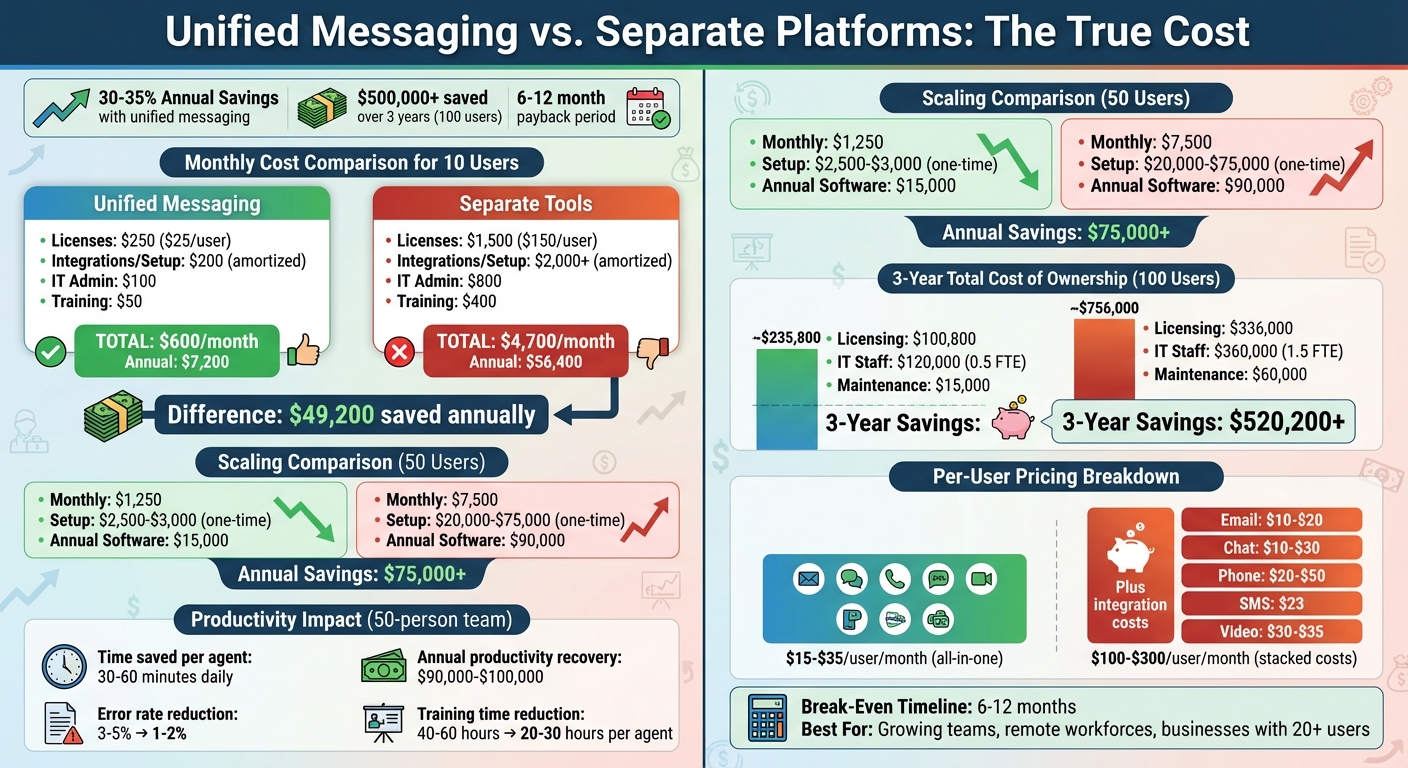
For a small team of 10, unified messaging costs about $250 per month (assuming $25 per user). In contrast, managing separate tools could reach $1,500 monthly (or $150 per user). That’s a six-fold difference. Scale the team to 50 users, and the costs jump to $1,250 for unified messaging versus $7,500 for separate tools each month. Over a year, this adds up to a staggering difference of over $75,000. The reason? Separate tools often charge for overlapping features across multiple platforms.
Setup and Integration Expenses
The gap widens further when you factor in setup and integration costs. Setting up a unified messaging platform typically costs between $2,500 and $3,000 for up to 50 users. Meanwhile, integrating separate tools comes with a hefty price tag - ranging from $5,000 to $15,000 per connection. Add in the need for APIs and extended developer hours, and the total can soar to $20,000–$75,000 for multiple platforms.
Cost Comparison Table
Here’s a breakdown of monthly costs for a 10-user team, highlighting the financial difference across key areas:
| Category | Unified Messaging | Separate Tools |
|---|---|---|
| Licenses | $250 ($25/user) | $1,500 ($150/user) |
| Integrations/Setup (amortized) | $200 | $2,000+ |
| IT Admin | $100 (minimal) | $800 |
| Training | $50 | $400 |
| Total Monthly | $600 | $4,700 |
For a 10-user team, unified messaging costs roughly $600 per month, compared to $4,700 for separate tools. Over a year, that’s $7,200 versus $56,400, a difference of nearly $50,000.
Real-world examples reinforce these numbers. Cisco’s BE6000 study found that for 500 users, unified messaging saved between $15,000 and $163,000 in five-year total ownership costs compared to competitors like Avaya and Mitel, thanks to lower licensing and integration expenses. Similarly, Frost & Sullivan reported 35% annual savings in communication costs through unified platforms, while IDC highlighted up to a 30% reduction in telecom expenses by avoiding multi-vendor systems.
sbb-itb-fd3217b
Indirect Costs and Productivity Impacts
Beyond the obvious expenses, using separate tools introduces hidden costs that can weigh heavily on an organization. These inefficiencies often manifest as lost time, missed opportunities, and errors that chip away at revenue.
Agent Productivity and Handling Times
Switching between multiple platforms eats into productivity. A study by Qatalog and Cornell University revealed that workers lose about 90 minutes daily just searching for information and toggling between apps. For a 50-agent team earning $30 per hour (fully loaded), reclaiming even 30 minutes per agent each day could translate into $90,000–$100,000 annually in recovered labor capacity - time that can be redirected toward revenue-driving activities.
With Inbox Agents, this inefficiency is tackled head-on. Agents no longer waste valuable time sifting through separate email accounts, chat platforms, and social media inboxes to piece together conversations. Instead, AI-powered tools like automated summaries and smart replies streamline their workflow, cutting down the time spent reading long threads or drafting routine responses. By providing a complete view of customer interactions, agents can resolve issues faster and with fewer back-and-forth exchanges. This not only boosts productivity but also reduces errors and missed opportunities.
Error Reduction and Missed Opportunities
When customers jump between channels - starting with an email, following up via Instagram DM, and later reaching out on WhatsApp - disconnected systems often lose track of the conversation. This leads to missed messages, redundant replies, and revenue leakage. According to Salesforce, 52% of customers stop purchasing after experiencing poor service, often caused by delays or inconsistent messaging across channels.
Centralized systems address this problem by keeping all interactions in one place. With unified messaging, agents can see the full context of a conversation, making it easier to meet service level agreements (SLAs), follow up proactively, and deliver consistent responses. Even a small 1–2% reduction in lost opportunities can result in significant savings - potentially tens or hundreds of thousands of dollars annually - especially for businesses with customer lifetime values between $1,000 and $2,000. Inbox Agents' AI tools, such as abuse filtering, automated prioritization, and "Dollarbox" revenue tracking, ensure high-value messages don’t get buried under routine correspondence.
Productivity Comparison Table
The advantages of unified messaging become even clearer when comparing key productivity metrics. Below is a snapshot of how a 25-agent team performs with unified messaging versus separate tools:
| Metric | Unified Messaging | Separate Tools |
|---|---|---|
| Average Handling Time | 4.5–5.5 minutes | 6–7 minutes |
| Training Hours per New Agent | 20–30 hours | 40–60 hours |
| Error Rate (misrouted/redundant responses) | 1–2% | 3–5% |
| Escalation Rate | 8–12% | 15–20% |
| Time Lost to Searching/Switching | Minimal (~10 min/day) | 60–90 min/day |
The differences quickly add up. Shorter handling times mean agents can handle more conversations during their shifts. Reduced training hours get new hires up to speed faster. Lower error rates and fewer escalations free up supervisors to focus on more strategic tasks. Ultimately, the productivity improvements from consolidating tools often outweigh the direct cost savings by a considerable margin.
Total Cost of Ownership and ROI Analysis
Multi-Year TCO Comparison
When you analyze costs over a three-to-five-year period, the financial benefits of unified messaging become clear. On average, unified messaging costs about $28 per user each month, which translates to $100,800 in licensing fees for 100 agents over three years. Compare that to the $336,000 spent on separate tools during the same period, and you’re looking at a $235,200 savings in subscription costs alone.
But licensing is just one piece of the puzzle. Separate tools often require 1.5 full-time employees (FTEs) to manage, whereas unified systems typically need only 0.5 FTE. This difference can save a business approximately $240,000 over three years, assuming an FTE salary of $80,000. Maintenance costs also favor unified platforms, with annual expenses averaging $5,000, compared to $20,000 for fragmented tools. Add it all up, and businesses can save over $500,000 across three years. These numbers highlight the financial efficiency and fast return offered by unified systems.
Break-Even Analysis
To understand how quickly you can recover migration expenses, a break-even analysis is essential. Simply divide the upfront migration costs by the monthly savings. For example, if migration costs total $40,000 and monthly savings are $6,000, the break-even point is reached in 6.7 months. After that, every dollar saved contributes directly to profitability.
Migration costs for unified messaging typically range from $2,500–$3,000 for the first 50 users, with an additional cost of about $30 per user beyond that. Given recurring monthly savings of $15–$30 per user - not to mention reduced IT labor costs - the payback period often falls between six and twelve months. Platforms like Inbox Agents, which integrate communication channels and use AI-powered tools like automated summaries and smart replies, can shorten this timeline even further by cutting labor costs and reducing missed opportunities.
Scalability and Long-Term Savings
Unified messaging doesn’t just save money in the short term - it becomes even more efficient as your team grows. With predictable per-seat pricing and lower administrative overhead, unified systems are easier to scale. A single vendor manages the entire platform, eliminating the need for complex integrations and reducing the overhead associated with adding new users or systems. For example, while a team of 20 agents might see modest savings, a team of 200 agents could turn even a $10 per user per month difference into six-figure savings over five years. Avoiding the need for additional IT hires further amplifies these savings.
Studies show that businesses adopting unified communications can reduce communication costs by 30–35% annually through vendor consolidation and streamlined operations. Additionally, as message volumes increase, AI-powered features in platforms like Inbox Agents allow teams to handle rising workloads without proportionally increasing staff. This makes unified messaging even more cost-effective over time, especially for growing organizations.
Conclusion: Choosing the Right Approach
Unified messaging platforms can significantly cut costs for U.S. businesses. Research shows that consolidating communication tools can reduce annual expenses by 30–35%. Over three to five years, these savings add up even more, thanks to lower IT labor costs, reduced maintenance needs, and the recovery of countless productivity hours.
But the benefits go beyond just saving money. Productivity gets a major boost when teams no longer have to juggle multiple apps to manage messages. Switching between platforms eats up time that could be spent closing deals, helping customers, or driving growth. With unified messaging, everything - emails, texts, social media, and voice communications - is in one place, making it easier to respond quickly and avoid missed opportunities.
For businesses managing multiple communication channels, unified messaging becomes even more appealing as teams grow. The per-user subscription pricing model scales well, making it increasingly affordable. Companies with remote teams or limited IT resources will also appreciate the simplified administration that comes with these platforms.
Some platforms, like Inbox Agents, take things further with AI-powered tools. Features like automated inbox summaries, smart replies, and advanced filtering allow teams to handle more messages without needing to hire more staff. In industries where labor costs are high, even small time savings per employee can translate into noticeable financial advantages.
When you consider both the upfront costs and the hidden productivity losses caused by inefficient communication tools, unified messaging emerges as a smart long-term investment. A three-to-five-year cost analysis, combined with a look at how much time savings are worth in dollars, can provide a clear picture of the potential return on investment. For many organizations struggling with scattered communication systems, unified messaging can start delivering measurable results in as little as six to twelve months - and the benefits keep growing as your business scales.
FAQs
How can unified messaging platforms ease the IT workload compared to managing separate tools?
Unified messaging platforms make life easier for IT teams by bringing together various communication tools into a single, streamlined system. Instead of juggling multiple platforms, IT managers can handle everything in one place, cutting down on maintenance headaches and saving both time and resources.
What’s more, these platforms often come with automation features like smart message routing and task management. These tools take care of repetitive tasks, freeing up IT teams to focus on bigger, more strategic goals. By centralizing operations and automating routine processes, businesses can boost efficiency and shift their attention to what truly matters.
How can unified messaging help businesses save money in the long run?
Unified messaging offers long-term cost savings by simplifying how businesses handle communication. By consolidating tools into a single platform, companies can eliminate the expense of maintaining multiple subscriptions, reduce administrative workload, and enhance overall productivity.
Having everything centralized means employees spend less time juggling between different tools. This reduces mistakes and ensures communication flows more smoothly. The result? Not only lower costs but also the ability to seize opportunities that might slip through the cracks in a disorganized system.
How does a unified messaging platform save time and boost productivity?
A unified messaging platform brings all your communication channels together in one place, cutting out the need to constantly toggle between different apps. This means fewer distractions and more focus on what’s truly important.
By simplifying workflows, it helps you respond faster, prioritize messages more effectively, and manage conversations with ease. The result? Increased efficiency, more time for critical tasks, and greater opportunities to focus on growing your business.