

2025 Guide to Scalable Customer Support Automation
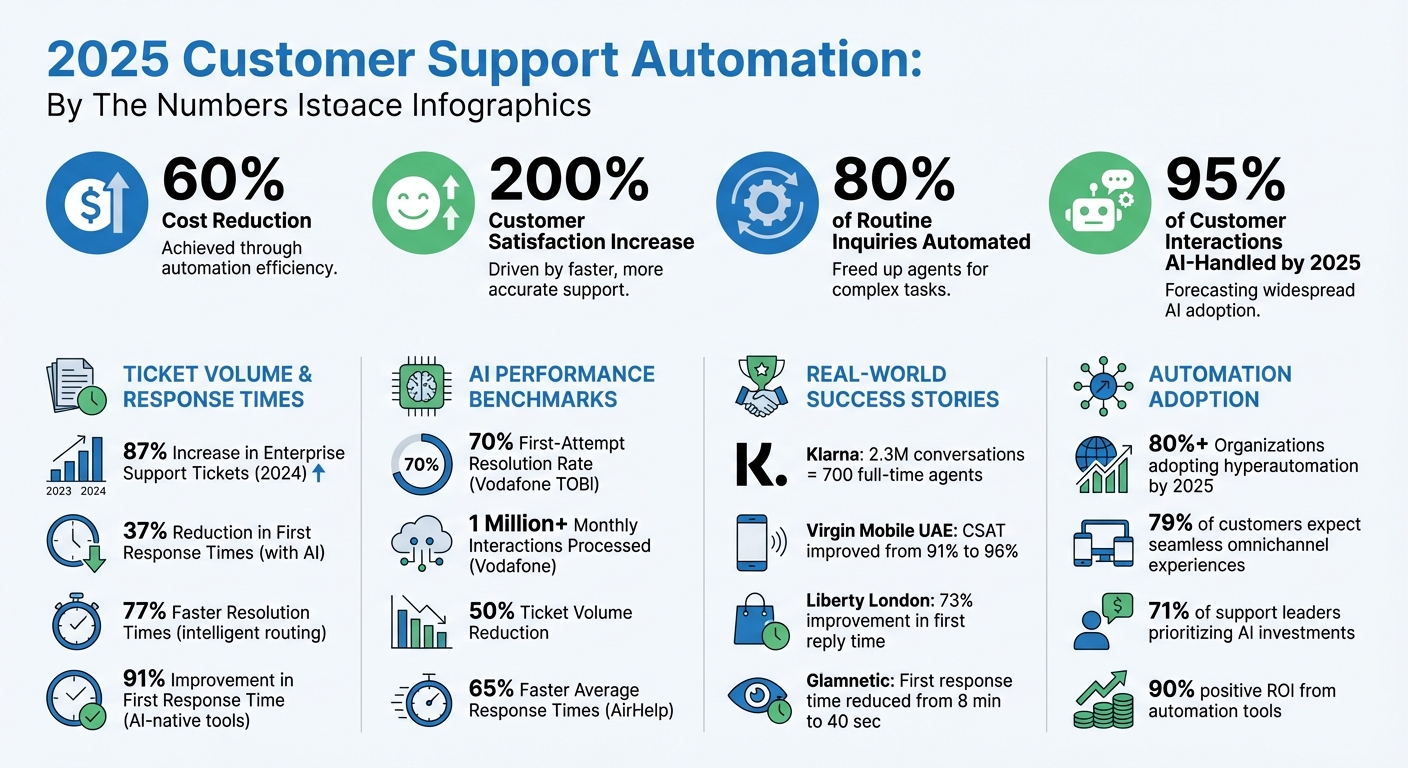
Automation in customer support is transforming the way businesses handle growing demands. By leveraging AI and digital tools, companies can cut costs by 60%, improve customer satisfaction by 200%, and manage up to 80% of routine inquiries like password resets and order tracking. AI is projected to handle 95% of global customer interactions by 2025, making it a key solution as ticket volumes rise and customer patience decreases.
Key Takeaways:
- Cost Savings: Automation reduces operational expenses and improves efficiency.
- Customer Satisfaction: Faster resolutions and personalized responses boost satisfaction rates.
- Scalability: Manage higher volumes with minimal staffing increases.
- AI Capabilities: Tools like chatbots and AI assistants streamline repetitive tasks, sort messages, and provide tailored responses.
- Human-AI Collaboration: Escalation workflows ensure complex issues are handled effectively by human agents.
To scale automation successfully, businesses must integrate unified inboxes, train AI with accurate data, and continuously refine workflows based on performance metrics. With the right strategy, automation enables 24/7 support, omnichannel consistency, and proactive customer service.
Customer Support Automation Impact: Key Statistics and Benefits for 2025
We Automated 80% of Customer Support With One AI Agent (No Code)
Strategies for Scaling Customer Support Automation
Scaling customer support automation requires a well-defined plan that outlines message workflows, AI responsibilities, and clear paths for human intervention. Businesses that succeed in this area often rely on three key strategies to manage increasing support demands without significantly raising staffing costs.
Centralizing Customer Messages from Multiple Channels
Today’s customers use a variety of communication channels - email, SMS, live chat, social media, and phone - and often switch between them mid-conversation. A unified conversational inbox can simplify this complexity by consolidating all interactions into one platform. For example, a conversation that starts on Facebook can seamlessly continue via email, sparing the customer from repeating their issue.
Integrating systems through APIs is crucial for creating detailed customer profiles. These profiles combine data like purchase history and previous interactions, giving agents the context they need for tailored responses. By 2025, it’s projected that over 80% of organizations will have adopted some form of hyperautomation. The next step in scaling automation is deploying AI to handle routine tasks.
Using AI to Resolve Customer Issues
AI is particularly effective for handling repetitive, high-volume tasks such as password resets, order tracking, and answering FAQs. These applications not only deliver quick results but also free up human agents to tackle more complex problems. For instance, one company cut its ticket volume by 50% while boosting customer satisfaction by 9.44%.
Modern AI systems are equipped to manage unstructured data, solve multi-step problems, and perform actions across different applications. A great example is Vodafone UK’s "TOBi" AI assistant, which processes over 1 million interactions each month and resolves about 70% of issues on the first attempt, as of April 2025. To maximize AI’s potential, it’s essential to unify knowledge sources from platforms like Zendesk, Salesforce, and Slack, ensuring the AI has the context it needs for accurate responses. For cases that exceed AI’s capabilities, effective escalation workflows are a must.
Creating Workflows for Escalated Issues
Even the most advanced AI systems will encounter situations that demand human judgment. To handle these cases, businesses should design workflows with multi-trigger rules that determine when to escalate an issue. Triggers might include the type of issue, customer sentiment, complexity, or a direct request for human assistance. For example, AirHelp developed a chatbot to handle compensation claims and prioritize tickets based on urgency, reducing average response times by up to 65%.
Smooth handoffs are critical. When escalating an issue, all conversation history and CRM data should be transferred to the human agent, ensuring the customer doesn’t have to repeat themselves. Even after escalation, AI can assist by summarizing conversations, suggesting relevant knowledge base articles, and drafting response options in real time. These workflows help maintain high-quality support as automation scales.
"AI automation works best when humans are in the loop. Humans remain responsible for training AI models. Service leaders establish clear escalation rules that trigger handoffs to human reps for issues such as billing disputes, cancellations, or sensitive feedback."
- Rami El-Abidin, HubSpot
AI Features for Managing High Support Volumes
When support ticket volumes surge - rising 87% in enterprise organizations in 2024 - AI-powered tools become critical for maintaining quality responses without the need to expand support teams. Modern AI systems leverage Natural Language Processing (NLP) and intent detection to efficiently categorize incoming messages, assess urgency, and route tickets to the appropriate team or agent. Organizations using these tools have reported a 37% reduction in first response times compared to those relying solely on manual processes. Here are some key AI features that streamline workflows and improve customer support quality.
Automated Message Sorting and Spam Filtering
AI systems analyze the language, tone, and content of incoming messages to determine their intent and priority. Through sentiment analysis, the system flags urgent or frustrated messages - such as "I want a manager" or "This is unacceptable" - for immediate human review. Spam and low-priority messages are filtered out, allowing agents to focus on more critical interactions. By eliminating manual ticket triage, this intelligent routing can boost resolution times by up to 77%. On average, service professionals save over two hours daily by automating repetitive sorting tasks.
Crafting Custom Responses with Customer Data
AI agents utilize Retrieval-Augmented Generation (RAG) to pull verified information from internal knowledge bases and integrate it with real-time data from CRM systems, order platforms, and billing tools. This allows AI to create highly personalized responses, incorporating details like order status, subscription level, purchase history, and account preferences. For instance, instead of a generic reply like "We're looking into your order", the AI can respond with precision: "Your order #45892 shipped via FedEx on 01/03/2026 and is expected to arrive by 01/07/2026." Such tailored communication has a measurable impact - companies implementing automation at this level report a 200% increase in customer satisfaction within the first year.
Using Analytics to Anticipate Customer Needs
AI doesn’t just respond to customer queries - it also analyzes trends to anticipate future needs. By identifying conversation patterns, volume spikes, recurring issues, or gaps in documentation, AI can help businesses stay ahead. For example, Klarna introduced an AI assistant in 2024 that managed 2.3 million conversations in its first month, handling the workload of 700 full-time agents. The system uncovered patterns in customer interactions, enabling the company to proactively address common problems before they escalated. High-performing AI platforms can detect 60-70% more knowledge gaps than human agents through these analyses. This predictive insight allows businesses to send automated updates - like alerts for service outages, reminders for renewals, or shipping notifications - before customers even reach out, significantly cutting down on inbound ticket volume.
How Inbox Agents Unifies Customer Support
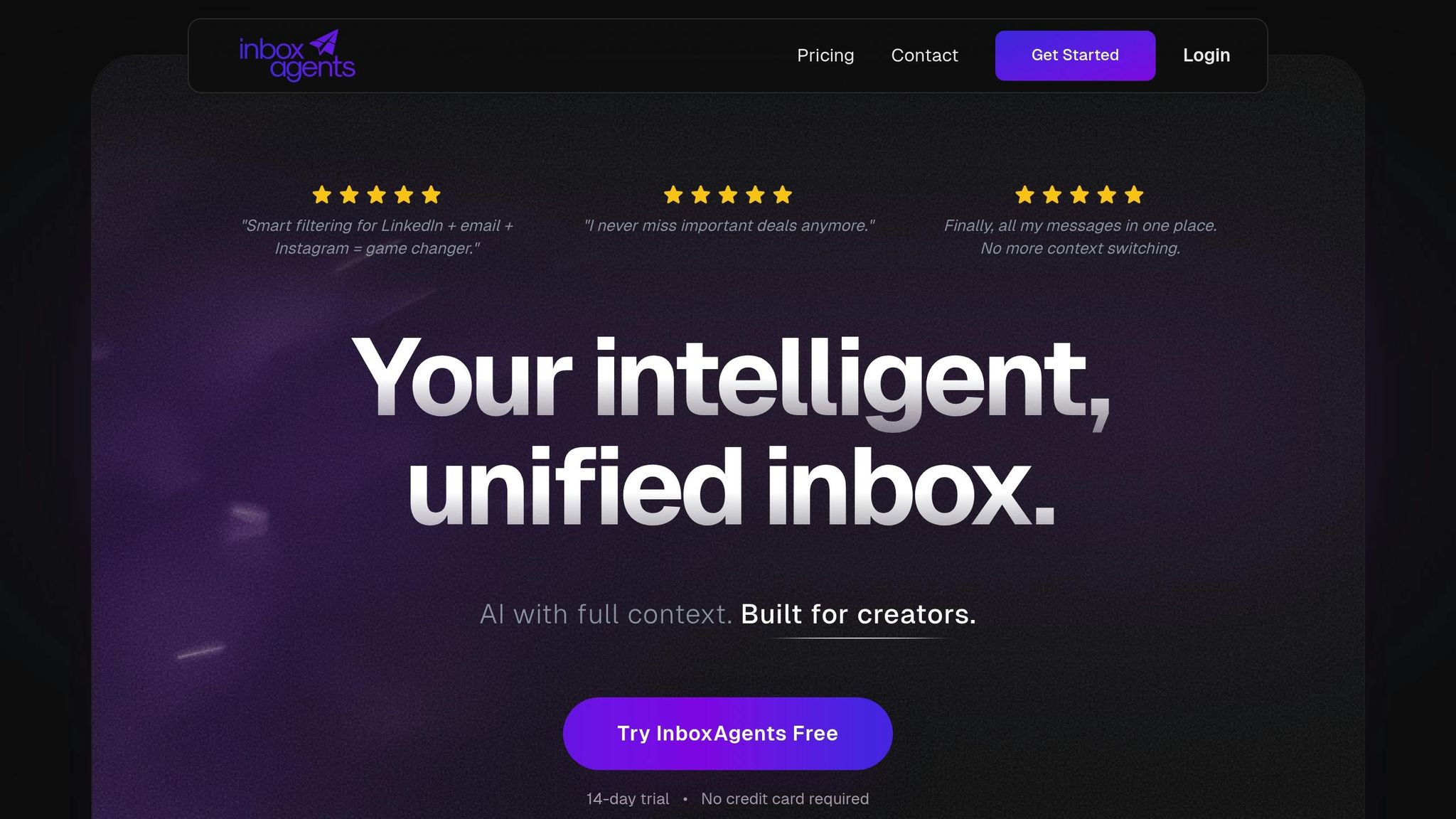
Inbox Agents takes the chaos out of customer support by bringing all interactions into one place. Managing messages across different platforms can lead to lost context and inconsistent service - a major issue when 79% of customers expect seamless, connected experiences across all touchpoints. On top of that, 70% of customers believe support agents should already have a full understanding of their situation during any interaction. To meet these expectations, Inbox Agents centralizes communication, ensuring teams can handle growing demands while delivering consistent, high-quality support.
Unified Inbox with AI Message Filtering
With Inbox Agents, messages from web chat, email, SMS, and social media are consolidated into a single, easy-to-manage dashboard. The platform uses natural language processing (NLP) to instantly analyze the intent and sentiment behind each message. For instance, if a customer writes, "I've been waiting three days for a response", the system flags it as urgent for immediate human attention. This smart filtering eliminates manual sorting, freeing up time for support teams to focus on resolving critical issues rather than sifting through spam or low-priority messages. By streamlining this process, Inbox Agents ensures that every message is handled efficiently and with the right level of care.
Automated Summaries and AI-Generated Replies
Lengthy ticket histories can slow down agents, but Inbox Agents solves this with instant AI-generated summaries. These summaries, available in both text and audio formats, provide a quick overview of entire conversations, helping agents get up to speed in seconds. On top of that, the platform can draft responses by pulling verified information from your knowledge base or product documentation. Companies using these features have seen average cost reductions of 60%, and 90% of customer experience leaders report a positive return on investment from these tools. Instead of typing out repetitive answers, agents can tweak and personalize AI-drafted replies, ensuring they align with the company’s tone while delivering accurate information quickly. This not only speeds up resolution times but also boosts overall efficiency.
Handling Negotiations and Personalizing Responses
Complex interactions like price negotiations, refund requests, or subscription changes are no problem for Inbox Agents. The platform pulls real-time data from systems like your CRM, order management, and billing tools to craft responses tailored to each customer’s unique needs. For example, if a customer asks for a refund, the AI can assess their account details and company policies to either approve the request automatically or escalate it to a human agent with a detailed summary. By blending automation with personalization, businesses can manage high volumes of inquiries while still delivering the individual attention customers expect. This approach has led to a 200% increase in customer satisfaction within the first year for companies adopting these advanced automation tools.
sbb-itb-fd3217b
Best Practices for Setting Up Automation Workflows
Creating automation that truly works at scale takes more than just turning on a tool. Start by mapping out your current manual workflows - because if your processes are messy, automating them will only make the chaos move faster. As Max T from Chatbase explains:
"Automation isn't a tool problem. It's a system design problem. If the underlying flow of your support process is broken or messy, automating it just makes the mess faster."
Focus your efforts on tasks that are high in volume but low in complexity, such as password resets, order tracking, or answering basic FAQs. These types of tasks tend to drain resources unnecessarily. Begin by carefully mapping out every step in your existing workflow, and then design automated processes with clear escalation triggers built in from the start. This approach helps you pinpoint which tasks are the best candidates for automation.
Setting Clear Goals for Automation
Before automating anything, define what success looks like. Set specific, measurable goals by identifying key performance indicators (KPIs). For example, you might track improvements in metrics like Mean Time to Resolution (MTTR) or Ticket Deflection Rate. Additionally, monitor Customer Effort Score (CES) and First Response Time (FRT) to ensure your automation efforts are actually improving the customer experience. Companies using AI-native tools have reported reductions in first response times of up to 91%. Without clear goals, you risk automating without direction.
Once your goals are in place, make sure your system is equipped with accurate and relevant data.
Training AI Systems with Your Business Data
The effectiveness of AI hinges on the quality of the data it’s trained on. Link your automation platform to your CRM, knowledge base, and product documentation to ensure it pulls reliable and up-to-date information. Leveraging Retrieval-Augmented Generation (RAG) can help the AI reference only official company resources, avoiding unsupported or incorrect responses. To train your system effectively, use at least one year of historical customer tickets. This data helps the AI understand how your customers phrase questions and what solutions work best.
For example, Virgin Mobile UAE utilized this approach by automating ticket routing and embedding live chat features. They handled over 1,000 daily requests while boosting their CSAT score from 91% to 96%. To fine-tune your system, start with a pilot run using 15–20 recent tickets to identify areas where accuracy needs improvement. Strong data integration ensures your automation keeps pace with customer needs.
Keeping Humans in the Loop for Complex Cases
While automation excels at handling routine tasks, humans are indispensable for situations that require empathy or nuanced judgment. Set up clear escalation triggers for scenarios like billing disputes, cancellations, legal inquiries, or when the AI detects signs of customer frustration. Make sure that when a case is escalated, the full conversation history is passed along. This preserves context and spares customers from repeating themselves.
Striking the right balance between automation and human oversight is crucial for maintaining high-quality support as your volume grows. Liberty London, for instance, adopted this hybrid approach and achieved an 11% reduction in overall resolution time and a 73% improvement in first reply time. Moreover, 79% of support employees say AI improves their jobs by eliminating repetitive tasks. The aim isn’t to replace human agents but to enhance their capabilities. For example, AI can draft responses that agents can then review and personalize, maintaining that all-important human touch while speeding up workflows.
Tracking Performance and Improving Results
Once your automation system is up and running, the next step is all about monitoring its performance and making adjustments where needed. Without keeping an eye on key metrics, there's no way to know what's working - or what isn't. The ultimate goal is to create a feedback loop where data drives improvements, helping you fine-tune the system for maximum efficiency.
Important Metrics to Track
Focus on metrics that measure both speed and quality. First Response Time (FRT) is a critical indicator of how quickly your system reacts. For top performance, aim for chat responses under 2 minutes and email responses under 4 hours. Another key metric is the First Contact Resolution (FCR) rate, which ideally should fall between 70–80%, showing how often issues are resolved on the first attempt. Additionally, track the Automation Rate - the percentage of tickets resolved without human involvement. Many advanced systems can automate between 40–60% of inquiries.
Customer experience metrics are just as important. Strive for Customer Satisfaction (CSAT) scores in the 80–90% range, and don’t overlook the Customer Effort Score (CES) - a metric 1.8 times more effective than CSAT at predicting customer loyalty. CES can help you identify areas where customers face unnecessary friction. Another important metric is the Escalation Rate, which measures how often bot interactions are escalated to human agents. Keeping this rate below 5% is a good benchmark. For instance, during Black Friday Cyber Monday 2024, Glamnetic used automation to handle repetitive tickets, slashing their First Response Time from 8 minutes to just 40 seconds - a 91% improvement.
Using Feedback to Improve Automation
Escalations provide valuable insights. By tagging these handoffs with specific reasons - like missing information, unclear logic, or misunderstood intent - you can identify exactly where your automation needs tweaking. High escalation rates often point to knowledge gaps, which may require updated documentation or additional training data.
Deploying real-time CSAT surveys after chatbot interactions is another effective way to gather customer feedback. Simple tools, like thumbs-up or thumbs-down ratings on AI-generated responses, can also highlight issues such as overly formal replies, irrelevant answers, or inaccuracies. Take inspiration from Dr. Bronner's: in 2025, they automated 48% of customer inquiries, saving $5,248 in just one month and projecting annual savings of $100,000. Their success came from continuously analyzing which automated responses worked well and refining those that didn’t. This process not only improved existing workflows but also revealed new opportunities for automation.
Expanding Automation with Data Insights
Analytics can help you uncover even more opportunities for automation. Instead of grouping tickets by product category, try organizing them by customer intent, such as "Where is my order?" or "Feature isn't working?" This approach can spotlight high-volume issues that are perfect candidates for automation. Companies that adopt this strategy have reported cost reductions of up to 60% and CSAT improvements of 200% within a year.
Another key metric to monitor is the Containment Rate, which measures how self-sufficient your bot is. Think of automation as a constantly evolving system - regular updates based on data are essential. Sharing these insights with your product and engineering teams can address root causes of customer issues, reducing the overall volume of support tickets. By using data strategically, you can scale your automation effectively while continuing to improve customer support.
Conclusion
Automating customer support isn't just about saving money - it’s about creating a system that grows alongside your business. By reducing costs by 60% and boosting customer satisfaction by 200% in just one year, automation proves its worth. Handling 70–80% of routine inquiries like password resets or order tracking frees up your human agents to tackle more complex, high-value tasks.
Tools like Inbox Agents bring all customer messages into a single, streamlined interface, saving up to 9% of work time. With AI-powered features like filtering, automated summaries, and smart replies, your team can manage 2× to 10× the support volume without needing to expand the team proportionally. Plus, the platform’s ability to tailor responses using your business data ensures every interaction feels personal and meaningful.
To make the most of these tools, start small. Automate high-volume, straightforward tasks first, and ensure you have clear escalation paths for more complex issues. Keep refining your system by updating your knowledge base and using metrics to improve over time. With 71% of support leaders prioritizing AI investments to scale their services efficiently, the real question is: how soon can you get started?
FAQs
How can businesses seamlessly integrate AI into their existing customer support systems?
To bring AI into your customer support setup effectively, the first step is to have a solid plan. Start by reviewing all your communication channels - email, phone, chat, and social media - and pinpointing the data AI will need to function properly. This includes ticket IDs, customer profiles, SLA rules, and knowledge-base articles. Opt for a platform with open APIs that can sync in real time. This way, AI-generated responses can integrate directly with your systems, eliminating the need for manual input.
Using a unified messaging platform, such as Inbox Agents, can make this process much easier. These platforms bring all communication channels into one interface and come equipped with AI-powered features like smart replies, automated summaries, and abuse filtering. They also sync effortlessly with your CRM and ticketing tools. This setup ensures AI suggestions are displayed right in the agent's view, keeping the context of past conversations intact and enabling smooth transitions to human agents when necessary.
For a successful implementation, introduce AI gradually. Start with simpler tasks and monitor key metrics like first-contact resolution rates and sentiment scores. This phased approach allows you to refine AI performance over time, maintain customer confidence, and consistently provide high-quality support.
What metrics should I track to measure the success of customer support automation?
To measure the success of customer support automation, focus on metrics that showcase both efficiency and customer satisfaction. Key indicators include:
- First Contact Resolution (FCR): The percentage of issues resolved during the first interaction.
- First Response Time (FRT): The speed at which the system responds to new inquiries.
- Average Resolution Time: How long it takes to fully resolve an issue.
- SLA Compliance: The percentage of tickets handled within the agreed service timelines.
- Customer Satisfaction (CSAT): A direct measure of how satisfied customers are with the support they receive.
- Net Promoter Score (NPS): A reflection of customer loyalty and likelihood to recommend your service.
In addition, keep an eye on Cost per Ticket to gauge financial efficiency and track Automation Coverage and Ticket Deflection Rate to understand how much of the workload is being handled by AI systems.
Using a unified dashboard to monitor these metrics connects automation performance to overall business goals. For example, higher FCR rates and reduced Cost per Ticket point to greater efficiency, while steady or improving CSAT and NPS scores signal a strong customer experience. Regularly reviewing these numbers ensures your automation efforts remain scalable and effective without compromising support quality.
How can businesses effectively balance AI automation with human involvement in customer support?
To strike the perfect balance, businesses should let AI handle repetitive, high-volume tasks - think routing tickets, retrieving FAQs, or drafting initial replies - while leaving complex, emotional, or high-stakes interactions to human agents. AI can deliver quick, tailored responses and flag conversations that need human intervention, creating a smooth partnership between automation and live support.
For the best outcomes, companies can:
- Set up smart escalation rules to ensure sensitive or unclear issues are directed to human agents.
- Develop feedback loops by refining AI responses based on edits made by agents and real-world interactions.
- Track performance metrics like resolution times and customer satisfaction, while giving agents the ability to override automation when necessary.
Using a unified platform, such as Inbox Agents, can make this process even smoother. It centralizes all messaging channels into one interface, provides AI-driven tools like automated summaries and smart replies, and ensures agents can step in whenever needed. This strategy allows businesses to scale their support operations efficiently while maintaining the personal connection that keeps customers coming back.