

5 Ways AI Categorizes Team Messages
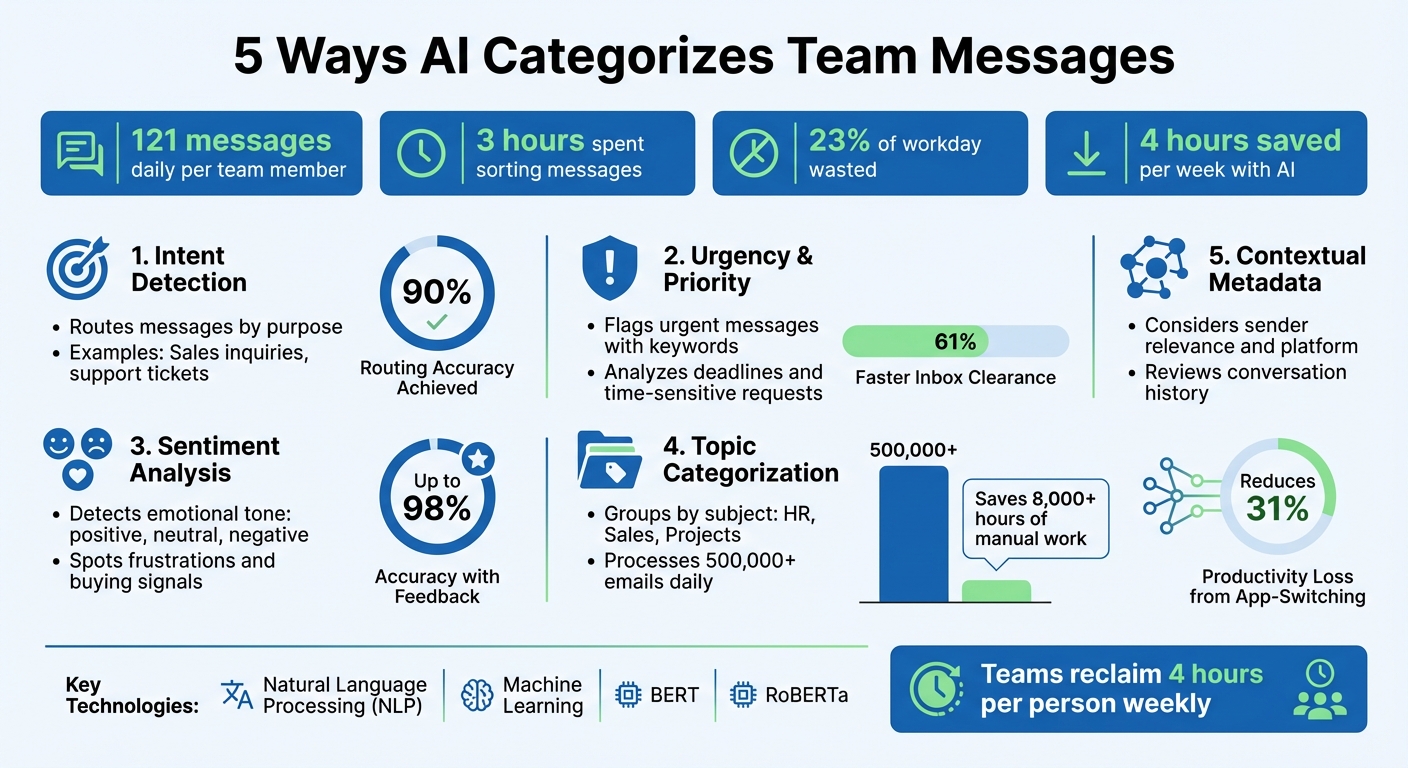
Is your inbox overflowing with messages? Teams handle over 121 messages daily, spending 3 hours sorting through them, which eats up 23% of the workday. AI solves this by categorizing messages based on intent, urgency, tone, topic, and context. It uses tools like Natural Language Processing (NLP) and machine learning to prioritize what matters most, saving time and reducing distractions.
Here’s what AI can do for your team:
- Intent Detection: Routes messages based on purpose, like sales inquiries or support tickets.
- Urgency & Priority: Flags urgent messages and escalates critical issues.
- Sentiment Analysis: Identifies emotional cues to spot frustrations or buying signals.
- Topic Categorization: Groups messages by subject, such as "HR" or "Sales."
- Contextual Metadata: Considers sender relevance, platform, and message history.
AI-powered tools like Inbox Agents centralize messages from platforms like Gmail, Slack, and WhatsApp into one inbox. Features like smart triage, automated replies, and revenue-focused folders help teams reclaim up to 4 hours per week while staying focused on important tasks.
Tired of manual sorting? Tools like Inbox Agents offer a free trial so you can experience the benefits firsthand.
5 Ways AI Categorizes Team Messages to Save Time and Boost Productivity
Sort Slack Mentions with AI Wizard | Send to Tasks, Gmail & Sheets ⚡
How AI Improves Team Communication
AI takes the chaos out of message overload, helping teams stay productive and focused. By managing large volumes of messages and instantly delivering them to the right person, AI eliminates the hassle of sorting through a flood of 121+ daily messages across various platforms. Instead, it consolidates everything into a single, organized inbox. This simple shift reduces the 31% productivity loss caused by constant app-switching, giving teams more time to focus on what really matters.
But AI doesn’t stop at just organizing messages - it takes things a step further with smart triage and automated routing. Using Natural Language Understanding, AI can differentiate between low-priority messages (like newsletters or promotions) and high-priority ones (like urgent client requests or promising leads). It automatically tags and directs messages to the right team members based on their expertise - design feedback goes straight to creative directors, while customer support tickets land with the appropriate reps. By grouping similar messages, like sales inquiries or project updates, teams can tackle them in one go. This approach helps sales teams focus on revenue opportunities while project managers stay on top of deadlines, saving up to 4 hours per person every week.
AI also simplifies lengthy email threads by pulling out the key points and action items, such as deadlines or next steps. It can even turn these into calendar events or to-do lists automatically, so nothing gets missed. And when it comes to communication, the numbers speak for themselves: personalized, AI-driven messages perform six times better than generic ones.
1. By Sender Intent
Intent Detection and Routing
AI can identify the intent behind a message by analyzing the conversation's context. Using Natural Language Understanding (NLU), it reviews the entire history of a conversation thread, along with prior interactions, to determine the purpose of a message - whether it's an inquiry, a complaint, a purchase interest, or an update. This ability to read between the lines ensures that messages are categorized accurately.
The system goes a step further by learning your team's specific communication styles, preferred terminology, and internal dynamics. For instance, if a message includes phrases like "interested in pricing" or "can we schedule a demo", AI tags it as a buying intent and sends it directly to your sales team. On the other hand, a report about facilities maintenance is routed to the operations team, and messages from frustrated customers are flagged and escalated to support specialists.
"Their AI-powered solution improved our email routing accuracy to 90% in just weeks, streamlining our operations and enhancing customer satisfaction."
– Christophe Lapeau, Product Owner, Securex
What’s more, advanced AI systems can handle messages containing multiple intents. For example, if someone asks a routine question but also mentions they're considering a purchase, the AI drafts an automatic response for the straightforward query while forwarding the sales opportunity to a representative. This "reply-or-escalate" approach ensures that no important opportunities are overlooked.
2. By Urgency and Priority
Urgency Prioritization
AI systems are now adept at determining the urgency of messages. By leveraging Natural Language Understanding, they can pick up on keywords like "deadline" or "ASAP" and flag those messages for immediate attention. What’s even more impressive is their ability to differentiate between a hard deadline and a casual mention of urgency.
Once identified, urgent messages are routed to priority queues, while less critical updates are moved lower in the list. This streamlined process has shown to cut average inbox clearance time by 61%. Beyond just timing, AI also analyzes the tone of messages to fine-tune their prioritization.
Sentiment and Tone Analysis
AI doesn’t just stop at urgency - it also tracks emotional cues. It monitors conversations for changes in sentiment, such as a shift from neutral to frustrated, or when a simple bug report starts signaling an escalation. For example, a firm or pressing tone will take precedence over a casual follow-up, even if no explicit deadline is mentioned.
"Manual work misses patterns. AI agents catch them early, automate your insights, and help your team act faster - with clarity and confidence." – Arvat.ai
Additionally, AI can detect buying intent or potential revenue opportunities within messages. This ensures that sales-related inquiries are prioritized over general questions, reducing the chance of missing valuable leads.
Contextual Metadata Integration
To provide a well-rounded approach, AI incorporates metadata alongside urgency and tone analysis. It evaluates the sender's context to decide how important a message is. For instance, emails from a supervisor, a VIP client, or an investor will naturally rank higher than routine team updates. The system assigns weighted scores based on the sender’s relationship to the business.
AI doesn’t just look at individual messages - it reviews entire conversation threads and past interactions to understand the bigger picture. This means it can spot when a small issue escalates into a major problem, like a critical system failure. With feedback loops in place, these AI agents achieve up to 98% accuracy in categorizing messages. This level of contextual understanding ensures that teams focus on what matters most, driving meaningful business results.
3. By Sentiment and Tone
Sentiment and Tone Analysis
Building on the insights gained from urgency and metadata, sentiment analysis adds an emotional layer to message categorization. AI doesn’t just stop at recognizing words - it picks up on subtle emotional cues hidden within the text. By identifying whether a sentiment is positive, neutral, or negative, and even pinpointing specific emotions, it offers a richer understanding of conversations.
This ability is especially useful for spotting potential issues early. For instance, Microsoft Copilot evaluates email drafts to predict how their tone and structure might be received. It then suggests ways to make the message clearer or more engaging.
"Sentiment analysis is a natural language processing (NLP) technique that uses computational linguistics and machine learning to detect the emotional tone behind text data." – Elastic
AI takes this a step further with context-aware models like BERT and RoBERTa. These models go beyond surface-level analysis, using conversation history and metadata to interpret subtleties such as sarcasm or irony. By adapting to individual communication styles, they learn specific terminology, tone preferences, and even relationship dynamics. This ensures that automated responses feel natural and align with the user’s voice. With ongoing feedback, these systems can achieve an impressive accuracy rate of up to 98%.
sbb-itb-fd3217b
4. By Topic and Content Relevance
Topic-based categorization
AI has transformed how messages are organized by analyzing their content and automatically assigning relevant labels like "Project A", "HR Inquiries", or "Invoices" - saving countless hours of manual sorting. Unlike older systems that relied on rigid keyword filters, modern AI leverages advanced language models (e.g., GPT-4o) to grasp the full context of conversations. This approach not only improves categorization but also lays the groundwork for smarter routing and more accurate filtering.
When combined with tools like intent and urgency detection, topic-based categorization becomes a powerful asset for managing messages effectively. By understanding the subject matter, AI can route messages to the right teams with precision. For instance, shipping disputes are sent to logistics, payroll questions go to HR, and technical concerns are forwarded to support. This eliminates the time-consuming process of manual triage, which can take up as much as 23% of a professional's workday.
AI also helps cut through the noise by identifying high-priority messages and filtering out less critical notifications. For sales teams, specialized AI tools can flag messages that show "revenue potential" or "buying intent", ensuring no valuable lead is overlooked. Considering the average person receives over 121 messages daily across various platforms, this kind of filtering is no longer just helpful - it’s essential.
Additionally, topic-based categorization allows users to create custom views for specific needs, such as meeting requests or investor updates. This reduces context switching and helps professionals stay focused. Impressively, enterprise-grade AI systems can now process over 500,000 emails daily, saving more than 8,000 hours of manual effort through automated classification.
5. By Contextual Metadata
Contextual Metadata Integration
AI doesn't just process the words in your messages - it digs deeper by analyzing contextual metadata to categorize them more effectively. This metadata includes details like sender relationships, thread history, platform source, timestamps, and even behavioral cues, such as shifts in sentiment. With the help of contextual Retrieval-Augmented Generation (RAG), AI anchors its categorization in real-time business data.
For example, AI evaluates relationship dynamics to distinguish routine updates from critical opportunities. It can determine whether a message is from a frequent contact, a potential lead, or a key investor, and then route it accordingly to folders like "Investor Updates" or "Partnership Leads". The platform source also plays a role - a LinkedIn message gets handled differently than a Slack notification or email. This reduces the need for constant context switching, which studies show can eat up 31% of your focus during the workday.
The Model Context Protocol (MCP) enables AI to connect with various data sources, such as CRMs, project management tools, and lead databases, for deeper message context. This integration allows for more personalized and precise categorization, streamlining workflows. As Slack puts it:
"The promise of human–AI collaboration is lost when agents must constantly ask for details before acting".
AI quickly adapts to your team's communication style, learning nuances within 1–2 weeks. Feedback and priority settings speed up this process. You can even customize automation levels - for instance, ensuring high-value investors' messages always require manual review, while allowing routine scheduling tasks to be automated.
This metadata-driven approach creates a unified communication experience. Platforms like Slack transform into centralized hubs where AI monitors conversations across channels, fine-tuning its categorization as your needs evolve. The end result? A smarter inbox that doesn’t just read messages but understands their meaning within the framework of your business relationships and workflows.
How Inbox Agents Helps Categorize Messages
Inbox Agents takes AI-powered categorization to the next level by combining messages from platforms like Gmail, Outlook, LinkedIn, Slack, Discord, Instagram, WhatsApp, Messenger, and X (formerly Twitter) into one streamlined inbox. This unified interface eliminates the hassle of jumping between apps, saving users time and reducing distractions. With everything in one place, Inbox Agents introduces specialized tools like the Dollarbox feature to make managing messages even more efficient.
The Dollarbox feature is designed to pinpoint messages with financial potential, organizing them into smart folders such as Revenue Opportunities, Investor Updates, Partnership Leads, and Routine Messages. As Grace Annalise, Product Designer, explains:
"The inbox identifies messages with revenue potential and puts it in one place".
To help teams focus on what matters most, the platform provides automated daily briefings that summarize high-priority messages. Users can also speed up the AI's learning process by using the priority training feature in the settings and offering feedback on AI-generated suggestions.
Inbox Agents doesn’t stop at categorization. It takes care of routine tasks with features like smart replies and automated meeting scheduling based on context. Importantly, users still maintain control, as all outgoing messages require approval.
For even more customization, users can adjust automation levels for specific contacts. For instance, high-value investors can be set to require manual review, while routine scheduling requests are handled automatically by AI-generated drafts. These advanced tools seamlessly integrate with the platform’s existing AI processes, creating a smooth and efficient messaging workflow.
The platform offers a 14-day free trial with full access to all features - no credit card required. For those needing additional platform connections, a Pro Plan is available.
Conclusion
AI categorization is changing the way teams manage their messages by analyzing intent, urgency, sentiment, topic, and context. Instead of wasting over 3 hours a day jumping between platforms and sorting through 121+ messages, teams can rely on AI to spotlight what truly matters. It pinpoints revenue opportunities, identifies frustrated customers before problems escalate, and filters out unnecessary noise - turning a draining task into a streamlined process.
Beyond categorization, the real game-changer lies in unified communication. Imagine consolidating Email, LinkedIn, Slack, WhatsApp, Discord, and more into one intelligent inbox. With AI, teams can escape the constant back-and-forth of switching platforms and stay focused on what matters most. Tools like automated daily briefings, smart replies that match your tone, and revenue detection features ensure you spend less time on routine tasks and more time tackling high-impact work.
Teams using AI-powered categorization are reclaiming an average of 4 hours per person each week [10, 12]. That’s extra time to close deals, nurture relationships, and push projects forward. These productivity gains highlight why it’s so important to rethink how your team handles messaging workflows.
Still sorting messages manually across multiple platforms? You’re leaving valuable time on the table. Inbox Agents offers a 14-day free trial - no credit card required - so you can experience unified inbox management, revenue opportunity detection, and automated workflows firsthand. With its human-in-the-loop approach, the platform lets you stay in control while AI takes care of the tedious work.
The results speak for themselves. The only question is how much longer your team can afford to stick with outdated methods.
FAQs
How does AI identify urgent messages?
AI determines urgent messages by analyzing a mix of language, tone, and context. It picks up on time-sensitive phrases like "ASAP," "urgent," or "deadline," while also gauging the tone and sentiment of the message - spotting frustration or a sense of urgency in the wording. Sudden tone shifts or negative emotions can also indicate a higher priority.
On top of that, AI tracks behavioral patterns, such as how quickly the sender typically responds, how often recent interactions have occurred, and activity across related channels. By combining all these elements, it calculates an urgency score. This ensures that critical messages are flagged for immediate attention, while less pressing ones are set aside for later.
Inbox Agents uses this approach to streamline communication in a unified inbox, allowing teams to focus on high-priority messages without wasting time on manual sorting.
How does sentiment analysis help categorize team messages?
Sentiment analysis leverages AI to determine the emotional tone of a message, categorizing it as positive, negative, or neutral. This emotional insight adds an extra layer to message categorization, complementing key factors like intent and urgency.
For instance, messages that convey frustration or urgency can be flagged for immediate action, while neutral or positive messages might be routed through automated workflows or included in summary digests. This approach helps teams focus on high-priority conversations while ensuring communication stays organized. Additionally, sentiment analysis powers tools like smart-reply suggestions and sentiment dashboards, providing valuable insights into team dynamics and identifying potential conflicts.
Inbox Agents seamlessly incorporates sentiment analysis into its unified inbox, automatically tagging messages based on tone. This ensures that emotionally charged or urgent messages are addressed promptly, while routine updates are handled efficiently. By doing so, it enhances workflow management and response accuracy across platforms such as email, LinkedIn, and WhatsApp.
How does AI help teams manage messages across multiple platforms?
AI makes team communication easier by seamlessly connecting with tools like email, Slack, LinkedIn, Instagram, and WhatsApp. It works in real-time to sort messages by intent, urgency, and context, pulling the most critical ones into a unified inbox. This means no more jumping between apps or manually sifting through endless conversations.
Teams also gain access to features like smart replies, quick inbox summaries, and automated management of repetitive tasks - think spam filtering or follow-up reminders. By simplifying workflows and highlighting what matters most, AI helps teams save time, stay focused, and get more done.