

How AI Analyzes Messages in Real Time
Managing your messages doesn't have to be overwhelming. Every day, professionals deal with an average of 121 messages across platforms, spending over 3 hours sorting through them. The problem? Important communications often get buried, leading to missed opportunities and wasted time.
AI-powered message analysis solves this by processing emails, chats, and even voice messages in under 300 milliseconds. It identifies urgency, categorizes content, flags critical issues, and suggests responses - all in real time. This technology helps businesses save hours, improve response times, and focus on high-value tasks.
Key Takeaways:
- AI simplifies communication: It centralizes messages from multiple platforms and organizes them by topic, urgency, and sentiment.
- Efficiency gains: Teams using AI save 18 hours per project every two weeks and reduce unnecessary meetings by 26 per month.
- Smart features: AI filters spam, detects risks, summarizes messages, and generates context-aware replies.
By integrating tools like Inbox Agents, businesses can automate tedious tasks, secure sensitive data, and prioritize what truly matters. Whether you're in customer service, sales, or general communication, AI transforms your inbox into a productivity hub.
Building Responsive AI Agents with Real-Time Communication | Blaise Thomas, Agora
How AI Processes Messages in Real Time
AI Message Processing Pipeline: 5 Stages from Ingestion to Action
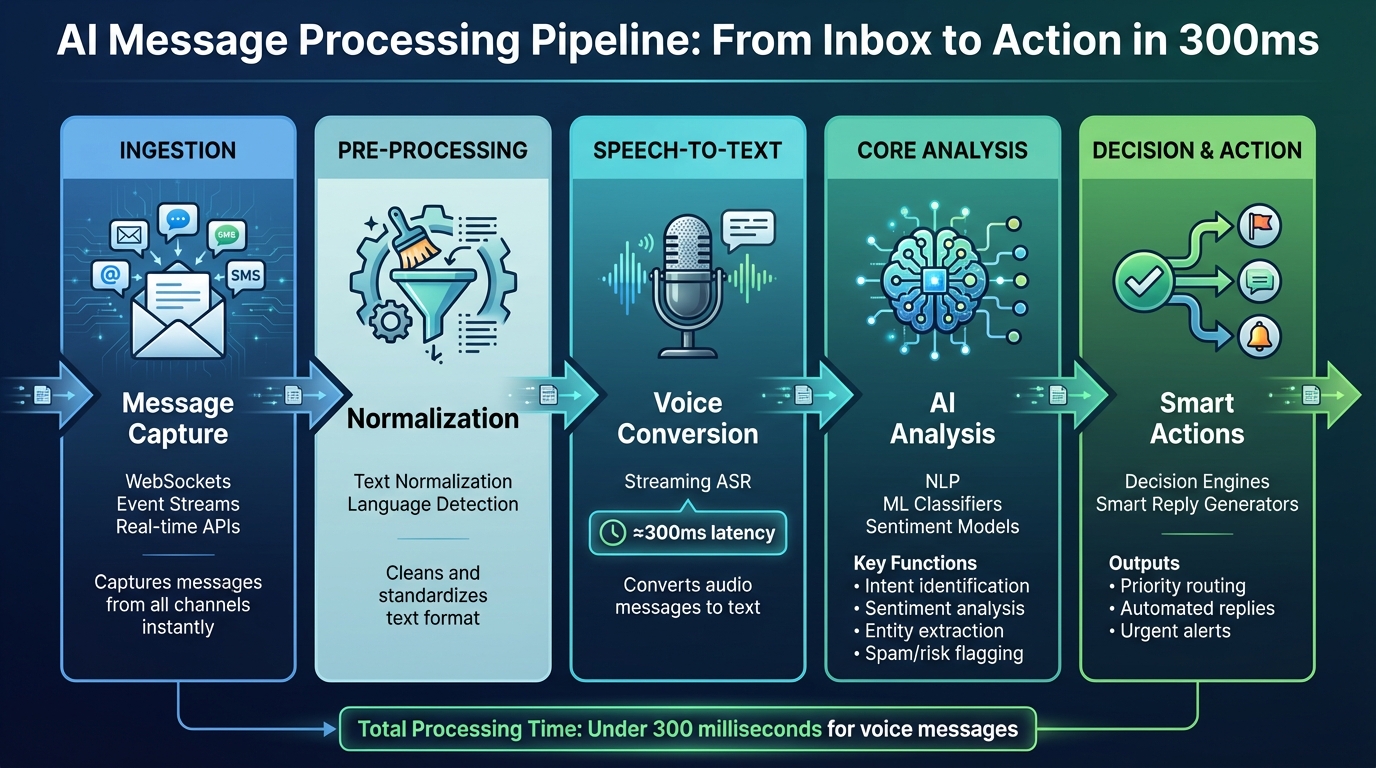
When a message comes in - whether it’s an email, a LinkedIn DM, or a WhatsApp chat - AI kicks into gear, transforming raw text into structured, actionable data through a series of steps. Voice messages, for example, are processed in about 300 milliseconds. This speed enables AI to handle hundreds of messages daily without breaking a sweat.
The AI Message Processing Steps
The process starts with the ingestion stage, where AI systems capture messages from platforms using technologies like WebSockets and event-driven architectures. These tools enable instant notifications, cutting out delays caused by polling.
Next up is the normalization stage, which cleans up the raw data. This involves removing unnecessary details like system timestamps, standardizing text formats, and detecting the language. Metadata - such as the sender’s identity, message timestamp, and source - is preserved to provide context for deeper analysis. For voice messages, a streaming speech recognition system transcribes the audio into text with a latency of roughly 300 milliseconds, ensuring all communication types are processed consistently.
Once cleaned and standardized, the data moves to the core analysis stage. Here, multiple AI models work simultaneously to:
- Identify the message’s intent and topic.
- Assess its sentiment and emotional tone.
- Extract key entities like names, monetary amounts, or dates.
- Filter out spam or flag risky content.
A decision engine then pulls all these insights together to decide on the next step - whether it’s routing the message to a priority folder, generating a smart reply, or flagging an urgent issue for immediate attention.
Take, for example, Inbox Agents: this platform uses parallel processing to analyze feedback streams in real time, saving teams hours of manual work and allowing them to focus on more impactful tasks.
AI Technologies That Power Message Analysis
At the heart of message processing is Natural Language Processing (NLP), which breaks sentences into smaller components and identifies grammatical structures. For instance, if you type, “Can we push our meeting to 3 PM?”, NLP understands that “push” means “reschedule” in this context, not a physical action.
Machine Learning (ML) adds another layer by recognizing patterns in large datasets to classify messages, predict urgency, and improve accuracy over time. For example, an ML model trained on customer support tickets can distinguish between routine questions and urgent issues requiring escalation.
Sentiment analysis introduces an emotional layer, identifying whether a message is positive, negative, or neutral and even pinpointing specific emotions like frustration or happiness. Combined with entity extraction, which pulls out details like names, companies, and dates, AI can transform unstructured conversations into neatly organized records. For example, a message like “John Smith from Acme Corp wants to discuss the $50,000 contract by Friday” becomes a structured lead entry with all the essential details captured.
How AI Achieves Real-Time Speed
Real-time processing isn’t just about speed; it’s about efficiency. AI systems rely on lightweight, optimized models for quick tasks like spam detection or basic categorization while reserving more complex models for tasks like generating summaries.
Streaming architectures make this possible by processing data as it arrives instead of waiting to gather it in batches. Caching frequently used data, such as user profiles or common phrases, further reduces redundant calculations and speeds up the process.
A combination of parallel processing, in-memory computing, and distributed systems enables AI to handle large volumes of messages with consistently low latency.
| Pipeline Stage | What Happens | Key Technologies |
|---|---|---|
| Ingestion | Captures messages from all channels | WebSockets, event streams, real-time APIs |
| Pre-processing | Cleans and standardizes text; detects language | Text normalization, language detection |
| Speech-to-Text | Converts audio to text for voice messages | Streaming ASR (≈300 ms latency) |
| Core Analysis | Analyzes intent, sentiment, entities, and flags | NLP, ML classifiers, sentiment models |
| Decision & Action | Triggers replies, alerts, or routing | Decision engines, smart reply generators |
This streamlined pipeline is the backbone of platforms like Inbox Agents, which consolidate email, SMS, and chat into a single interface. By running real-time AI analysis on every incoming message, they offer features like automated inbox summaries, smart replies, and advanced spam filtering - all tailored to meet the specific needs of businesses and their communication styles.
How AI Categorizes and Prioritizes Messages
AI transforms an overwhelming inbox into a clean, structured workspace by sorting messages into meaningful categories and highlighting the ones that need your immediate attention.
Sorting Messages by Type and Topic
AI relies on supervised learning models trained on historical data to group messages by channel, subject matter, and workflow status. For example, an email from a customer might be labeled "Support – Billing", while a LinkedIn message from a potential client could be tagged as "Pre-sales – Demo Request." These models analyze patterns in the text, sender roles, past conversations, and metadata to make these decisions in real time.
Tools like Inbox Agents take this a step further by creating smart folders that automatically organize threads by type and topic. Categories might include "Revenue Opportunities", "Investor Updates", "Partnership Leads", or "Routine Messages." The AI learns your preferences, terminology, and relationships within a couple of weeks of regular use. You can accelerate its learning by giving feedback on its suggestions.
Once the messages are categorized, AI moves on to assess which ones require urgent attention.
Identifying Priority and Urgency Levels
Not all messages are equally important, and AI excels at spotting which ones need to be addressed first. It identifies urgency by scanning for keywords like "urgent", "ASAP", "today", "outage", or "cancel", as well as extracting deadlines, dollar amounts, and other critical details through entity recognition. AI also evaluates sentiment and tone, flagging messages that convey frustration or anger, and considers contextual factors like customer value or recent interactions.
For instance, a message saying, "We need to discuss the $50,000 contract by Friday - our team is frustrated with the delays", will rank higher in priority than a general question about product features. By assigning urgency levels - high, medium, or low - AI ensures that time-sensitive and high-value communications rise to the top. Tools like Inbox Agents use these insights to deliver daily briefings, so you can focus on the most pressing matters without being overwhelmed.
Filtering Spam and Identifying Risks
AI doesn’t just organize and prioritize - it also protects your inbox. Modern spam detection goes beyond simple keyword blacklists. It analyzes sender reputation (such as domain age and IP activity), message structure (like excessive links or tracking codes), and semantic patterns that suggest phishing or spam (e.g., "verify your account" or "reset password").
Additionally, AI flags abusive content, such as harassment, threats, or fraud attempts, by examining language, context, and tone. High-risk messages can be quarantined or routed to a separate review queue, while moderate-risk emails may appear with warnings. The system continuously updates its models based on new spam trends and user feedback, adapting to emerging threats in real time.
This multi-layered approach ensures your inbox stays organized, secure, and focused on what truly matters.
sbb-itb-fd3217b
How AI Generates Useful Insights from Messages
Once messages are sorted and prioritized, the next step is turning them into actionable insights. AI takes conversations and pulls out essential summaries, key data points, and even suggests responses - helping you act more efficiently.
Creating Quick Summaries
Using natural language processing (NLP), AI scans lengthy conversations to highlight important issues, decisions, and action items, while filtering out unnecessary details. This allows teams to focus more on high-impact tasks. In fact, teams using AI-generated summaries report spending 43% more time on revenue-driving activities.
Inbox Agents simplifies this process with its Daily Briefings feature. This tool automatically generates summaries that spotlight revenue opportunities. Within one to two weeks, the AI adapts to your communication style and uses "smart triage" to prioritize messages that matter most, cutting through the clutter.
"Get a daily summary of messages that actually make money, so you can focus on revenue-generating opportunities without constant interruptions."
Extracting Structured Data
AI is also adept at pulling specific data points - like dates, dollar amounts, and tasks - from unstructured text. For example, if a client emails, "Let's finalize the $25,000 contract by March 15th", the AI pinpoints the monetary amount, deadline, and required action. It can then create a calendar event, update your CRM, or add a task to your project management tool through API integrations.
This functionality relies on entity recognition models that categorize and process information in real time. For instance, AssemblyAI’s streaming speech-to-text technology delivers transcriptions with a latency of about 300 milliseconds, enabling live data extraction during conversations. The result? Less manual data entry and fewer missed follow-ups.
Beyond just extracting information, AI enhances communication by drafting responses tailored to the context.
Generating Smart Replies and Drafts
AI evaluates the context of a message, the sender's identity, and the conversation history to recommend appropriate replies. For example, if someone asks, "Can we meet tomorrow to discuss the project?", the AI might suggest: "I'm available tomorrow at 2pm or 4pm. Would either of those work for you?". These suggestions save time on routine interactions and even help finalize meeting details.
AI-generated drafts are designed for review, allowing users to make edits before sending. Inbox Agents lets you adjust automation levels for different types of messages and refine accuracy through feedback. Over time, the system learns your tone, terminology, and relationship dynamics. Advanced AI models like OpenAI’s ChatGPT are even used in customer service to craft context-sensitive responses during live calls, adapting to emotional nuances in real time.
McKinsey highlights that businesses using AI-powered messaging analytics see up to a 25% boost in engagement rates. Faster, more relevant, and personalized responses are key drivers of this improvement. Together, these tools transform your inbox from a time drain into a productivity powerhouse.
Best Practices for Using Real-Time AI Analysis
Using AI for real-time message analysis can be a game-changer, but it takes more than just flipping a switch. To truly benefit, you need well-defined goals, thoughtful oversight, and strong security measures to protect your data while improving efficiency.
Define Clear Goals
Start by setting specific, measurable goals that align with your business priorities. For instance, a customer service team might aim to cut average response times from 4 hours to under 30 minutes or achieve over 95% accuracy in message categorization. Keep track of metrics like backlog reduction rates, customer satisfaction scores, and the percentage of messages handled automatically. Additionally, focus on identifying high-value opportunities, such as sales leads or partnership inquiries, and assess how AI can help your team prioritize these tasks. Clear objectives like these create a solid foundation for balancing automation with human oversight.
Balance Automation with Human Review
It’s smart to take a gradual approach to automation. Start in "observation mode", where AI analyzes messages without taking action. This allows your team to evaluate AI decisions and build confidence in the system. Roll out automation in phases - begin with categorizing messages, then move on to flagging priority items, and finally automate routine responses. Keep human oversight in place for sensitive or complex issues. Tools like Inbox Agents let you adjust automation levels based on message types and assign specific cases for manual review. This ensures that nuanced interactions still get the attention they require.
Protect Privacy and Security
Data security is non-negotiable. Use end-to-end encryption (TLS 1.2 or higher) for messages in transit and AES-256 encryption for stored data. Implement role-based access controls to limit who can access messages, and require multi-factor authentication for system entry. Stay compliant with U.S. privacy laws like CCPA and HIPAA by documenting your data collection, processing, and retention practices. AI-powered security measures can help reduce fraud-related losses by as much as 50%. Maintain detailed audit logs of message access and establish data retention policies to automatically archive or delete old messages in line with compliance rules. These steps ensure your data remains safe while you maximize the potential of AI.
Conclusion
Real-time AI message analysis simplifies communication management so you can focus on what truly matters. Instead of dedicating over three hours a day to sorting through messages across multiple platforms, AI steps in to prioritize messages and filter out unnecessary distractions. With response times of less than a second and speech-to-text processing as fast as 300 milliseconds, these tools ensure you stay on top of crucial conversations. The combination of smart categorization and instant summaries means important deals or critical messages won’t slip through the cracks. Many teams have reported using the time saved for more impactful tasks, while businesses adopting these tools have seen engagement rates rise by up to 25% and fraud-related losses decrease by as much as 50%.
Getting started with AI integration is straightforward. Begin by setting clear communication goals, such as faster response times, and gradually introduce automation while keeping human oversight for more complex scenarios. AI systems adapt quickly, often achieving high accuracy within just one to two weeks of consistent use.
These tools not only improve efficiency but also ensure reliable performance. Whether you're handling customer support, sales outreach, or daily correspondence, real-time AI analysis helps you regain control of your inbox. Platforms like Inbox Agents bring everything together, offering AI-powered features such as automated summaries, smart replies, and personalized spam filters. The result? Faster responses, better organization, and more time to focus on tasks that truly matter.
FAQs
How does AI assess the urgency of a message?
AI determines how urgent a message is by examining its content, context, and metadata in real time. It looks for elements like specific keywords, tone, sender details, and timestamps to decide if the message needs immediate attention.
For instance, messages with phrases like "urgent" or "as soon as possible" might be marked as high priority. Additionally, AI can factor in who sent the message and past interactions with that sender to fine-tune its evaluation. This helps users focus on what truly needs their attention first.
How does AI process and organize messages in real time?
AI leverages cutting-edge tools like natural language processing (NLP) and machine learning to sort and analyze messages as they come in. These systems can pick out essential details, understand the intent behind messages, and prioritize tasks, helping you stay on top of your communication and respond more effectively.
By adapting to your unique communication habits and preferences, AI can craft tailored responses, block spam or harmful messages, and even recommend quick, smart replies. This instant processing not only simplifies your workflow but also ensures you stay organized and never overlook a crucial message.
How does AI keep my message data secure?
AI keeps your message data secure by employing cutting-edge encryption techniques. This ensures that your information stays protected both during transmission and while it's stored, shielding it from unauthorized access at every step.
On top of that, many AI systems implement strict access controls and adhere to data privacy laws like GDPR and CCPA. These measures ensure your data is managed responsibly and stays secure. Frequent updates and constant monitoring add an extra layer of defense against potential risks.