

AI Tools for Comparing Platform Engagement Metrics
If you want to compare engagement across email, SMS, WhatsApp, push, social, and in-app, the right tool depends on what you want to measure. Some tools focus on campaigns, some on product behavior, some on social sentiment, and some on live conversations in one inbox.
Here’s the short version:
- I’d use Inbox Agents for cross-channel conversation handling, reply speed, and message volume
- I’d use Braze for multi-channel campaign performance and journey reporting
- I’d use Mixpanel for product and event-based engagement analysis
- I’d use Klaviyo for email/SMS comparison in e-commerce
- I’d use Sprout Social or Talkwalker for social sentiment and share of voice
- I’d use Qualtrics or Medallia for survey and customer experience feedback across touchpoints
The main metric groups in this space are:
- Volume: sends and message count
- Delivery: delivery rate
- Attention: opens and read rates
- Interaction: clicks, replies, response time
- Outcome: conversions, ROI, and resolution rates
A simple rule helps: campaign tools tell you what was sent and what converted; conversation tools tell you how people replied; feedback tools tell you how people felt.
Quick Comparison
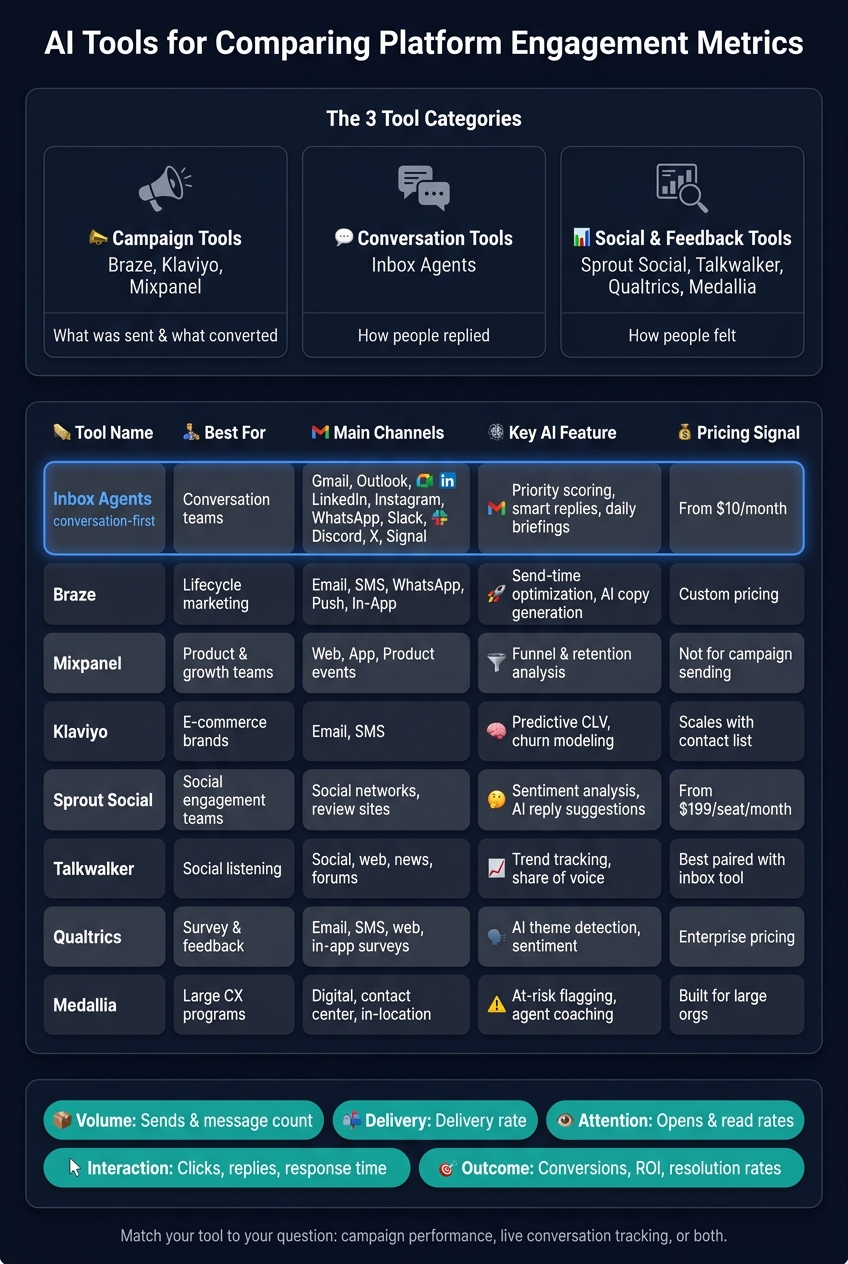
AI Engagement Analytics Tools Compared: Channels, Features & Pricing
| Tool | Best For | Main Channels | AI Functions | Main Limits |
|---|---|---|---|---|
| Inbox Agents | Conversation teams | Gmail, Outlook, LinkedIn, Instagram, WhatsApp, Slack, Discord, X, Signal | Priority scoring, daily briefings, smart replies | Cloud only; learning period of 2 to 3 weeks |
| Braze | Lifecycle marketing | Email, SMS, WhatsApp, push, in-app | Send-time tuning, copy help, journey analysis | Custom pricing; setup can take time |
| Mixpanel | Product and growth teams | Web, app, product, messaging events | Funnel analysis, retention analysis | Not built for campaign sending |
| Klaviyo | E-commerce | Email, SMS | CLV prediction, churn modeling, segmentation | Mostly limited to email and SMS |
| Sprout Social | Social engagement teams | Social networks, review sites | Sentiment analysis, reply suggestions | Starts at $199/seat/month |
| Talkwalker | Social listening | Social, web, news, forums | Trend tracking, sentiment, share of voice | Works best with a separate inbox tool |
| Qualtrics | Survey and feedback analysis | Email, SMS, web, in-app surveys | Theme detection, sentiment analysis | Enterprise cost; setup can be heavy |
| Medallia | Large CX programs | Digital, contact center, in-location | Risk flags, agent coaching | Built more for large teams |
If I were choosing, I’d start with one question: Do I need campaign data, conversation data, or both? That one answer cuts the list down fast.
How this roundup selects and evaluates AI engagement analytics tools
This roundup includes only tools that compare engagement across more than one messaging channel in a single reporting view. Put simply, if a tool can't line up performance across channels in one place, it didn't make the cut.
The criteria here focus on one thing: whether a tool can compare those metrics cleanly and clearly across channels.
Selection criteria for cross-platform engagement analysis
The table below sums up the standards used to compare each tool.
| Criteria | What We Looked For |
|---|---|
| Channels supported | Native support versus third-party add-ons for WhatsApp, Instagram, email, SMS, and similar platforms |
| AI insight quality | Real-time sentiment analysis, intent classification, and automated resolution support |
| Engagement metrics available | Open rates, click-through rate, response time, and resolution rates |
| Reporting depth | Campaign reporting down to conversation-level funnel analysis |
| Cross-platform attribution | Ability to match one customer across channels and track the path to conversion |
| Team usability | Unified inbox, routing, handoffs, and setup speed |
Campaign-level reporting shows results. Conversation-level reporting shows where friction starts.
What the comparison tables in this roundup cover
Each tool section includes a summary table with its cross-platform comparison strengths, supported channels, AI features, and tracked engagement metrics. The goal is simple: make trade-offs easy to spot at a glance.
Tools with native AI reporting tend to produce more consistent cross-channel comparisons. Where that matters, the tables call it out.
These criteria shape the tool roundup that follows.
Inbox Agents for unified conversation engagement comparisons
Inbox Agents earns its spot in this roundup by taking scattered messages and turning them into side-by-side engagement data. It pulls Gmail, Outlook, LinkedIn, Instagram, WhatsApp, Slack, Discord, Twitter/X, and Signal into one dashboard, so teams can compare response times and message volume across channels without bouncing between apps.
How Inbox Agents supports cross-platform engagement tracking
Inbox Agents uses AI to cut out noise, flag high-priority threads, and send daily briefings that sum up activity across connected channels. Dollarbox uses predictive scoring and NLP to rank messages by revenue potential, which helps teams spot which channels are leading to the most valuable conversations. Its AI-written smart replies also adjust to each user's tone and terminology after a 2- to 3-week learning period.
For teams dealing with lots of conversations across many channels, that can save a lot of time and make triage less messy.
Best for business teams
Inbox Agents makes the most sense for teams that care more about response speed and conversation value than deep reporting from one channel alone. It's a good match for sales and growth teams handling a high volume of messages across fragmented platforms and looking for a faster way to spot high-value leads. On the other hand, it's less suited to teams that only need email management or those in heavily regulated industries that require custom data residency.
| Feature Category | Inbox Agents Capabilities |
|---|---|
| Unified Platforms | Gmail, Outlook, LinkedIn, Slack, Discord, Instagram, WhatsApp, Twitter/X, Signal (Beta) |
| Tracked Metrics | Revenue potential score (Dollarbox), conversation volume, time-to-reply alerts |
| AI Features | Daily briefings, smart replies, noise reduction, opportunity detection |
| Side-by-Side Review | Single dashboard with keyboard shortcuts and real-time sync across all channels |
| Key Limitations | Cloud-based only (no on-premise), 2- to 3-week AI learning period, best for high-volume teams |
Pricing starts at $10/month for Basic and $15/month for Pro, with a NemoClaw add-on priced at $50/month for custom hosted AI agents.
sbb-itb-fd3217b
AI tools for comparing engagement metrics: a roundup
If unified inbox reporting isn't enough, these tools help you compare campaign results, product behavior, and social sentiment.
Braze, Mixpanel, and Klaviyo for campaign and product engagement reporting
Braze is geared toward lifecycle teams running cross-channel campaigns. Its AI handles send-time optimization and copy generation, while its analytics tie channel activity to revenue and cross-channel customer journeys. With custom pricing, it tends to make more sense for larger teams.
Mixpanel centers on event-level behavior across your product and connected messaging touchpoints. That makes it useful when you need to dig into why engagement numbers look the way they do, not just what changed.
Klaviyo is aimed at e-commerce brands and lets teams compare email and SMS performance side by side. It uses predictive AI to estimate customer lifetime value and churn risk, with pricing that grows along with contact list size and message volume.
| Tool | Primary Channels | Key AI Features | Best-Fit Use Case | Key Limitations |
|---|---|---|---|---|
| Braze | Email, SMS, WhatsApp, Push, In-App | Send-time optimization, AI copy generation | Enterprise lifecycle marketing | Custom pricing; complex setup |
| Mixpanel | Product, Web, App, Messaging Events | Event-level funnel and retention analysis | Product and growth teams | Less suited for campaign orchestration |
| Klaviyo | Email, SMS | Predictive CLV, churn risk modeling, RFM segmentation | E-commerce brands (Shopify/WooCommerce) | Limited to email and SMS channels |
Test event-tracking latency in demos; delays distort conversion numbers.
Campaign tools show what was sent and what happened after. Social and experience tools show how people reacted. When channel performance is only one slice of the story, product and sentiment tools can give you a deeper comparison.
Sprout Social, Qualtrics, Medallia, and Talkwalker for social and experience analytics
This next group moves from sending and product behavior into sentiment, feedback, and share of voice across touchpoints.
Social listening tools:
Sprout Social covers major social networks and review sites. Its AI includes sentiment analysis and an "Enhance Reply" feature that suggests responses right in the inbox. Per-seat pricing starts at $199/seat/month and goes up to $399/seat/month for advanced sentiment features, so costs can climb fast as teams grow.
Talkwalker is built for broad social listening. It tracks trends, share of voice, and sentiment across more than 100 million sources, including social platforms, news sites, and forums. It's a strong fit for teams that need a big-picture view, though it's best paired with a replies inbox or engagement workflow so teams can act on what they find.
Customer experience feedback tools:
Qualtrics gathers structured feedback across email, SMS, web, and in-app surveys, then uses AI to pull out themes and sentiment trends from open-ended responses. Its main strength is linking survey data to operational metrics, but enterprise pricing and setup complexity can put it out of reach for smaller teams.
Medallia collects experience signals from digital, contact center, and in-location touchpoints. Its AI flags at-risk customers and surfaces coaching opportunities for agents. It's built for large organizations managing feedback at scale, and that level of depth usually means dedicated implementation resources.
| Tool | Channels Monitored | AI Insight Functions | Cross-Platform Strengths | Key Limitations |
|---|---|---|---|---|
| Sprout Social | Major social networks, review sites | Sentiment analysis, AI-suggested replies | Strong enterprise inbox automation | Per-seat pricing is expensive at scale |
| Talkwalker | Social, web, news, forums | Trend tracking, share-of-voice, sentiment | Broad listening across large source sets | Best paired with a replies inbox or engagement workflow |
| Qualtrics | Email, SMS, web, in-app surveys | AI theme detection, sentiment analysis | Connects survey feedback to operational data | Enterprise pricing; complex implementation |
| Medallia | Digital, contact center, in-location | At-risk customer flagging, agent coaching | Experience signals across physical and digital touchpoints | Built for large organizations; requires dedicated setup |
Conclusion: How to pick the right AI tool for engagement comparison
Pick your AI tool based on the engagement metrics you need to compare across platforms.
If you need campaign performance data, focus on tools that compare open rates, CTR, costs, and ROI across channels. If you need conversation analytics, look for platforms that show sentiment, response times, and resolution patterns. And if your team wants one view of conversations across every messaging platform, Inbox Agents is built to bring those workflows together in one interface.
At the end of the day, the choice depends on the metric layer you care about most. Match the tool to your main question: campaign performance, live conversation tracking, or both.
Start with summaries and drafts first. Then add deeper automation after your data is unified.
Once your reporting model is clear, keep implementation simple. Start with your two highest-volume channels, run them for two weeks, then add more platforms.
Choose the tool that fits your channel mix, workflow, and decision needs.
FAQs
Which metrics matter most across channels?
Prioritize metrics tied to business outcomes, not vanity counts. The ones that matter most are conversion rate, goal completion rate, and CSAT because they show whether your messaging is driving actual results.
It also helps to track resolution rate, deflection rate, and revenue attribution. Those metrics show whether AI is handling questions well and whether those conversations connect to real business value.
Do I need campaign data or conversation data?
Yes - both matter if you want a full picture of platform engagement.
Conversation data shows the context and history behind individual interactions. Campaign data, on the other hand, helps you track engagement against broader marketing themes.
When you bring them together in Inbox Agents, you can connect audience interactions to business outcomes and adjust messaging in real time.
How should I start comparing channels?
Start by defining your main business motion - like lifecycle marketing, conversational support, or a hybrid model - so you measure what lines up with your goals. Then pin down your source of truth and the success metrics that matter most, such as resolution rates or response times.
From there, keep the list tight. Focus on a realistic shortlist of 3 to 6 platforms. As you compare options, pay close attention to how each one handles data unification, identity resolution, and cross-channel customer history.