

How AI Simplifies Multi-Channel Outreach
AI makes multi-channel outreach easier by keeping every conversation in one place, stopping duplicate follow-ups, and helping teams reply faster.
If I had to sum up the article in a few lines, it would be this:
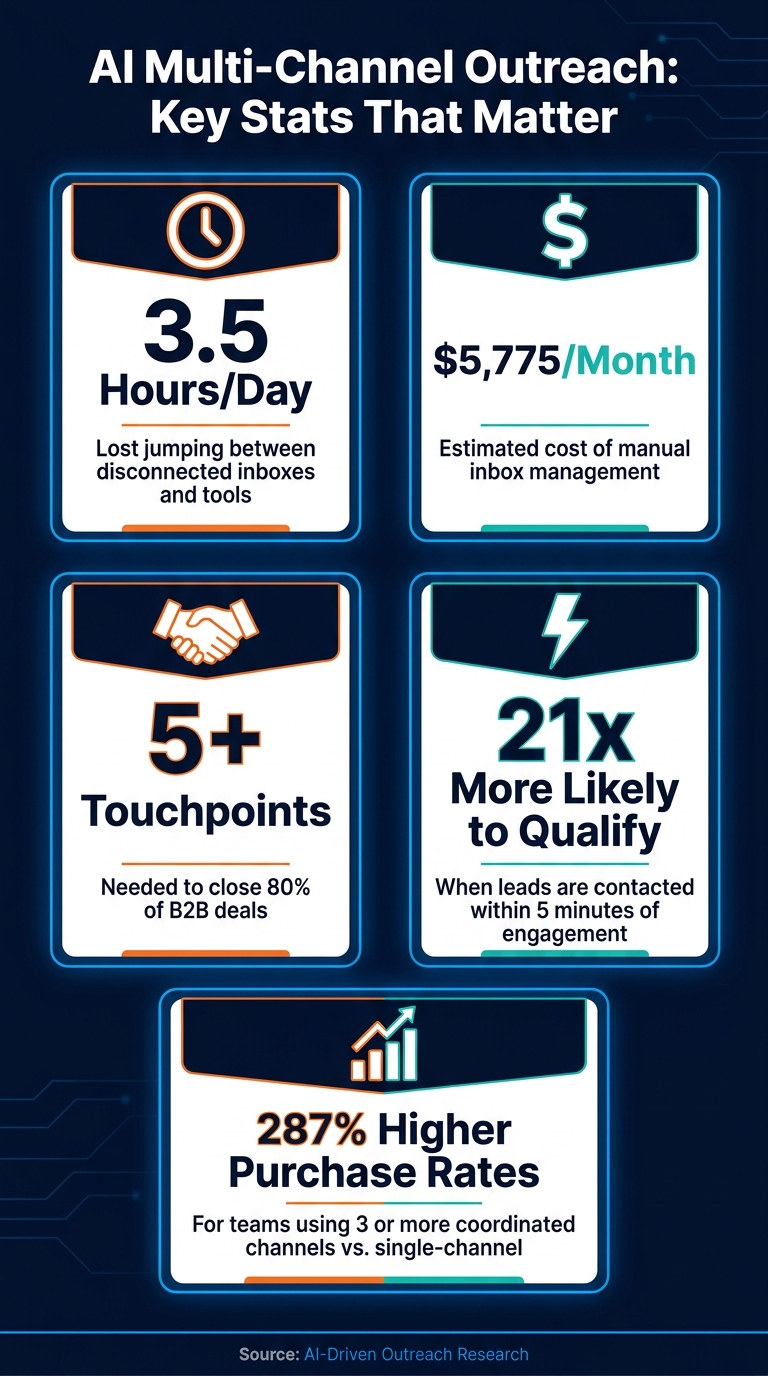
- Teams often lose 3.5 hours per day jumping between inboxes and tools
- Manual inbox work can cost about $5,775 per month
- 80% of B2B deals need 5+ meaningful interactions
- Leads contacted within 5 minutes can be up to 21x more likely to qualify
- Teams using 3 or more channels can see 287% higher purchase rates than single-channel teams
So the main fix is simple: I bring email, LinkedIn, SMS, calls, and chat into one workflow, let AI pause sequences when someone replies, and use live buyer signals to decide the next touch instead of sticking to a fixed calendar.
Here’s the short version of what matters most:
- Put every channel into one shared inbox
- Use pause-on-reply across all channels
- Let AI draft replies based on the full conversation
- Route pricing questions and strong replies to a person
- Track channel mix, reply speed, and conversion path
- Keep sequences to about 5–7 touches
- Honor opt-outs across channels within 24 hours
The core idea is not sending more messages. It’s making sure each message fits what the contact already did.
This article explains how I’d use AI to cut inbox clutter, keep context from getting lost, and turn scattered outreach into one clear system.
AI Multi-Channel Outreach: Key Stats & Benefits
Why AI-based Multi-channel Cold Outreach Works So Well | Part 4 of AI Sales Cadence Series
sbb-itb-fd3217b
How AI Simplifies Coordination Across Channels
The problem isn't volume. It's lost context.
AI brings channel data into one place, reacts to live signals, and drafts messages that fit the thread. That helps teams avoid duplicate follow-ups, missed replies, and messy handoffs. Once that context sits in one place, AI can also route the next step on its own.
Unified Context for Every Conversation
When a rep jumps between Gmail, LinkedIn, and SMS to reconstruct a prospect's history, they lose time and open the door to mistakes. AI cuts that friction by pulling messages from each platform into a single conversation thread. So before anyone sends the next note, they can see what was said, where it happened, and when it happened.
Inbox Agents unifies messaging from multiple platforms, generates inbox summaries, filters spam, surfaces smart replies, and tailors responses to each thread. That kind of visibility has a direct payoff: teams can respond to engaged leads faster and miss fewer replies. Leads contacted within 5 minutes of an engagement signal are up to 21 times more likely to qualify than those reached after 30 minutes.
Automated Sequences and Real-Time Adjustments
Once teams share context, AI can trigger follow-ups the moment a prospect does something.
Most outreach sequences still run on a fixed schedule, no matter what the prospect actually does. AI swaps that rigid setup for behavior-based decisions.
If a prospect opens an email, the system can flag them right away for a follow-up call or LinkedIn message while the topic is still top of mind. If they reply on any channel, active sequences pause on their own - no duplicate messages and no awkward overlap. In plain terms, the next step comes from live behavior, not a preset calendar.
That shift matters. Companies using three or more coordinated channels see 287% higher purchase rates than those relying on a single channel. Separate channels stop feeling scattered and start working like one connected workflow.
Personalized Messages Without Extra Manual Writing
That same shared context also makes messages better.
Generative AI can draft outreach that refers to a prospect's role, industry, recent activity, or place in the pipeline - without asking a rep to write every message from scratch. The result is outreach that feels specific and relevant, even at scale.
This is a big deal for high-volume teams. AI-generated workflows can cut manual coordination time from over 12 hours per week to under 2 hours, while keeping message quality steady across every channel.
A Practical Setup for AI-Driven Outreach
Once AI has the conversation context, the next move is to turn that context into a workflow your team can run again and again. The setup is pretty simple: map your channels, connect your systems, and measure what happens. Shared context only matters when it changes who gets routed where, when a message goes out, and when a human steps in.
Map Your Channels, Goals, and Handoffs
Start by writing down every channel you use on purpose: email, LinkedIn, SMS, WhatsApp, or any mix of them. For each channel, note where leads usually come in, how fast you plan to respond, and what success means. That could be channel attribution, cross-channel conversion rates, or time to conversion by path. Clear metrics beat fuzzy guesswork every time.
Then set your handoff rules. Let AI handle first touches and routine follow-ups. Send pricing questions, objections, and high-value replies to a person. Put those rules in writing before you connect anything. That document becomes your playbook for routing, timing, and review.
Connect Systems and Set Outreach Rules
Once your map is ready, connect your channels in one workspace so the team can work from a single thread. A unified inbox - like Inbox Agents - keeps email, LinkedIn, and WhatsApp in one view.
After that, set two rules you don't want anyone skipping:
- Turn on a pause-on-reply trigger across channels.
- Limit each channel to one touch per week, and keep the full sequence to 5–7 touches.
Next, use your mapped segments and buying signals to trigger behavior-based follow-ups instead of sticking to a rigid cadence. If someone shows intent, the workflow should react. If not, it shouldn't just keep marching forward on autopilot.
For compliance, each email sequence needs a clear opt-out link, and any unsubscribe must be honored across all active channels within 24 hours.
With the system connected, the next job is figuring out which channel combinations actually lead to meetings and deals.
Track Results and Refine the Workflow
Performance data should shape your routing, timing, and sequence rules. Track channel attribution, cross-channel conversion rates, time to conversion by path, and cost per meeting by channel mix. Those numbers tell you what's working and what's just adding noise.
AI can also roll up engagement signals from different channels into one score, which helps your team prioritize prospects who are active even if they haven't replied yet.
Use AI inbox summaries and smart replies to move review along faster. Watch for sequences that work well for certain personas, then adjust the channel mix based on what the data shows over 3–5 touches. Keep tuning the workflow on a regular basis so outreach stays tied to data, not hunches.
Best Practices for Better Outreach Results
Once the workflow is connected, a few routing rules can keep every channel moving together instead of pulling in different directions.
Match Timing and Routing to Each Channel
Each channel has its own pace, and AI does its best work when your sequence fits that pace. Start with email as the easiest first touch. Then follow up on LinkedIn 2–3 days later to build familiarity. Around Day 9, add a phone call as a change of pace. Save SMS for warm contacts or time-sensitive updates.
Routing should also shift based on what the prospect does. If someone opens an email but doesn't reply, AI can move the next touch to LinkedIn with a softer, context-aware message. That kind of routing helps teams spend more time on people who are more likely to answer.
Focus on High-Value Conversations First
Not every reply needs the same level of urgency. Prospects who engage on 2+ channels are 287% more likely to purchase than those who stay on a single channel. So those contacts should move to the top of the queue on their own.
A unified inbox with prioritization and spam filtering helps bring high-intent replies forward first. Inbox Agents supports this by sending high-intent messages to a human fast, while keeping low-priority replies out of the main queue.
Manual Outreach vs. AI-Coordinated Outreach
The gap becomes pretty obvious in the day-to-day work.
- Manual outreach across disconnected channels lets context slip, slows replies, and makes follow-up harder to track.
- AI-coordinated outreach keeps each channel tied to one shared record and reacts to live signals in real time.
That means follow-up stays fast, steady, and connected to what the prospect is doing right now.
Conclusion: Build a More Reliable Outreach System With AI
Multi-channel outreach tends to fall apart when each channel runs on its own and nothing shares the same context. One message goes out by email, another by LinkedIn, a third by SMS, and before long the whole thing feels disconnected. AI helps tie that activity together into one workflow.
It does that by centralizing context, triggering follow-ups based on behavior, and personalizing messages at scale. So instead of outreach feeling random or all over the place, it feels deliberate.
The teams that do this well usually keep a few basics in place:
- They give each channel a clear role
- They set pause-on-reply rules
- They review results on a regular basis using performance data
That kind of discipline is much easier to keep up when the workflow lives in one place. A unified workspace cuts down on the back-and-forth and makes the system easier to run. Inbox Agents brings channels into one interface with AI summaries, smart replies, spam filtering, and automated outreach.
FAQs
How does AI keep outreach from feeling repetitive?
AI helps outreach feel less repetitive by moving away from high-volume, one-channel messaging and toward a more varied, cross-platform approach. Instead of sending the same kind of message again and again, it rotates between email, LinkedIn, and phone. That way, people get familiar with your name through different touchpoints, not through nonstop repetition.
It can also use behavioral signals to shape the next best move. If someone ignored an email but replied on LinkedIn, for example, the system can shift the channel or adjust the tone based on that response. Add in personal details and smart spacing between messages, and the conversation feels more natural and human.
What should I automate first in a multi-channel workflow?
Start by automating triage and prioritization for incoming messages. When notifications pile up, sorting them by hand can turn into a mess fast. Good leads get buried, and your team ends up dealing with too much noise.
With a unified inbox, AI can sort low-value chatter from high-intent signals, so you spend more time on conversations that can drive growth. From there, you can automate sequence execution, follow-ups, and content built for each channel.
How can I measure if multi-channel outreach is working?
Track the full buyer journey across platforms, not just single-channel metrics. That means looking past one dashboard or one touchpoint and seeing how people move from email to LinkedIn to your site.
A few numbers can keep you grounded:
- Reply rate above 10%
- Meeting booking rate above 3%
- Bounce rate below 2%
You can also use AI-driven engagement scores based on email opens, LinkedIn activity, and website visits. This gives you a clearer read on interest instead of relying on one signal alone.
Then test your messaging and channel mix with A/B tests to see what actually lands. Sometimes a small shift in wording changes reply rates. Other times, the channel matters more than the message.
Inbox Agents can help by pulling communications into one place and showing which channels are leading to the most meaningful engagement.