


Common API Abuse Scenarios and Solutions
Most API abuse falls into 3 buckets: account attacks, traffic overload, and data or messaging misuse. I’d handle them first with route-level rate limits, shared counters, and cost-based quotas before traffic reaches login systems, databases, email/SMS tools, or AI endpoints.
Here’s the short version:
-
Account abuse hits login, OTP, signup, and password reset routes.
- Use sliding window limits
- Key by IP + user/email/identifier
- Add short delays and lockouts
- Return
429withRetry-After
-
Resource abuse comes from retry storms, polling, noisy tenants, and heavy AI calls.
- Use multi-layer limits: system, tenant, user, and endpoint
- Apply weighted costs to expensive routes
- Queue non-urgent jobs
- Warn at 75% and 90% of quota
-
Data abuse includes scraping, ID guessing, outbound message pumping, and auto-reply loops.
- Set action-specific caps
- Limit export depth and pagination
- Add per-recipient cooldowns
- Watch for even-timed bot traffic, bounce spikes, and loop headers with real-time inbox monitoring
A few numbers show why this matters:
- Fake OTP traffic can cost $0.05 to $0.20 per message
- Microsoft Graph throttles Outlook mailbox traffic at 10,000 requests per 10 minutes per app per mailbox
- One large LLM call can cost about 200 simple requests
- One email abuse case led to 2,412 emails in 90 minutes and $34,200 in lost revenue
If I had to boil the article down to one point, it would be this: don’t use one limit for every route. I’d match limits to risk, cost, and identity, then tune them from 429 logs after launch.
| Abuse type | What it looks like | First fix |
|---|---|---|
| Account abuse | Brute force, credential stuffing, reset floods | Sliding window + composite keys |
| Resource abuse | Retry storms, polling, heavy AI use | Layered quotas + weighted tokens |
| Data abuse | Scraping, exports, message pumping, reply loops | Action caps + behavior checks |
That’s the core playbook I’d use to cut bad traffic, keep normal users moving, and avoid surprise API, AI, SMS, and email bills.
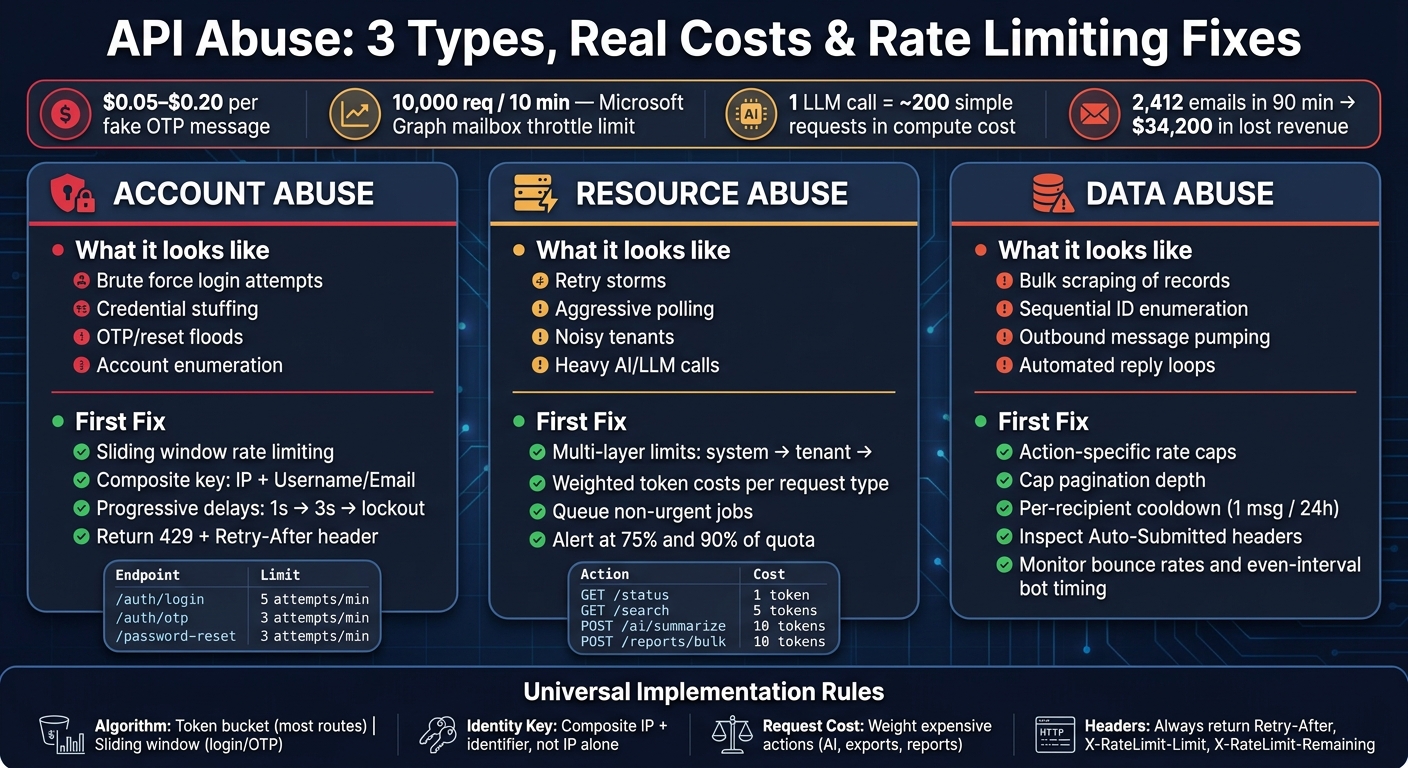
API Abuse Types: Patterns, Detection & Rate Limiting Solutions
Account Abuse: Brute Force, Credential Stuffing, and Recovery Floods
Auth endpoints are usually the first place abuse shows up. That’s why they need the strictest controls.
Login, signup, reset, and OTP endpoints are prime targets because they sit right on the edge of your system. If your team manages customer conversations across connected messaging accounts, one stolen login can expose a lot more than a single profile. It can open up connected inboxes and workflows too.
The Problem: Repeated Login Attempts and Account Enumeration
Brute force is the most direct kind of account abuse. A script keeps trying passwords against one account until something works. Credential stuffing is more focused: attackers take large sets of leaked usernames and passwords and try them across many accounts, often during outages or low-visibility periods. A common warning sign is a dense cluster of failed logins from one IP range, or from IPs that keep rotating.
Account enumeration is quieter, but still dangerous. An attacker sends requests to /signup or /password-reset with different email addresses and studies the responses. If the system says something like "that email isn't registered", it confirms which accounts are real.
Recovery floods push this even further. Automated requests hammer a verification endpoint and flood a target user’s phone with reset codes. That creates noise, stress, and cost at the same time. Each fake OTP message costs a business between $0.05 and $0.20 in direct messaging fees. In many cases, the flood is just cover for an account takeover attempt happening at the same time.
For messaging platforms like Inbox Agents, account takeover can expose connected channels and automated workflows at once.
These attacks work when the same endpoint keeps accepting repeated attempts with no meaningful distinction between users, IPs, or request types.
The Solution: Per-User, Per-IP, and Endpoint-Specific Limits
Use a composite key that combines the IP address with an identifier, and set lower limits for anonymous or proxy traffic. An IP-only rule can block good users who share the same network or sit behind CGNAT. A pure per-account rule misses distributed attacks spread across many identifiers. Using both closes that gap.
For auth flows, sliding window rate limiting is the better choice. A fixed window leaves room for burst behavior at the edge of the reset period. In plain English, an attacker can cram extra attempts into that boundary. A sliding window cuts that off.
Here’s a simple setup:
| Endpoint | Limit | Key Type |
|---|---|---|
/auth/login |
5 attempts / minute | IP + Username |
/auth/otp |
3 attempts / minute | IP + Identifier |
/password-reset |
3 attempts / minute | IP + Email |
OTP and reset endpoints need tighter caps. Each failed attempt there carries direct cost and more takeover risk than a failed login by itself.
It also helps to add progressive delays. For example:
- 1 second after 3 failures
- 3 seconds after 5 failures
- Temporary lockout after 8 failures
This makes brute force far more expensive to run, while still leaving room for a real user who just typed the wrong password a few times.
Every 429 response should include a Retry-After header so good clients know when to try again. And before you even check rate limits, normalize identifiers. Lowercase the email. Strip subaddress tags like +tag. Otherwise, attackers can dodge per-account rules by aliasing the same address.
Next: resource abuse, where high-volume traffic drives cost spikes and runaway clients.
sbb-itb-fd3217b
Resource Abuse: Traffic Floods, Cost Spikes, and Runaway Clients
Resource abuse usually starts with boring stuff: a bad integration, a retry loop that never settles down, or a client that skips delays between calls. Then things snowball. Requests pile up, costs jump, and the whole service starts to drag. That’s why this comes right after account attacks. The client may be valid, but it can still be far too noisy and far too expensive.
The Problem: High-Volume Requests and Expensive Operations
When an API slows down, clients often time out and retry. If a lot of clients do that at the same time, the retries add even more pressure to a system that’s already struggling. That traffic can multiply the original load and push the system past its limit. This pattern is a retry storm.
Polling makes the mess worse. Instead of waiting for a change notification, clients keep hitting read endpoints again and again just to see if anything changed. That creates a steady stream of extra requests that often do no useful work. Microsoft Graph, for example, throttles Outlook mailbox traffic at 10,000 requests per 10 minutes per app per mailbox.
Costs can climb even faster in AI-powered workflows. A single large-context LLM request can cost as much as 200 ordinary requests in compute, so raw request count doesn’t tell the whole story. For Inbox Agents-style inbox syncs and AI summaries, one runaway integration can drive up downstream compute and API costs fast.
The Solution: Multi-Layer Limits, Quotas, and Back-Pressure
One global rate limit isn’t enough. You need limits at a few layers: system-wide, per-tenant, per-user, and per-endpoint. That setup helps stop one heavy customer from crowding out everyone else on the same infrastructure. In multi-tenant systems, that’s the classic noisy neighbor problem.
For costly operations, weighted rate limiting works well. Instead of treating every request the same, give each one a cost based on how much load it creates.
| Endpoint Type | Example | Weighted Cost |
|---|---|---|
| Simple status check | GET /status |
1 token |
| Search query | GET /search |
5 tokens |
| AI inference or summary | POST /ai/summarize |
10 tokens |
| Bulk report generation | POST /reports/bulk |
10 tokens |
With this model, every request pulls from the same bucket, but heavier actions drain it faster. That gives you a better way to protect your database and downstream services without forcing every endpoint into the same hard cap.
For non-urgent jobs like background syncs, report generation, and bulk exports, it often makes more sense to queue the work or slow it down. Return 429 only when clients need to back off. It also helps to alert teams when usage hits 75% and 90% of quota so they can make changes before they slam into a hard limit.
Polling should also be swapped out for webhooks where you can. Push change notifications instead of asking clients to keep checking for updates.
Volume limits help a lot, but they won’t stop scraping or message pumping on their own. That takes action-specific limits.
Data Abuse: Scraping, Enumeration, and Messaging Endpoint Misuse
Unlike traffic floods, data abuse is quiet. It slips under the radar while draining records, hurting your reputation, and burning through send budget.
The Problem: Bulk Data Harvesting and Message Pumping
Scrapers usually don't make a scene. They hammer read-heavy endpoints - conversation histories, contact records, and exported reports - thousands of times per minute. And they often show up with obvious client strings like scrapy, python-requests, or curl. In messaging and AI setups, that usually means histories, contacts, exports, and outbound sends are the first targets.
There's also a quieter version of the same problem: enumeration. Instead of scraping broad pages, attackers guess sequential IDs and pull records one by one until they work through the dataset.
Messaging endpoints bring a different kind of pain. Outbound message pumping is when someone uses your API to fire off SMS or email at scale. The result is simple: higher sending costs and a damaged sender reputation. And once bounce rates climb, things go downhill fast. In one documented case, an AI agent sent 2,412 unauthorized emails in 90 minutes. That led to 187 redemptions of a fake discount code and $34,200 in lost revenue.
Automated response loops are part of this picture too. A misconfigured autoresponder can end up replying to its own replies over and over. When that happens, request volume can snowball, queues can stall, and downstream systems can slow to a crawl.
The Solution: Action-Specific Limits and Behavior-Based Detection
The fix starts with rate limits tied to the action, not just the raw request count.
Some endpoints cost more than others. Export endpoints and bulk search queries should have much tighter caps than a basic status check. Pagination depth should also be capped, so one session can't walk the full dataset page by page. For outbound messaging, a per-recipient cooldown helps shut down pumping no matter which account or API key is used. For example, allow no more than one automated message per recipient in a 24-hour window.
Static caps help, but they won't stop abuse spread across many accounts or IPs. That's where behavior-based detection comes in. Watch for bot-like timing, such as messages sent at perfectly even intervals, or sudden bursts after long silence. Keep an eye on bounce and complaint rates too. It also helps to set hourly, daily, and monthly caps so you can catch slower abuse patterns that don't trip short-window limits.
On unified inbox platforms like Inbox Agents, rate limits work best when paired with abuse and spam filtering. That gives you a better shot at flagging strange outbound patterns early.
For response loop prevention, inspect inbound messages for Auto-Submitted, X-Auto-Response-Suppress, and Precedence headers before sending any automated reply. Your own automated outbound replies should include Auto-Submitted: auto-replied so downstream systems can suppress loops on their side. That step should sit right next to outbound messaging limits, not come later.
Implementation Checklist and Conclusion
How to Apply Rate Limits Without Breaking Legitimate Use
Use these controls together in production, not as one-off rules. Rate limiting is an abuse policy, not an on/off switch. It helps stop brute force, traffic floods, and scraping only when the limit fits the route.
Here’s the setup to use:
- Algorithm: Use token bucket for most routes; use sliding window for login and OTP.
- Identity key: Use composite keys, not IP alone, for authenticated and login routes.
- Request cost: Assign higher costs to expensive actions like AI generation, exports, and reports.
- Headers: Always return
Retry-After,X-RateLimit-Limit, andX-RateLimit-Remainingso well-behaved clients can back off gracefully.
Once limits are live, tune them with actual traffic data. After launch, review 429s for 7 days. If the same legitimate users keep hitting limits but still complete their actions, move the threshold up. The point is simple: don’t block good users before you stop runaway cost. Send warnings at 75% and 90% of quota.
Then tighten delivery across proxies and servers. Use X-Forwarded-For to read the client IP behind proxies. Use Redis or another shared store so counters stay in sync across instances.
Key Takeaways
The goal stays the same across each abuse type: slow bad traffic without getting in the way of normal use. Rate limiting works best when thresholds match route risk, request cost, and client identity. The strongest setups combine endpoint-specific thresholds, weighted costs, composite keys, and regular tuning. Treat rate limiting as part of your abuse policy - the first line of defense against account abuse, resource abuse, and data abuse - not just a box to check.
FAQs
How do I choose the right rate limit for each API route?
Start by defining what you're protecting instead of applying one global rule to everything.
Pick the right limit key first. For example, use an IP address for anonymous traffic and a user ID for authenticated requests. Then map each endpoint to its risk level, likely abuse patterns, false-positive cost, and the right key granularity.
For login or password reset flows, use strict lower limits with sliding windows. For most other endpoints, token buckets are a good fit. Use weighted limits for expensive routes, and rely on observability to tune both security and user experience.
When should I use sliding window instead of token bucket?
Use sliding window when you need strict enforcement of request limits over a rolling time frame, such as for login endpoints, password resets, or OTP verification.
Use token bucket as the default for most API endpoints because it allows short bursts and smoother traffic flow. Choose sliding window when precision matters and you need to strictly limit requests in the last N seconds.
What metrics should I monitor after rate limits go live?
After rate limits go live, keep a close eye on performance and abuse metrics. The goal is simple: make sure the policy slows down bad traffic without getting in the way of legitimate users.
Track:
- 429 Too Many Requests rates
- CPU and memory usage
- Blocked activity by IP, path, and user-agent
Review logs to spot patterns and tell malicious automation apart from valid tests or normal user behavior.