

How AI Customizes Replies with Sales Data
AI replies work best when they use the right sales data, clean records, and tight review rules. When teams feed AI with CRM fields, buyer signals, and account notes, replies can match the deal stage, fit the buyer better, and go out in less time. That matters because AI-personalized outreach can drive 3.6x more replies, and signal-based emails can hit 15% to 25% reply rates versus 1% to 3% for generic outreach.
Here’s the short version of what I took from this article:
- I need to give AI the data that changes the reply, not every field in the CRM.
- The best inputs are usually role, company details, deal stage, engagement signals, and internal account context.
- I should clean and standardize records before AI uses them, or the output gets awkward fast.
- I need to connect inbox, CRM, and thread history so AI sees the full conversation.
- I should use approval rules for pricing, contracts, discounts, C-suite threads, and high-value deals.
- I should measure positive reply rate, meetings booked, bounce rate, and opt-outs instead of leaning on open rates.
If I had to boil it down to one idea, it’s this: better replies come from better inputs. Not from better greetings. Not from stuffing in a first name. And not from letting AI send unchecked drafts on sensitive deals.
A few numbers stand out:
- 3.6x higher reply rates from AI-personalized outreach
- 15% to 25% reply rates for trigger-based emails
- 2% to 3% as a common positive reply baseline
- Up to 18% for highly tailored emails
- Below 2% bounce rate as a useful guardrail
- 90% confidence score as one review cutoff for draft approval
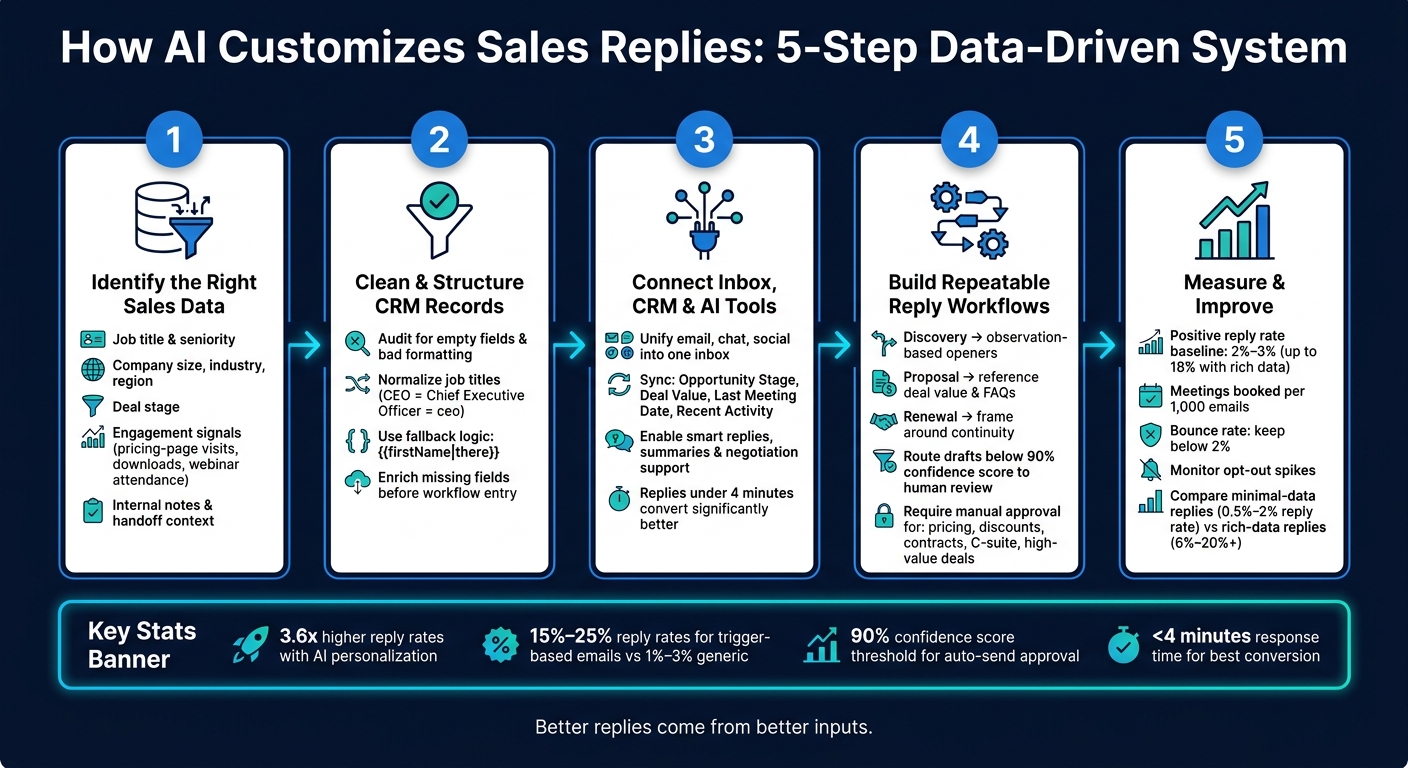
I also noticed a simple pattern running through the whole piece: first pick the sales data that matters, then clean it, then wire it into the inbox, then set human checks, then test the output. That sequence is the whole system.
The article does a good job showing that personalization is not just “Hi Sarah.” It means the reply changes based on who the buyer is, what they did, where the deal sits, and what the team already knows.
And that’s the point of the guide.
How AI Customizes Sales Replies: 5-Step Data-Driven System
How We Used AI to Personalize Sales Outreach at Scale
sbb-itb-fd3217b
1. Identify the sales data AI needs to customize replies
Not every data point helps AI write a better reply. The fields that matter are the ones that change what the message says, how it sounds, and when it gets sent. This level of precision is often supported by AI-powered inbox monitoring that tracks incoming signals in real time.
Core CRM fields that shape reply content
Job title and seniority are usually the strongest inputs. A VP of Sales needs more strategic, growth-focused copy. A researcher or individual contributor usually needs something more tactical and feature-focused. Company size, industry, and region also change the message. AI can shift the value prop based on industry and company stage, so the reply feels tied to the prospect’s actual situation.
Deal stage matters just as much. An early-stage prospect needs an exploratory reply. A late-stage prospect needs a close-oriented one. When AI knows where the opportunity stands, it can set the right urgency and focus instead of sending the same generic note to everyone.
Engagement signals that improve timing and relevance
A pricing-page visit, content download, trial activity, or webinar attendance can signal active intent and change the angle of the reply. These signals help most when they’re clean, current, and structured. If the data is messy or old, the message can miss the mark.
"The difference between 'I saw you're hiring' and 'I noticed you posted three AE roles this month, which typically indicates 40% growth targets' separates templates from insights." - Outreach.ai
Hiring activity can add one more layer of context. For example, recent job postings for a role like Senior Data Engineer may point to budget authority and clear pain points. That gives AI a more direct bridge to the prospect’s likely priorities.
Internal notes and team context that prevent poor replies
Handoff notes, pain point summaries, and escalation comments give AI needed context. When used well, these notes help prevent mismatched replies and keep the message in line with the account history. If notes mention an unresolved objection, the AI should account for it instead of repeating the same pitch.
Internal notes should stay out of customer-facing copy. Sensitive details like budget concerns, stakeholder friction, or margin targets should guide the framing, but they should not appear in the reply itself. The safer move is to map internal fields to AI context, not to reply text. For high-value or politically complex accounts, add a human review before sending. AI drafts the reply, and the rep approves it.
These inputs fall into five groups:
| Data Type | Specific Inputs | How It Changes the Reply |
|---|---|---|
| Role | Job title, tenure, seniority | Shifts tone from tactical to strategic |
| Firmographic | Industry, company size, region | Pivots the value prop to fit the prospect's world |
| Pipeline | Deal stage | Sets the reply's urgency and focus |
| Behavioral | Pricing-page visits, content downloads, webinar attendance, trial activity | Adds relevance and active-intent context |
| Internal context | Pain points, budget concerns, stakeholder priorities, handoff details | Shapes framing without exposing sensitive details |
Once these inputs are defined, the next step is cleaning them into fields AI can use in a consistent way.
2. Prepare and structure sales data before connecting AI
Clean CRM records and standardize key fields
AI writes better replies when your CRM data is clean. If records are messy, you get awkward outputs like "Hi LLC" or "Hi JANE."
Start with a CRM audit. Export a sample of records and check for empty fields, bad formatting, and inconsistent capitalization. Then standardize key values. For example, job titles like "CEO", "Chief Executive Officer", and "ceo" should all map to one label. Clean up name fields too. Remove suffixes, titles, and typos before AI touches them. Do the same for company names so "Acme Inc." and "Acme Corporation" both become "Acme."
It also helps to add CRM validation rules that stop incomplete or invalid entries from getting through. And when a field is still blank, use fallback logic like {{firstName|there}} so the message still sounds natural.
Use enrichment to fill missing fields before records enter the reply workflow.
Turn call notes and handoff details into structured inputs
Call notes and handoff details are often where the good stuff lives. The problem is that raw notes are messy. Turn them into a short template or summary that AI can reuse, so internal context shapes the reply without showing up in the message itself.
Once those notes are structured, connect each field to a reply rule.
Map data fields to reply behavior
After the data is clean and structured, decide which normalized fields should trigger which reply rules. This is how personalization comes from data instead of guesswork.
| Data Field / Signal | AI Reply Behavior |
|---|---|
| Objection: Budget/Timing | Treat as a "nurture later" case and schedule re-engagement rather than disqualification |
| Pricing Status: Sensitive | Focus on value proposition and proof points |
| Last Activity: OOO | Parse return date and reschedule the next touch |
| Technographic: Competitor | Bridge the gap by explaining migration benefits or specific pain points |
You can also use conditional logic to change copy by role.
"The secret is treating personalization as a data management system, not a creative writing challenge." - Hans Dekker, Instantly
Fields tied to pricing sensitivity or hard objections should act as guardrails, not as customer-facing copy.
With normalized fields and clear rules in place, the next move is wiring them into the inbox and CRM workflow.
3. Connect your inbox, CRM, and AI reply tools
Unify conversations so AI sees the full thread
Once your fields are normalized, connect them to your inbox and CRM so AI can use that data in real time.
If a prospect emails, chats, and then follows up on social, AI needs to see one thread, not three disconnected messages. Bring every channel into a single inbox before it drafts anything. Inbox Agents pulls email, chat, and social media into one workspace, so the AI sees the full conversation history instead of only the latest message.
Sync CRM and deal data into the reply workflow
Next, sync CRM data so AI can identify the contact and understand the deal context. Start with the fields that shape the reply most:
- Opportunity stage
- Deal value
- Last meeting date
- Recent activity
These fields change what AI says, how it says it, and when it sends the reply.
| Data Category | CRM Fields to Sync | What It Does in the Reply |
|---|---|---|
| Identity | First Name, Job Title | Personalizes the greeting and tone |
| Context | Industry, Tech Stack, Company Size | Tailors the value proposition to the business |
| Pipeline | Opportunity Stage, Deal Value | Adjusts urgency and formality |
| Activity | Last Meeting Date, Past Replies, Email Opens/Clicks | References recent touchpoints for continuity |
| Signals | Hiring Activity, Funding Updates | Adds timely context based on the buyer's current situation |
With those fields synced, AI can draft replies using current sales context instead of falling back on static templates.
Enable smart replies, summaries, and negotiation support
Once the data is connected, turn on smart replies, summaries, and negotiation support. Inbox Agents uses synced sales data to generate personalized smart replies, create automated inbox summaries, and help with negotiation handling based on account history, deal size, and past objections.
For complex accounts, it’s smart to stop automation at the draft stage. High-value or sensitive deals should require human approval before anything goes out. That extra check matters.
Speed matters too. Replies sent in under 4 minutes can convert much better than next-day responses.
4. Build repeatable reply workflows for sales teams
Create reply patterns for each deal stage
Once your data is connected, the next move is to build reply patterns that fit the actual stage of the deal. A discovery follow-up should sound different from a proposal reply. And neither should sound like a renewal email.
AI works best here when you give it clear stage context pulled straight from the CRM and inbox data connected in section 3 or automated inbox management tools.
At the discovery stage, AI can pull notes from the first call and open with a specific observation instead of a flat "Just following up." At the proposal stage, it can reference the deal value in the CRM and answer common follow-up questions with the right context. AI-personalized outreach generates 3.6x higher reply rates than generic templates.
For renewal outreach, AI can use the original close date and past interactions to frame the conversation around continuity instead of acting like the relationship is starting over.
Once these stage-based patterns are in place, set internal review rules for sensitive threads.
Use team collaboration data without exposing internal details
Handoff notes and internal deal commentary should go into AI context only. They should never appear in customer-facing text.
When a deal changes hands, AI should reflect the new owner's understanding of the account without passing along internal shorthand to the prospect. One simple way to enforce this is with a human review queue, where each AI-generated message waits for rep review before it sends. That changes the rep's job in a useful way: instead of drafting every reply from scratch, AEs review the drafts that matter most.
This step also helps teams catch cases where internal phrasing or deal notes slip into a draft by mistake.
Set approval rules for pricing and high-value deals
Route drafts below a 90% confidence score to human review. Require manual approval for pricing, discounts, contract terms, high-value accounts, and C-suite threads. For high-value or sensitive accounts, humans should review every draft, no matter the confidence score.
"If the account is high-value or politically complex, let AI earn the first response. Don't let it run the whole conversation."
These controls keep automation fast while protecting high-stakes replies. Next, measure which workflows improve results.
5. Measure reply quality and improve the system
Track the metrics that show business impact
Once the workflow is live, the next step is simple: check whether sales context is leading to better replies and more booked meetings.
Open rates used to be a go-to metric. Now, they’re much less useful. Privacy features like Apple Mail Privacy Protection make opens harder to read with confidence. A better metric is positive reply rate, which leaves out unsubscribes and negative replies. A common baseline is 2%–3%, while highly personalized emails can hit 18%.
A few other numbers matter too:
- Meetings booked per 1,000 emails
- Bounce rate below 2%
- Opt-out spikes
These metrics show whether the system is bringing in pipeline without hurting deliverability or making messages feel off-target.
It also helps to track the time between a positive reply and a booked meeting. That gap tells you a lot. If AI-assisted follow-up is fast and on point, interest is more likely to turn into a scheduled call.
Compare rich-data replies against minimal-data replies
The cleanest way to test this is a side-by-side comparison. Put replies built from basic fields next to replies built from full CRM and engagement context, then measure reply quality and downstream conversion.
| Feature | Minimal-Data Replies | Rich-Data Replies |
|---|---|---|
| Data inputs | First name, company name | Role, tech stack, hiring signals, recent news, intent |
| Relevance | Feels templated | Feels tailored |
| Reply rate | 0.5%–2% | 6%–20%+ |
| Setup effort | Low (template-based) | Moderate (requires CRM and signal integration) |
Run both versions at the same time. Then compare positive reply rate, meetings booked, and meeting conversion. That gives you a clear view of where richer context helps and where it doesn’t.
Conclusion: Keep data clean, workflows controlled, and testing regular
As results come in, use them to tighten the workflow. AI can customize replies well, but only if the data behind it is accurate, structured, and connected. Messy CRM records and broken thread history lead to generic output, no matter how good the model is.
The controls from section 4 - confidence thresholds and human review queues - are what stop automation from getting ahead of your team’s judgment. For sensitive deals, automate replies only when the confidence score is above 90%. Send everything else to human review.
A platform like Inbox Agents pulls these parts into one place by unifying messaging channels in a single interface and adding AI-powered summaries, smart replies, negotiation handling, and personalized responses built around your business context. That setup helps the system get better over time.
Treat AI replies as a process. Clean the data, review confidence scores, test reply patterns, and refine based on what the numbers show.
FAQs
What sales data matters most for AI replies?
The most important sales data is the kind that shows relevance and reflects the prospect’s current situation.
That includes:
- identity data, such as role and tenure
- technographic data, like their current software stack
- behavioral intent signals, such as website visits or content downloads
- contextual triggers, like funding, new leadership hires, or expansions
Inbox Agents helps teams use this data to tailor AI replies across conversations.
How clean does CRM data need to be?
CRM data needs to be clean and standardized if you want AI to work the way it should. If the data is messy, the output gets messy too. That can lead to simple but damaging mistakes, like odd capitalization, blank fields, or broken personalization.
Before launch, audit your CRM for duplicate contacts, inconsistent naming, and incomplete records. Set clear formatting rules, add validation checks, and make sure key fields stay filled in. Then keep an eye on it. Regular maintenance and monitoring matter because bad data at scale can weaken outreach performance and hurt sender reputation.
When should AI replies need human approval?
Human approval matters most in high-stakes interactions like complex objection handling, discovery, qualification, and sensitive negotiation stages where nuance can make or break the outcome.
For routine tasks, such as intent classification or out-of-office replies, AI can work on its own. Inbox Agents can also draft replies for review, which helps teams stay in control and make sure each response fits business goals and the account context.